HTML table to worksheet in SheetJS
If the data is already on screen as an HTML table, SheetJS can read the table element directly. This is the first step of an export-this-table button.
How it works
- Read the table element. The example finds the table with
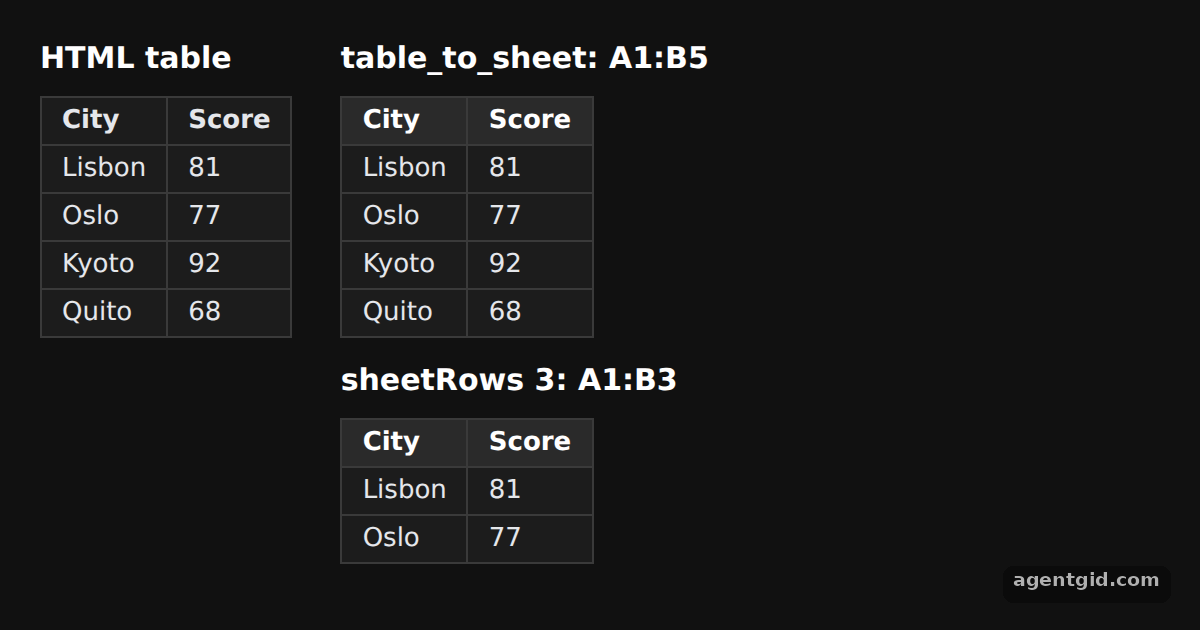
document.getElementById("source")and passes it toXLSX.utils.table_to_sheet. The right side shows the worksheet it returns. [1] - Numbers become numbers. The Score cells are text in the HTML, but in the worksheet they are numeric values. City names stay strings. [1]
- Only the first rows.
table_to_bookwraps the result in a workbook. With{ sheetRows: 3 }it reads just the header and two data rows, as the second range shows. [1]
Run and edit it
It runs in your browser, in a sandboxed frame that cannot see this site; the packages load from esm.sh only after you press Run.
import * as XLSX from "xlsx";

// Dark page styles
const css = document.createElement("style");
css.textContent = `
  body { margin: 0; background: #111; }
  #root { font: 14px system-ui, sans-serif; color: #e5e7eb; padding: 20px; box-sizing: border-box; }
  h3 { margin: 0 0 10px; font-size: 15px; color: #fff; }
  table { border-collapse: collapse; background: #1c1c1c; }
  td, th { border: 1px solid #3a3a3a; padding: 6px 12px; text-align: left; }
  tr:first-child td { background: #2a2a2a; font-weight: 600; color: #fff; }
`;
document.head.appendChild(css);
css.textContent += ".cols { display: flex; gap: 24px; } td, th { padding: 4px 10px; font-size: 13px; }";

const root = document.getElementById("root");
root.innerHTML = `
  <div class="cols">
    <div><h3>HTML table</h3>
      <table id="source">
        <tr><th>City</th><th>Score</th></tr>
        <tr><td>Lisbon</td><td>81</td></tr>
        <tr><td>Oslo</td><td>77</td></tr>
        <tr><td>Kyoto</td><td>92</td></tr>
        <tr><td>Quito</td><td>68</td></tr>
      </table>
    </div>
    <div id="out"></div>
  </div>`;

const tbl = document.getElementById("source");

// DOM table -> worksheet
const ws = XLSX.utils.table_to_sheet(tbl);

// DOM table -> workbook, reading only the first 3 rows
const wb = XLSX.utils.table_to_book(tbl, { sheetRows: 3 });
const firstRows = wb.Sheets[wb.SheetNames[0]];

document.getElementById("out").innerHTML =
  `<h3>table_to_sheet: ${ws["!ref"]}</h3>` + XLSX.utils.sheet_to_html(ws) +
  `<h3 style="margin-top:12px">sheetRows 3: ${firstRows["!ref"]}</h3>` +
  XLSX.utils.sheet_to_html(firstRows);
Add a row to the HTML table on the left and the parsed range on the right grows. Code written by AgentGid [1].
Add a row to the HTML table on the left and the parsed range on the right grows. Code written by AgentGid [1].Checked Oct 12, 2026: it starts without errors in Chromium with xlsx 0.18.5. Needs WebGL.
More SheetJS examples
Array of objects to worksheet in SheetJS Array of arrays to worksheet in SheetJS Add and append rows with sheet_add_aoa in SheetJS Write a workbook to CSV or XLSX data with SheetJS
Sources
Explanations written by AgentGid from the official docs; the numbers in brackets point here. The code marked "written by AgentGid" is ours and free to copy.