Array of objects to worksheet in SheetJS
Most app data is an array of objects, like rows from an API or a database. json_to_sheet turns that array into a worksheet you can export or display.
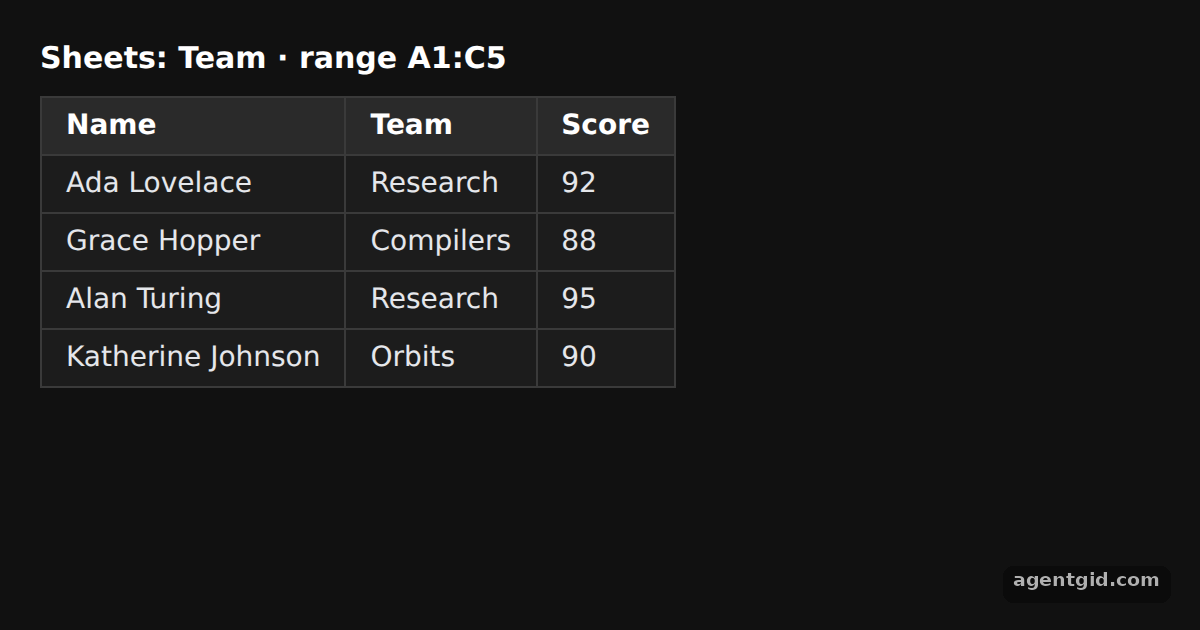
How it works
- Objects to worksheet.
XLSX.utils.json_to_sheet(rows)builds a worksheet from the array. The keysName,TeamandScorebecome the header row. [1] - Add it to a workbook.
book_newcreates an empty workbook andbook_append_sheetadds the worksheet under the nameTeam. The heading printswb.SheetNamesto show it. [2] - Show it as HTML. Instead of downloading a file, the example passes the worksheet to
sheet_to_htmland puts the returned string into the page. [3]
Run and edit it
It runs in your browser, in a sandboxed frame that cannot see this site; the packages load from esm.sh only after you press Run.
import * as XLSX from "xlsx";
// Dark page styles
const css = document.createElement("style");
css.textContent = `
body { margin: 0; background: #111; }
#root { font: 14px system-ui, sans-serif; color: #e5e7eb; padding: 20px; box-sizing: border-box; }
h3 { margin: 0 0 10px; font-size: 15px; color: #fff; }
table { border-collapse: collapse; background: #1c1c1c; }
td, th { border: 1px solid #3a3a3a; padding: 6px 12px; text-align: left; }
tr:first-child td { background: #2a2a2a; font-weight: 600; color: #fff; }
`;
document.head.appendChild(css);
const rows = [
{ Name: "Ada Lovelace", Team: "Research", Score: 92 },
{ Name: "Grace Hopper", Team: "Compilers", Score: 88 },
{ Name: "Alan Turing", Team: "Research", Score: 95 },
{ Name: "Katherine Johnson", Team: "Orbits", Score: 90 },
];
// Array of objects -> worksheet; the object keys become the header row
const ws = XLSX.utils.json_to_sheet(rows);
// Put the worksheet in a new workbook under the name "Team"
const wb = XLSX.utils.book_new();
XLSX.utils.book_append_sheet(wb, ws, "Team");
// Render the sheet back as an HTML table
const root = document.getElementById("root");
root.innerHTML =
`<h3>Sheets: ${wb.SheetNames.join(", ")} · range ${ws["!ref"]}</h3>` +
XLSX.utils.sheet_to_html(ws, { id: "team" });
Add a new key such as City to the first object and a new column appears in the table. Code written by AgentGid [1].
Add a new key such as City to the first object and a new column appears in the table. Code written by AgentGid [1].Checked Oct 12, 2026: it starts without errors in Chromium with xlsx 0.18.5. Needs WebGL.
More SheetJS examples
Array of arrays to worksheet in SheetJS Add and append rows with sheet_add_aoa in SheetJS HTML table to worksheet in SheetJS Write a workbook to CSV or XLSX data with SheetJS
Sources
- Docs: docs › api › utilities › array
- Docs: docs › getting-started › examples › export
- Docs: docs › api › utilities › html
Explanations written by AgentGid from the official docs; the numbers in brackets point here. The code marked "written by AgentGid" is ours and free to copy.