Array of arrays to worksheet in SheetJS
An array of arrays maps directly onto a spreadsheet grid: one inner array per row. aoa_to_sheet converts that grid into a SheetJS worksheet.
How it works
- One array per row. The first inner array is the header row and every following array is a data row.
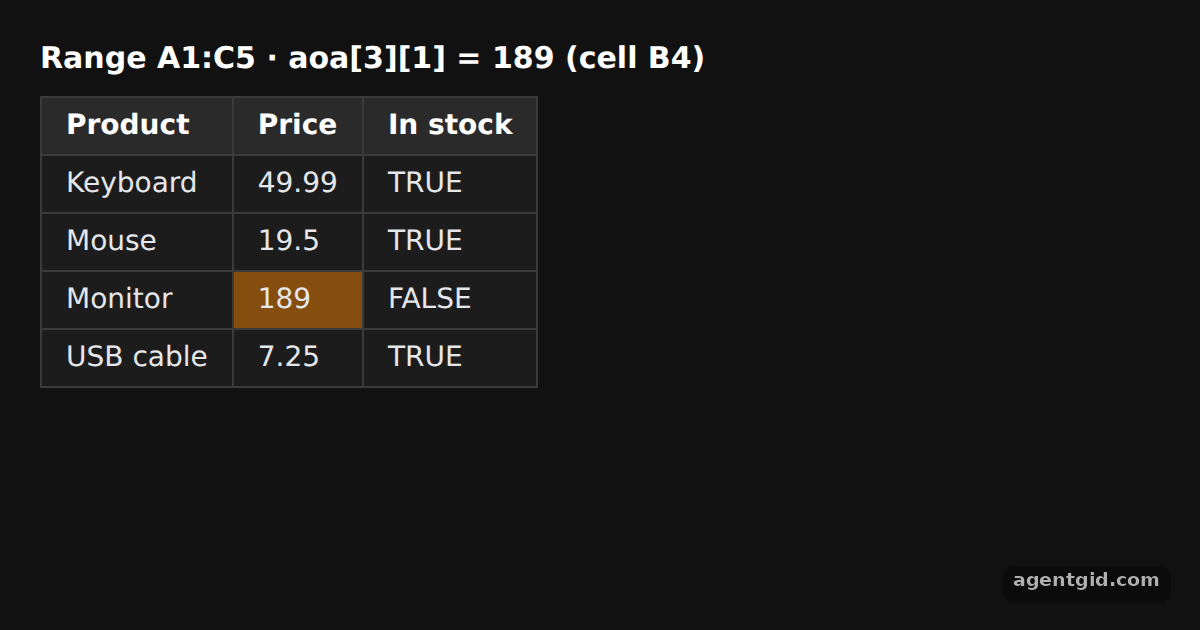
aoa[3][1]reads the Monitor price, which lands in cell B4. [1] - Grid to worksheet.
XLSX.utils.aoa_to_sheet(aoa)returns a worksheet with the same shape as the array. The!refproperty in the heading shows the filled range. [1] - Value types are kept. Prices stay numbers and the In stock column holds real booleans, which the HTML output prints as TRUE or FALSE. [1]
- Give the table an id.
sheet_to_html(ws, { id: "products" })sets the table id, which the example uses to highlight cell B4 with CSS. [2]
Run and edit it
It runs in your browser, in a sandboxed frame that cannot see this site; the packages load from esm.sh only after you press Run.
import * as XLSX from "xlsx";
// Dark page styles
const css = document.createElement("style");
css.textContent = `
body { margin: 0; background: #111; }
#root { font: 14px system-ui, sans-serif; color: #e5e7eb; padding: 20px; box-sizing: border-box; }
h3 { margin: 0 0 10px; font-size: 15px; color: #fff; }
table { border-collapse: collapse; background: #1c1c1c; }
td, th { border: 1px solid #3a3a3a; padding: 6px 12px; text-align: left; }
tr:first-child td { background: #2a2a2a; font-weight: 600; color: #fff; }
`;
document.head.appendChild(css);
css.textContent += "#products tr:nth-child(4) td:nth-child(2) { background: #854d0e; }";
const aoa = [
["Product", "Price", "In stock"],
["Keyboard", 49.99, true],
["Mouse", 19.5, true],
["Monitor", 189, false],
["USB cable", 7.25, true],
];
// Array of arrays -> worksheet (row 0 becomes row 1 in the sheet)
const ws = XLSX.utils.aoa_to_sheet(aoa);
// Values can still be read from the source grid by row and column index
const monitorPrice = aoa[3][1];
const root = document.getElementById("root");
root.innerHTML =
`<h3>Range ${ws["!ref"]} · aoa[3][1] = ${monitorPrice} (cell B4)</h3>` +
XLSX.utils.sheet_to_html(ws, { id: "products" });
Change the Monitor price in the array and the highlighted B4 cell updates. Code written by AgentGid [1].
Change the Monitor price in the array and the highlighted B4 cell updates. Code written by AgentGid [1].Checked Oct 12, 2026: it starts without errors in Chromium with xlsx 0.18.5. Needs WebGL.
More SheetJS examples
Array of objects to worksheet in SheetJS Add and append rows with sheet_add_aoa in SheetJS HTML table to worksheet in SheetJS Write a workbook to CSV or XLSX data with SheetJS
Sources
Explanations written by AgentGid from the official docs; the numbers in brackets point here. The code marked "written by AgentGid" is ours and free to copy.