Line numbers in react-syntax-highlighter
Line numbers make it easier to refer to a specific line in docs or code reviews.
All React Syntax Highlighter examples React Syntax Highlighter: usage and stats
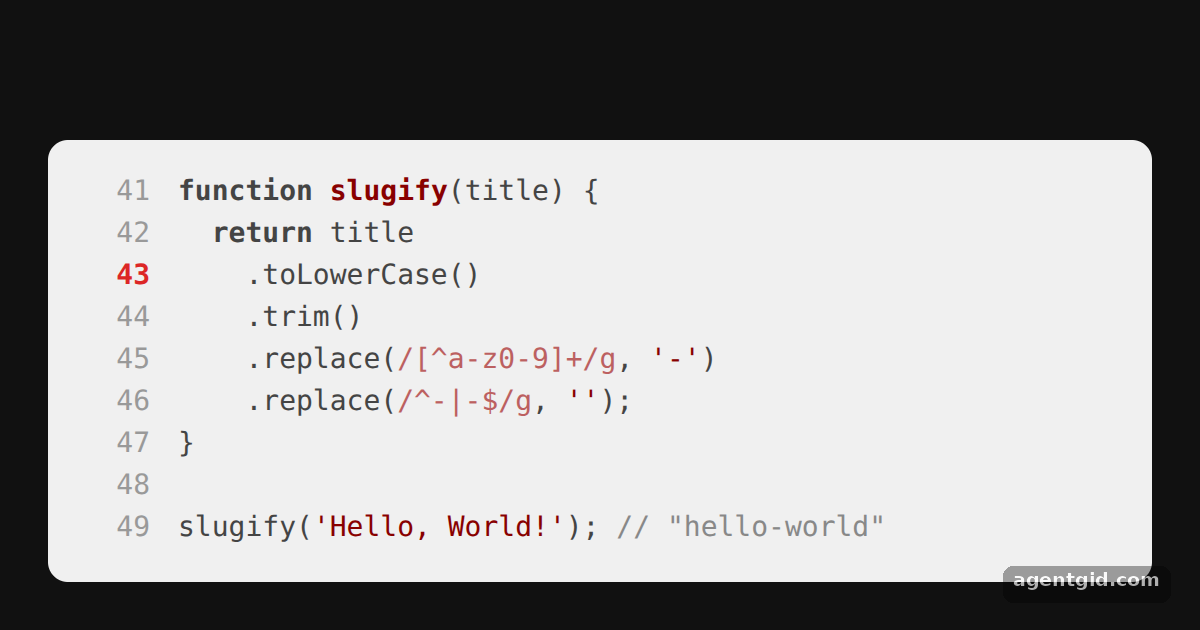
How it works
- Turn numbers on.
showLineNumbersadds a number column to the left of the highlighted code. [1] - Start from any line.
startingLineNumber={41}makes the snippet look like an excerpt from the middle of a file. [1] - Style each number.
lineNumberStyleis a function here: it receives the line number and returns a style, so line 43 is drawn in red. [1]
Run and edit it
It runs in your browser, in a sandboxed frame that cannot see this site; the packages load from esm.sh only after you press Run.
import SyntaxHighlighter from 'react-syntax-highlighter';

const code = `function slugify(title) {
  return title
    .toLowerCase()
    .trim()
    .replace(/[^a-z0-9]+/g, '-')
    .replace(/^-|-$/g, '');
}

slugify('Hello, World!'); // "hello-world"`;

export default function App() {
  return (
    <div style={{ background: '#111', height: 360, display: 'grid', placeItems: 'center' }}>
      <SyntaxHighlighter
        language="javascript"
        showLineNumbers
        startingLineNumber={41}
        lineNumberStyle={(n) => ({
          color: n === 43 ? '#dc2626' : '#999',
          fontWeight: n === 43 ? 700 : 400,
          minWidth: '2.5em',
        })}
        customStyle={{ width: 520, borderRadius: 10, fontSize: 14, padding: 16 }}
      >
        {code}
      </SyntaxHighlighter>
    </div>
  );
}
Change startingLineNumber and the highlighted number in lineNumberStyle to move the marker. Code written by AgentGid [1].
Change startingLineNumber and the highlighted number in lineNumberStyle to move the marker. Code written by AgentGid [1].Checked Oct 12, 2026: it starts without errors in Chromium with react-syntax-highlighter 16.1.2, react 19.3.0, react-dom 19.3.0. Needs WebGL.
More React Syntax Highlighter examples
Highlight code in React Prism highlighting for JSX Highlight specific lines Custom CSS theme with class names
Sources
Explanations written by AgentGid from the official docs; the numbers in brackets point here. The code marked "written by AgentGid" is ours and free to copy.