Highlight specific lines
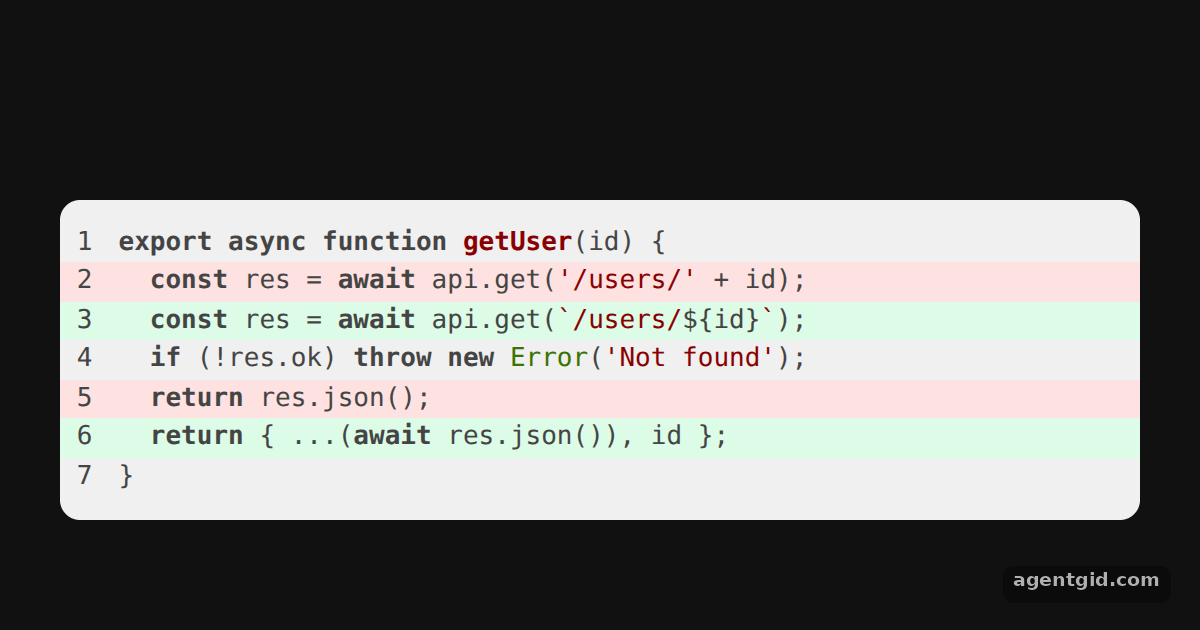
Wrapping each line in its own element lets you color whole lines, for example to show a diff or point at a changed line.
All React Syntax Highlighter examples React Syntax Highlighter: usage and stats
How it works
- Wrap every line.
wrapLinesputs each line of code inside its ownspan, which is what makes line-level styling possible. [1] - Pass props per line.
linePropsis a function of the line number. It returns astylewith a green or red background for the lines listed inaddedandremoved. [1] - Make the stripes full width. Each returned style sets
display: 'block'so the background spans the whole row, and line numbers are on so the marked lines are easy to match. [1]
Run and edit it
It runs in your browser, in a sandboxed frame that cannot see this site; the packages load from esm.sh only after you press Run.
import SyntaxHighlighter from 'react-syntax-highlighter';

const code = `export async function getUser(id) {
  const res = await api.get('/users/' + id);
  const res = await api.get(\`/users/\${id}\`);
  if (!res.ok) throw new Error('Not found');
  return res.json();
  return { ...(await res.json()), id };
}`;

const added = new Set([3, 6]);
const removed = new Set([2, 5]);

export default function App() {
  return (
    <div style={{ background: '#111', height: 360, display: 'grid', placeItems: 'center' }}>
      <SyntaxHighlighter
        language="javascript"
        showLineNumbers
        wrapLines
        lineProps={(n) => ({
          style: {
            display: 'block',
            background: added.has(n) ? '#dcfce7' : removed.has(n) ? '#fee2e2' : 'transparent',
          },
        })}
        customStyle={{ width: 540, borderRadius: 10, fontSize: 13, padding: '12px 0' }}
      >
        {code}
      </SyntaxHighlighter>
    </div>
  );
}
Edit the added and removed sets to move the colored stripes. Code written by AgentGid [1].
Edit the added and removed sets to move the colored stripes. Code written by AgentGid [1].Checked Oct 12, 2026: it starts without errors in Chromium with react-syntax-highlighter 16.1.2, react 19.3.0, react-dom 19.3.0. Needs WebGL.
More React Syntax Highlighter examples
Highlight code in React Prism highlighting for JSX Line numbers in react-syntax-highlighter Custom CSS theme with class names
Sources
Explanations written by AgentGid from the official docs; the numbers in brackets point here. The code marked "written by AgentGid" is ours and free to copy.