Selecting a whole week in React Day Picker
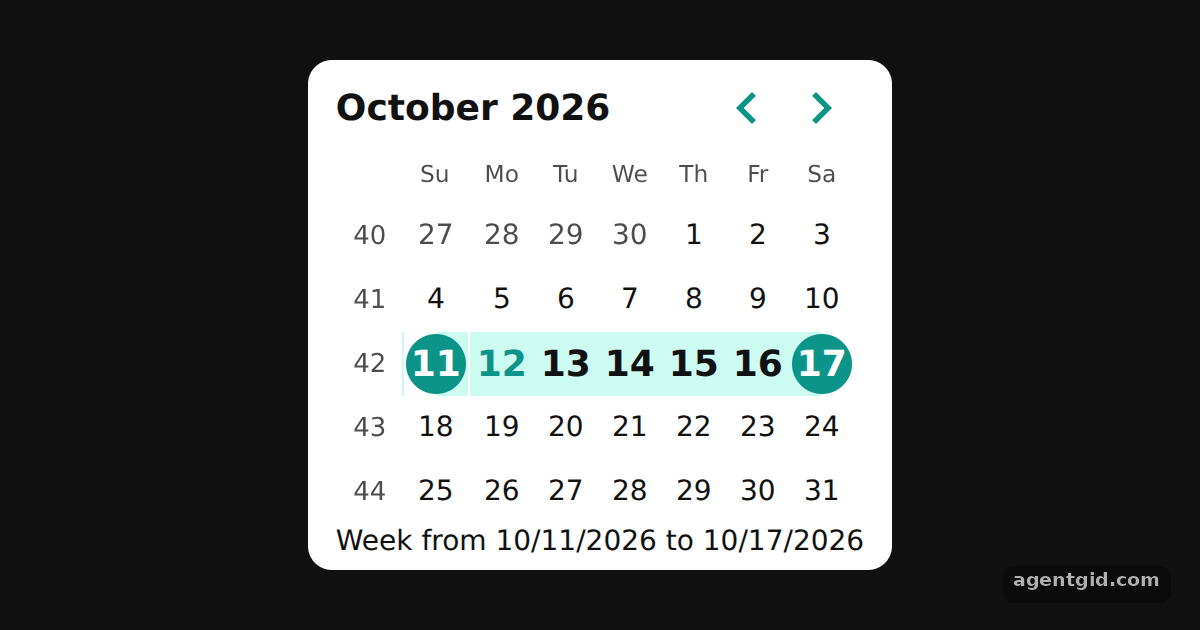
When the built-in modes do not fit, you can write your own selection rule. Here a click selects the full Sunday-to-Saturday week.
All React Day Picker examples React Day Picker: usage and stats
How it works
- Drop the mode and handle clicks. There is no
modeprop, so DayPicker does not select anything by itself.onDayClickgets the clicked day and its modifiers, andpickstores the week around that day. [1] - Mark the week with modifiers. The
modifiersprop marks the stored week asselected, withrange_start,range_endandrange_middleso it is drawn as one band.rangeIncludesDatechecks the middle days. [1] - Keep the keyboard working. Disabled or hidden days are ignored, and
onDayKeyDownruns the samepickfunction for Space and Enter.showWeekNumberadds the week number column. [1]
Run and edit it
It runs in your browser, in a sandboxed frame that cannot see this site; the packages load from esm.sh only after you press Run.
import { useState } from "react";
import { DayPicker, rangeIncludesDate } from "react-day-picker";

const vars = { "--rdp-accent-color": "#0d9488", "--rdp-accent-background-color": "#ccfbf1", "--rdp-day-width": "32px", "--rdp-day-height": "32px", "--rdp-day_button-width": "30px", "--rdp-day_button-height": "30px", "--rdp-nav-height": "2.25rem" };
const page = { minHeight: "100vh", display: "flex", alignItems: "center", justifyContent: "center", background: "#111", font: "14px system-ui, sans-serif" };
const card = { background: "#fff", color: "#111", borderRadius: 12, padding: "6px 14px" };

// Sunday-to-Saturday week around a day (plain Date math, no extra library)
const startOfWeek = (d) => new Date(d.getFullYear(), d.getMonth(), d.getDate() - d.getDay());
const endOfWeek = (d) => new Date(d.getFullYear(), d.getMonth(), d.getDate() + 6 - d.getDay());

export default function App() {
  const [week, setWeek] = useState(() => ({ from: startOfWeek(new Date()), to: endOfWeek(new Date()) }));

  const pick = (day, modifiers) => {
    if (modifiers.disabled || modifiers.hidden) return;
    setWeek(modifiers.selected ? undefined : { from: startOfWeek(day), to: endOfWeek(day) });
  };

  return (
    <div style={page}>
      <div style={card}>
        <DayPicker
          showWeekNumber
          showOutsideDays
          style={vars}
          modifiers={{
            selected: week,
            range_start: week?.from,
            range_end: week?.to,
            range_middle: (date) => (week ? rangeIncludesDate(week, date, true) : false),
          }}
          onDayClick={pick}
          onDayKeyDown={(day, modifiers, e) => {
            if (e.key === " " || e.key === "Enter") { e.preventDefault(); pick(day, modifiers); }
          }}
          footer={week ? `Week from ${week.from.toLocaleDateString()} to ${week.to.toLocaleDateString()}` : "Click a day to select its week."}
        />
      </div>
    </div>
  );
}
Click any day to select its week; click a day inside the selected week to clear it. Code written by AgentGid [1].
Click any day to select its week; click a day inside the selected week to clear it. Code written by AgentGid [1].Checked Oct 12, 2026: it starts without errors in Chromium with react-day-picker 10.0.2, react 19.3.0, react-dom 19.3.0. Needs WebGL.
More React Day Picker examples
Single date picker in React Day Picker Selecting multiple dates in React Day Picker Date range picker in React Day Picker Accessible date picker with React Day Picker
Sources
Explanations written by AgentGid from the official docs; the numbers in brackets point here. The code marked "written by AgentGid" is ours and free to copy.