Multiple drop zones in dnd kit
Real interfaces often have several drop targets. In dnd kit each one is a useDroppable call with its own id, and onDragEnd tells you which one received the item.
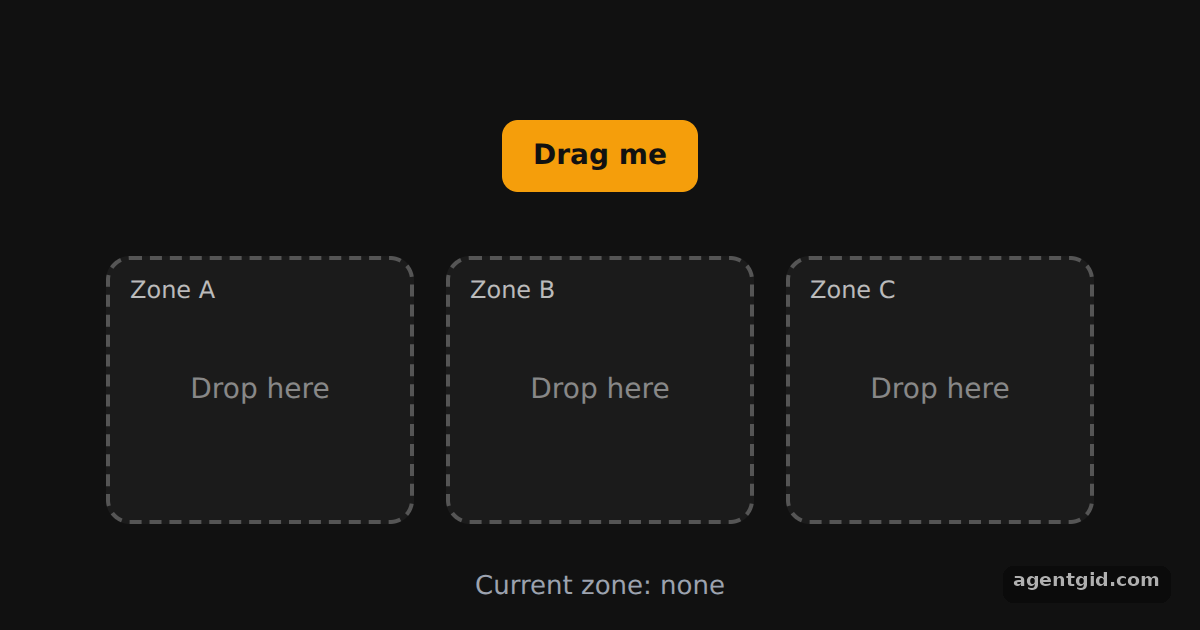
How it works
- One reusable Droppable.
Droppabletakes anidprop and passes it touseDroppable. The app renders it three times from the['A', 'B', 'C']array. [1] - Give every zone a unique id. The ids
A,BandCare whatevent.over.idreports when the item is released over a zone. [1] - Store where the item lives.
handleDragEndsavesover.idin state, ornullwhen the item is dropped outside every zone. Rendering then places the button in that zone or back at the top. [2]
Run and edit it
It runs in your browser, in a sandboxed frame that cannot see this site; the packages load from esm.sh only after you press Run.
import { useState } from 'react';
import { DndContext, useDraggable, useDroppable } from '@dnd-kit/core';
import { CSS } from '@dnd-kit/utilities';

function Draggable({ id, children }) {
  const { attributes, listeners, setNodeRef, transform } = useDraggable({ id });
  return (
    <button ref={setNodeRef} {...listeners} {...attributes} style={{
      transform: CSS.Translate.toString(transform), position: 'relative', zIndex: 2,
      touchAction: 'none', cursor: 'grab', padding: '10px 16px', border: 0, borderRadius: 8,
      background: '#f59e0b', color: '#111', font: '600 14px system-ui',
    }}>{children}</button>
  );
}

function Droppable({ id, children }) {
  const { isOver, setNodeRef } = useDroppable({ id });
  return (
    <div ref={setNodeRef} style={{
      width: 150, height: 130, borderRadius: 12, display: 'grid', placeItems: 'center', position: 'relative',
      border: `2px dashed ${isOver ? '#22c55e' : '#555'}`,
      background: isOver ? 'rgba(34,197,94,0.12)' : '#1b1b1b', color: '#888', font: '14px system-ui',
    }}>
      <span style={{ position: 'absolute', top: 8, left: 10, fontSize: 12, color: '#bbb' }}>Zone {id}</span>
      {children}
    </div>
  );
}

export default function App() {
  const containers = ['A', 'B', 'C'];
  const [zone, setZone] = useState(null);
  const draggableMarkup = <Draggable id="draggable">Drag me</Draggable>;

  function handleDragEnd(event) {
    const { over } = event;
    // Over a zone: keep it there. Anywhere else: back to the start.
    setZone(over ? over.id : null);
  }

  return (
    <div style={{ height: 360, background: '#111', display: 'flex', flexDirection: 'column',
      alignItems: 'center', justifyContent: 'center', gap: 24 }}>
      <DndContext onDragEnd={handleDragEnd}>
        <div style={{ height: 44 }}>{zone === null ? draggableMarkup : null}</div>
        <div style={{ display: 'flex', gap: 16 }}>
          {containers.map((id) => (
            <Droppable key={id} id={id}>{zone === id ? draggableMarkup : 'Drop here'}</Droppable>
          ))}
        </div>
        <div style={{ color: '#9ca3af', font: '13px system-ui' }}>Current zone: {zone ?? 'none'}</div>
      </DndContext>
    </div>
  );
}
Drag the orange button into zone A, B or C; drop it on empty space to send it back to the top. Code written by AgentGid [1].
Drag the orange button into zone A, B or C; drop it on empty space to send it back to the top. Code written by AgentGid [1].Checked Oct 12, 2026: it starts without errors in Chromium with @dnd-kit/core 6.3.1, react 19.3.0, react-dom 19.3.0, @dnd-kit/utilities 3.2.2, @dnd-kit/sortable 10.0.0. Needs WebGL.
More dnd kit examples
Draggable and droppable in dnd kit Sortable list in dnd kit Drag handles in dnd kit Sortable grid in dnd kit
Sources
Explanations written by AgentGid from the official docs; the numbers in brackets point here. The code marked "written by AgentGid" is ours and free to copy.