Accordion in Base UI
An accordion stacks headings that expand and collapse their own panels, which suits FAQs and settings pages.
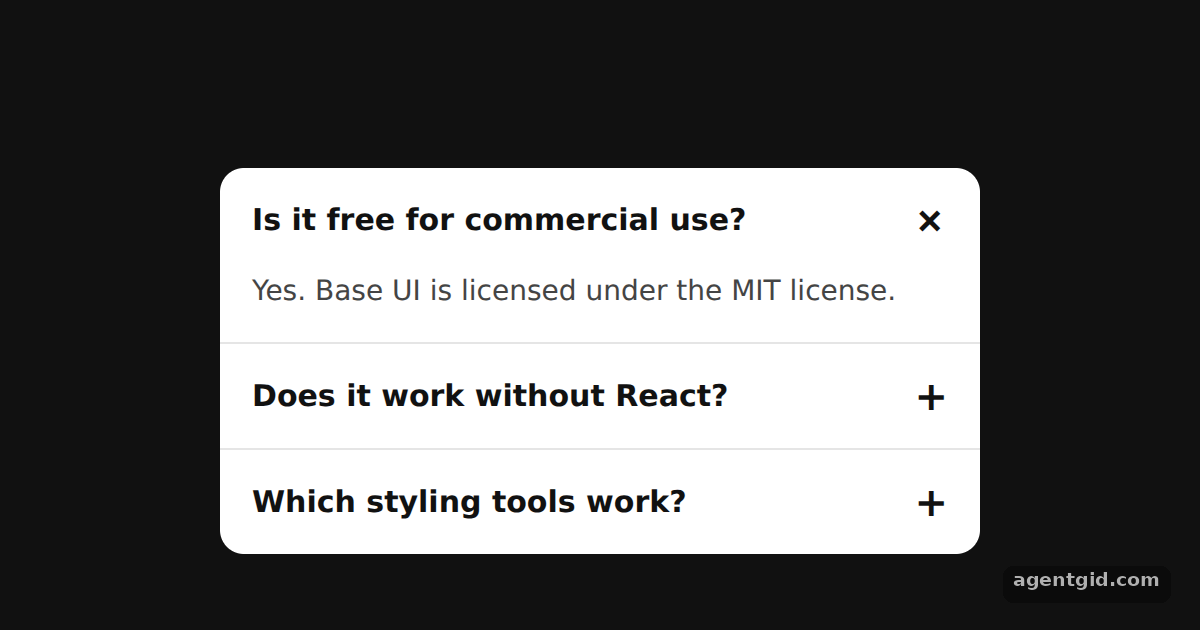
How it works
- Map items to parts. Each FAQ entry becomes an
Accordion.Itemwith avalue, holding aHeader, aTriggerand aPanel. [1] - Open a panel by default.
defaultValue={['license']}onAccordion.Rootlists the values of the items that start expanded. [2] - Keyboard and open-state styling. The triggers are buttons, so Tab, Enter and the arrow keys move between and toggle them. The plus icon rotates through the
data-panel-openattribute on the trigger. [3]
Run and edit it
It runs in your browser, in a sandboxed frame that cannot see this site; the packages load from esm.sh only after you press Run.
import { Accordion } from '@base-ui/react';

const faqs = [
  { value: 'license', q: 'Is it free for commercial use?', a: 'Yes. Base UI is licensed under the MIT license.' },
  { value: 'react', q: 'Does it work without React?', a: 'No. Base UI is a React library.' },
  { value: 'styles', q: 'Which styling tools work?', a: 'Tailwind, CSS Modules, CSS-in-JS or plain CSS.' },
];

const css = `
.acc { width: 380px; border-radius: 12px; background: #fff; color: #111;
  font-family: system-ui; overflow: hidden; }
.item + .item { border-top: 1px solid #e5e5e5; }
.hdr { margin: 0; }
.trg { width: 100%; display: flex; justify-content: space-between; align-items: center;
  padding: 14px 16px; border: none; background: none; font: 600 15px system-ui;
  color: #111; cursor: pointer; text-align: left; }
.trg:focus-visible { outline: 2px solid #2563eb; outline-offset: -2px; }
.icon { font-size: 20px; transition: transform 150ms; }
.trg[data-panel-open] .icon { transform: rotate(45deg); }
.panel { padding: 0 16px 14px; font-size: 14px; color: #444; }
`;

export default function App() {
  return (
    <div style={{ height: 360, display: 'grid', placeItems: 'center', background: '#111' }}>
      <style>{css}</style>
      <Accordion.Root className="acc" defaultValue={['license']}>
        {faqs.map((f) => (
          <Accordion.Item key={f.value} value={f.value} className="item">
            <Accordion.Header className="hdr">
              <Accordion.Trigger className="trg">
                {f.q} <span className="icon">+</span>
              </Accordion.Trigger>
            </Accordion.Header>
            <Accordion.Panel className="panel">{f.a}</Accordion.Panel>
          </Accordion.Item>
        ))}
      </Accordion.Root>
    </div>
  );
}
Click a question or tab to it and press Enter; use the arrow keys to move between questions. Code written by AgentGid [1].
Click a question or tab to it and press Enter; use the arrow keys to move between questions. Code written by AgentGid [1].Checked Oct 12, 2026: it starts without errors in Chromium with @base-ui/react 1.9.0, react 19.3.0, react-dom 19.3.0. Needs WebGL.
More Base UI examples
Popover in Base UI Dialog with focus control in Base UI Accessible form fields in Base UI Checkbox and Switch in Base UI
Sources
Explanations written by AgentGid from the official docs; the numbers in brackets point here. The code marked "written by AgentGid" is ours and free to copy.