Render functions with h() in Vue
Render functions let you describe the UI in JavaScript instead of a template. Attributes, events and conditions become plain object keys and expressions.
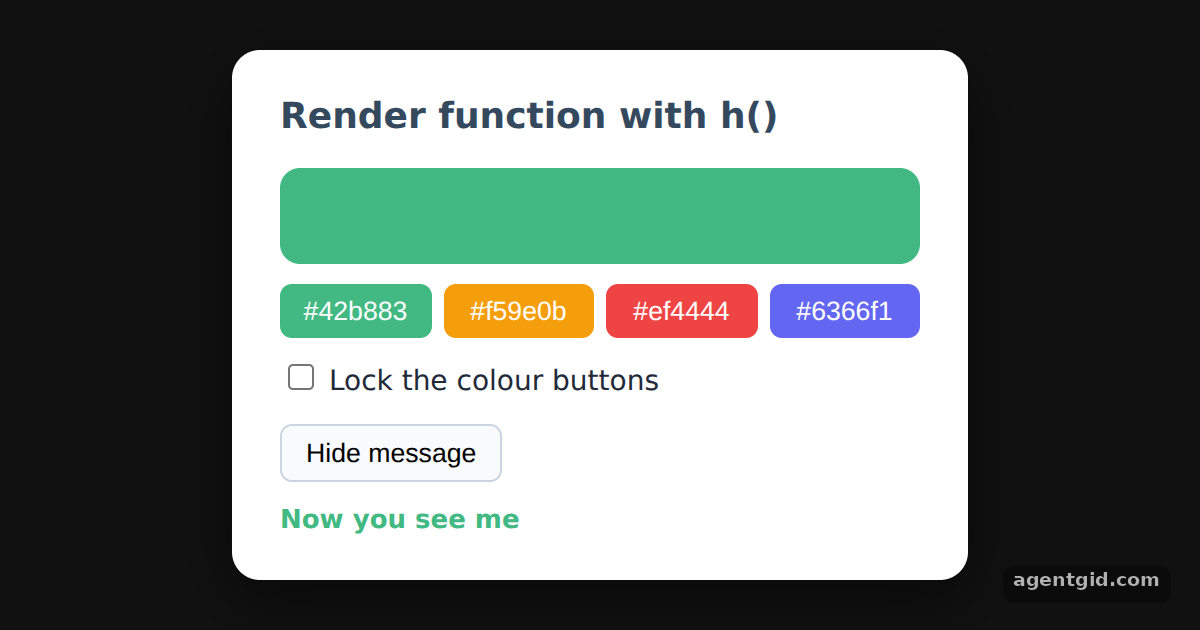
How it works
- Render functions instead of templates.
setup()returns a function that callsh(tag, props, children). The docs mention one trade-off compared with templates. [1] - Bind attributes and styles. The second argument of
h()carriesid,titleand astyleobject built from thecolorref. In a template the same job is done withv-bind. [1] - Boolean attributes. Each colour button gets
disabled: locked.value. Tick the checkbox and the buttons become disabled. [1] - Show or hide an element.
seen.value ? h('p', ...) : nullcreates the paragraph only whileseenis true, the jobv-ifdoes in a template. [1]
Run and edit it
It runs in your browser, in a sandboxed frame that cannot see this site; the packages load from esm.sh only after you press Run.
import { createApp, ref, h } from "vue";

const root = document.getElementById("root");
root.style.cssText = "height:100%;display:grid;place-items:center;background:#111;font-family:system-ui,sans-serif";

const card = "background:#fff;color:#1f2937;padding:20px 24px;border-radius:14px;width:320px;box-shadow:0 10px 30px rgba(0,0,0,.5)";
const colors = ["#42b883", "#f59e0b", "#ef4444", "#6366f1"];

createApp({
  setup() {
    const color = ref(colors[0]);
    const locked = ref(false);
    const seen = ref(true);

    return () =>
      h("div", { style: card }, [
        h("h2", { style: "margin:0 0 12px;font-size:18px;color:#35495e" }, "Render function with h()"),
        // attributes and styles go in the second argument of h()
        h("div", {
          id: "swatch",
          title: color.value,
          style: { height: "48px", borderRadius: "10px", background: color.value, marginBottom: "10px" },
        }),
        h("div", { style: "display:flex;gap:6px;margin-bottom:10px" },
          colors.map((c) =>
            h("button", {
              key: c,
              disabled: locked.value, // boolean attribute
              onClick: () => (color.value = c),
              style: { flex: 1, padding: "6px 0", border: 0, borderRadius: "6px", background: c, color: "#fff", opacity: locked.value ? 0.4 : 1 },
            }, c)
          )
        ),
        h("label", { style: "display:block;font-size:14px;margin-bottom:10px" }, [
          h("input", { type: "checkbox", checked: locked.value, onChange: (e) => (locked.value = e.target.checked) }),
          " Lock the colour buttons",
        ]),
        h("button", { onClick: () => (seen.value = !seen.value), style: "padding:6px 12px;border-radius:6px;border:1px solid #cbd5e1;background:#f8fafc;cursor:pointer" },
          seen.value ? "Hide message" : "Show message"),
        // plain JavaScript decides whether the element exists, like v-if in a template
        seen.value ? h("p", { style: { margin: "10px 0 0", color: color.value, fontWeight: 700 } }, "Now you see me") : null,
      ]);
  },
}).mount(root);
Tick "Lock the colour buttons" to see the disabled state, or hide the message. Code written by AgentGid [1].
Tick "Lock the colour buttons" to see the disabled state, or hide the message. Code written by AgentGid [1].Checked Oct 12, 2026: it starts without errors in Chromium with vue 3.5.43. Needs WebGL.
More Vue examples
A reactive counter with createApp and ref in Vue Options API in Vue: data, methods and mounted Multiple Vue apps on one page Catching errors with app.config.errorHandler in Vue
Sources
Explanations written by AgentGid from the official docs; the numbers in brackets point here. The code marked "written by AgentGid" is ours and free to copy.