Options API in Vue: data, methods and mounted
The Options API describes a component as an object of options. State, functions and lifecycle hooks each have their own key.
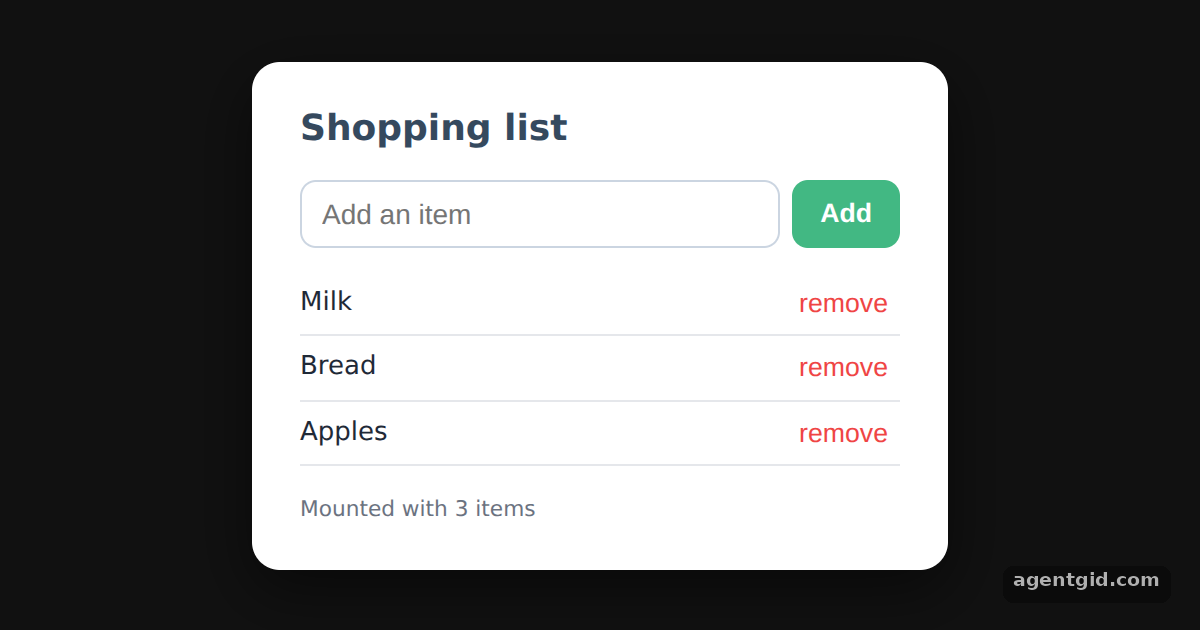
How it works
- Declare state in data().
data()returns the draft text, the list and a status line. Inside the component these are read and written asthis.items,this.draftand so on. [1] - Change it from methods.
add()pushes the draft into the list andremove(i)splices one item out. Both usethisto reach the state. [1] - Run code in mounted().
mounted()writes the status line once the component is on the page. Therender()option builds the markup withh()because this build has no template compiler. [1]
Run and edit it
It runs in your browser, in a sandboxed frame that cannot see this site; the packages load from esm.sh only after you press Run.
import { createApp, h } from "vue";

const root = document.getElementById("root");
root.style.cssText = "height:100%;display:grid;place-items:center;background:#111;font-family:system-ui,sans-serif";

const card = "background:#fff;color:#1f2937;padding:20px 24px;border-radius:14px;width:300px;box-shadow:0 10px 30px rgba(0,0,0,.5)";
const input = "flex:1;padding:8px 10px;border:1px solid #cbd5e1;border-radius:8px;font-size:14px";
const btn = "padding:8px 14px;border:0;border-radius:8px;background:#42b883;color:#fff;font-weight:600;cursor:pointer";

createApp({
  // state
  data() {
    return { draft: "", items: ["Milk", "Bread", "Apples"], status: "" };
  },
  // functions that change the state through `this`
  methods: {
    add() {
      const text = this.draft.trim();
      if (text) this.items.push(text);
      this.draft = "";
    },
    remove(index) {
      this.items.splice(index, 1);
    },
  },
  mounted() {
    this.status = `Mounted with ${this.items.length} items`;
  },
  render() {
    return h("div", { style: card }, [
      h("h2", { style: "margin:0 0 12px;font-size:18px;color:#35495e" }, "Shopping list"),
      h("div", { style: "display:flex;gap:6px" }, [
        h("input", {
          style: input,
          placeholder: "Add an item",
          value: this.draft,
          onInput: (e) => (this.draft = e.target.value),
          onKeydown: (e) => e.key === "Enter" && this.add(),
        }),
        h("button", { style: btn, onClick: this.add }, "Add"),
      ]),
      h("ul", { style: "list-style:none;padding:0;margin:12px 0" },
        this.items.map((item, i) =>
          h("li", { key: item + i, style: "display:flex;justify-content:space-between;padding:6px 0;border-bottom:1px solid #e5e7eb" }, [
            item,
            h("button", { style: "border:0;background:none;color:#ef4444;cursor:pointer", onClick: () => this.remove(i) }, "remove"),
          ])
        )
      ),
      h("small", { style: "color:#6b7280" }, this.status),
    ]);
  },
}).mount(root);
Type an item and press Enter or Add; click remove to take one out. Code written by AgentGid [1].
Type an item and press Enter or Add; click remove to take one out. Code written by AgentGid [1].Checked Oct 12, 2026: it starts without errors in Chromium with vue 3.5.43. Needs WebGL.
More Vue examples
A reactive counter with createApp and ref in Vue Render functions with h() in Vue Multiple Vue apps on one page Catching errors with app.config.errorHandler in Vue
Sources
Explanations written by AgentGid from the official docs; the numbers in brackets point here. The code marked "written by AgentGid" is ours and free to copy.