Fetching data with useQuery in TanStack Query
useQuery lets a component declare the data it needs by key and a query function. TanStack Query caches the result and shares it with every component that asks for the same key.
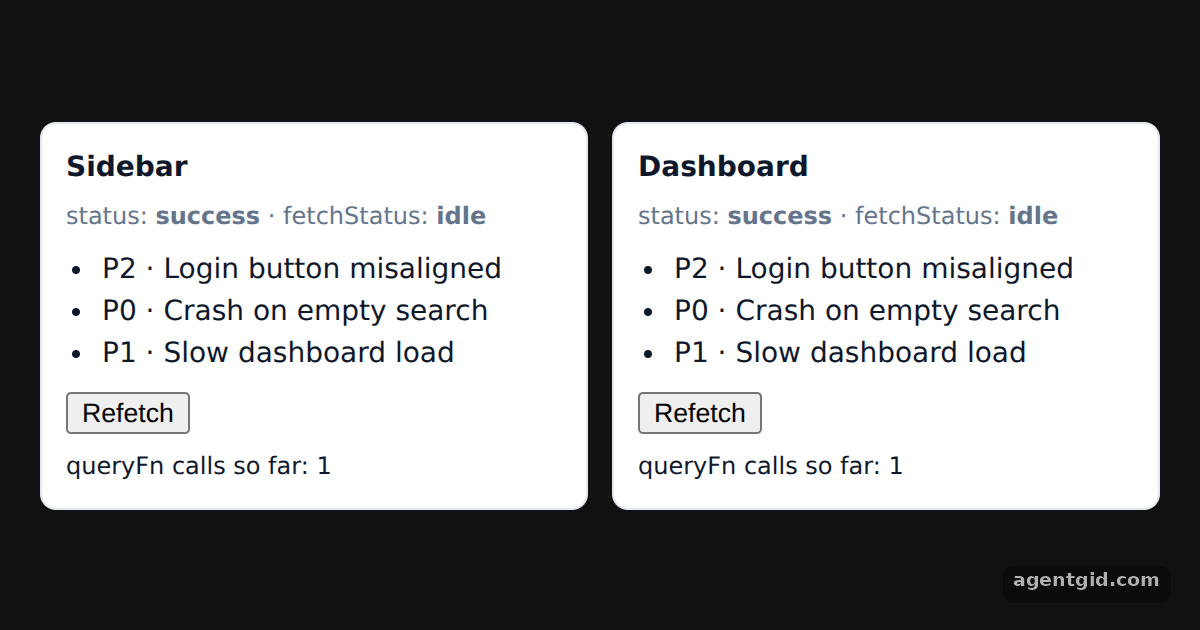
How it works
- Declare the query. Each
IssueListcallsuseQuerywithqueryKey: ['issues']and aqueryFnthat returns a promise. Here the promise resolves inline data after a short delay instead of calling a server. [1] - Read the query state. The hook returns
status,fetchStatusanddata. The example shows a loading line whilestatusispendingand the list once it issuccess. [1] - One cache entry, two components. Both cards use the same key, so the counter shows a single
queryFncall. The Refetch button callsrefetchQueriesfor that key, which runs the function once more and updates both cards together. [1]
Run and edit it
It runs in your browser, in a sandboxed frame that cannot see this site; the packages load from esm.sh only after you press Run.
import { QueryClient, QueryClientProvider, useQuery, useQueryClient } from '@tanstack/react-query'

const queryClient = new QueryClient()
let calls = 0

// Fake API: resolves inline data after a short delay
function getIssues() {
  calls += 1
  return new Promise((resolve) =>
    setTimeout(() => resolve([
      { id: 1, title: 'Login button misaligned', priority: 'P2' },
      { id: 2, title: 'Crash on empty search', priority: 'P0' },
      { id: 3, title: 'Slow dashboard load', priority: 'P1' },
    ]), 900)
  )
}

function IssueList({ label }) {
  const client = useQueryClient()
  const { status, fetchStatus, data } = useQuery({
    queryKey: ['issues'],
    queryFn: getIssues,
  })
  return (
    <div style={{ background: '#fff', border: '1px solid #e2e8f0', borderRadius: 8, padding: 12, flex: 1 }}>
      <div style={{ fontWeight: 600 }}>{label}</div>
      <div style={{ fontSize: 12, color: '#64748b', margin: '4px 0 8px' }}>
        status: <b>{status}</b> · fetchStatus: <b>{fetchStatus}</b>
      </div>
      {status === 'pending' ? <p>Loading issues…</p> : (
        <ul style={{ margin: '0 0 8px', paddingLeft: 18 }}>
          {data.map((i) => <li key={i.id}>{i.priority} · {i.title}</li>)}
        </ul>
      )}
      <button onClick={() => client.refetchQueries({ queryKey: ['issues'] })}>Refetch</button>
      <div style={{ fontSize: 12, marginTop: 6 }}>queryFn calls so far: {calls}</div>
    </div>
  )
}

export default function App() {
  return (
    <QueryClientProvider client={queryClient}>
      <div style={{ minHeight: '100vh', display: 'grid', placeItems: 'center', background: '#111', fontFamily: 'system-ui, sans-serif' }}>
        <div style={{ display: 'flex', gap: 12, width: 560, color: '#0f172a', fontSize: 14 }}>
          <IssueList label="Sidebar" />
          <IssueList label="Dashboard" />
        </div>
      </div>
    </QueryClientProvider>
  )
}
Press Refetch on either card and watch fetchStatus change on both while the queryFn call count goes up by one. Code written by AgentGid [1].
Press Refetch on either card and watch fetchStatus change on both while the queryFn call count goes up by one. Code written by AgentGid [1].Checked Oct 12, 2026: it starts without errors in Chromium with @tanstack/react-query 5.104.2, react 19.3.0, react-dom 19.3.0. Needs WebGL.
More TanStack Query examples
Mutations and query invalidation in TanStack Query Optimistic updates with rollback in TanStack Query Paginated queries in TanStack Query Dependent queries with enabled in TanStack Query
Sources
Explanations written by AgentGid from the official docs; the numbers in brackets point here. The code marked "written by AgentGid" is ours and free to copy.