Conditional classes with twJoin
twJoin joins class names conditionally, like clsx, but leaves conflict resolution out. It fits cases where you only need to combine classes.
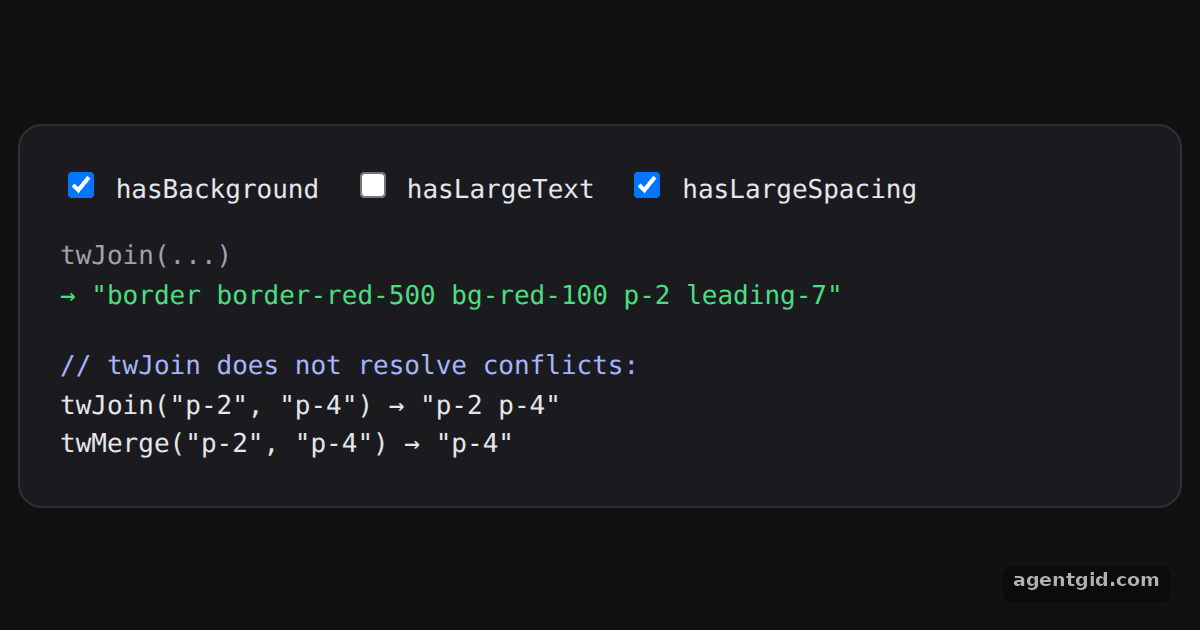
How it works
- Join classes conditionally. Each condition is written as
flag && "class", the same pattern as the API reference example. The checkboxes change the three flags. [1] - No conflict resolution. The last two lines show the difference:
twJoinkeeps bothp-2andp-4, whiletwMergekeeps only the last one. [1] - A clsx alternative.
twJointakes strings, arrays and falsy values but no objects. [1]
Run and edit it
It runs in your browser, in a sandboxed frame that cannot see this site; the packages load from esm.sh only after you press Run.
import { useState } from "react";
import { twJoin, twMerge } from "tailwind-merge";

export default function App() {
  const [hasBackground, setBg] = useState(true);
  const [hasLargeText, setText] = useState(false);
  const [hasLargeSpacing, setSpacing] = useState(true);

  // Falsy values are skipped, nested arrays are flattened
  const joined = twJoin(
    "border border-red-500",
    hasBackground && "bg-red-100",
    hasLargeText && "text-lg",
    hasLargeSpacing && ["p-2", hasLargeText ? "leading-8" : "leading-7"],
  );

  const toggles = [
    ["hasBackground", hasBackground, setBg],
    ["hasLargeText", hasLargeText, setText],
    ["hasLargeSpacing", hasLargeSpacing, setSpacing],
  ];

  return (
    <div style={page}>
      <div style={card}>
        <div style={{ display: "flex", gap: 16, marginBottom: 14 }}>
          {toggles.map(([name, value, set]) => (
            <label key={name} style={{ cursor: "pointer" }}>
              <input type="checkbox" checked={value} onChange={(e) => set(e.target.checked)} /> {name}
            </label>
          ))}
        </div>
        <div style={{ color: "#9ca3af" }}>twJoin(...)</div>
        <div style={{ color: "#4ade80", marginBottom: 16 }}>→ "{joined}"</div>
        <div style={{ color: "#a5b4fc" }}>// twJoin does not resolve conflicts:</div>
        <div>twJoin("p-2", "p-4") → "{twJoin("p-2", "p-4")}"</div>
        <div>twMerge("p-2", "p-4") → "{twMerge("p-2", "p-4")}"</div>
      </div>
    </div>
  );
}
const page = { minHeight: "100vh", display: "flex", alignItems: "center", justifyContent: "center", background: "#111", fontFamily: "ui-monospace, Menlo, monospace" };
const card = { width: 540, padding: 20, borderRadius: 12, background: "#1b1b1f", border: "1px solid #2e2e35", color: "#e5e7eb", fontSize: 13 };
Toggle the checkboxes and watch the joined class string change. Code written by AgentGid [1].
Toggle the checkboxes and watch the joined class string change. Code written by AgentGid [1].Checked Oct 12, 2026: it starts without errors in Chromium with tailwind-merge 3.7.0, react 19.3.0, react-dom 19.3.0. Needs WebGL.
More Tailwind Merge examples
Merging conflicting classes with twMerge Custom theme values in tailwind-merge Overriding component classes with twMerge Custom class groups in tailwind-merge
Sources
Explanations written by AgentGid from the official docs; the numbers in brackets point here. The code marked "written by AgentGid" is ours and free to copy.