Custom theme values in tailwind-merge
If your Tailwind theme adds custom values, tailwind-merge needs to know about them to resolve conflicts. extendTailwindMerge creates a merge function that does.
How it works
- Create a custom merge function.
extendTailwindMergereturns a new function, stored here ascustomTwMergenext to the defaulttwMerge. [1] - Extend the theme.
extend.theme.shadowlists the custom values without theshadow-prefix. The default shadow sizes stay available. [1] - Create it once. The function is created at module level, outside the component, so it is not rebuilt on every render. [2]
Run and edit it
It runs in your browser, in a sandboxed frame that cannot see this site; the packages load from esm.sh only after you press Run.
import { twMerge, extendTailwindMerge } from "tailwind-merge";

// Created once at the top level, not inside the component
const customTwMerge = extendTailwindMerge({
  extend: {
    theme: {
      // Custom values from the @theme layer, without the `shadow-` prefix
      shadow: ["100", "200", "300"],
    },
  },
});

const CASES = ["shadow-200 shadow-lg", "shadow-100 shadow-300", "shadow-lg shadow-100", "shadow-sm shadow-md"];

export default function App() {
  return (
    <div style={page}>
      <div style={card}>
        <div style={{ ...grid, color: "#a5b4fc", marginBottom: 8 }}>
          <span>input</span><span>twMerge</span><span>customTwMerge</span>
        </div>
        {CASES.map((input) => (
          <div key={input} style={{ ...grid, padding: "8px 0", borderTop: "1px solid #2e2e35" }}>
            <span style={{ color: "#9ca3af" }}>{input}</span>
            <span>{twMerge(input)}</span>
            <span style={{ color: "#4ade80" }}>{customTwMerge(input)}</span>
          </div>
        ))}
      </div>
    </div>
  );
}

const grid = { display: "grid", gridTemplateColumns: "1.3fr 1fr 1fr", gap: 10 };
const page = { minHeight: "100vh", display: "flex", alignItems: "center", justifyContent: "center", background: "#111", fontFamily: "ui-monospace, Menlo, monospace" };
const card = { width: 540, padding: 20, borderRadius: 12, background: "#1b1b1f", border: "1px solid #2e2e35", color: "#e5e7eb", fontSize: 13 };
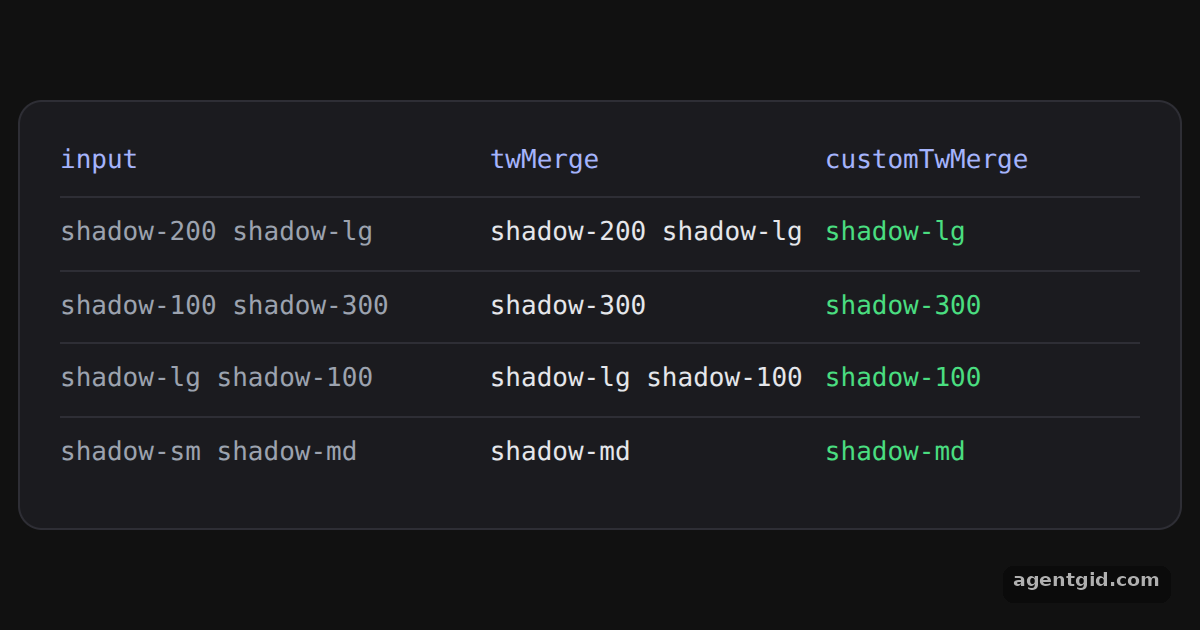
Compare the two columns: the custom function treats shadow-100, shadow-200 and shadow-300 as shadow sizes. Code written by AgentGid [1].
Compare the two columns: the custom function treats shadow-100, shadow-200 and shadow-300 as shadow sizes. Code written by AgentGid [1].Checked Oct 12, 2026: it starts without errors in Chromium with tailwind-merge 3.7.0, react 19.3.0, react-dom 19.3.0. Needs WebGL.
More Tailwind Merge examples
Merging conflicting classes with twMerge Conditional classes with twJoin Overriding component classes with twMerge Custom class groups in tailwind-merge
Sources
- Docs: dcastil › tailwind-merge › blob › tailwind-merge@3.7.0 › packages › tailwind-mer
- Docs: dcastil › tailwind-merge › blob › tailwind-merge@3.7.0 › packages › tailwind-mer
Explanations written by AgentGid from the official docs; the numbers in brackets point here. The code marked "written by AgentGid" is ours and free to copy.