Custom class groups in tailwind-merge
Plugins and custom utilities add classes tailwind-merge does not know. Class groups tell it which of them conflict with each other.
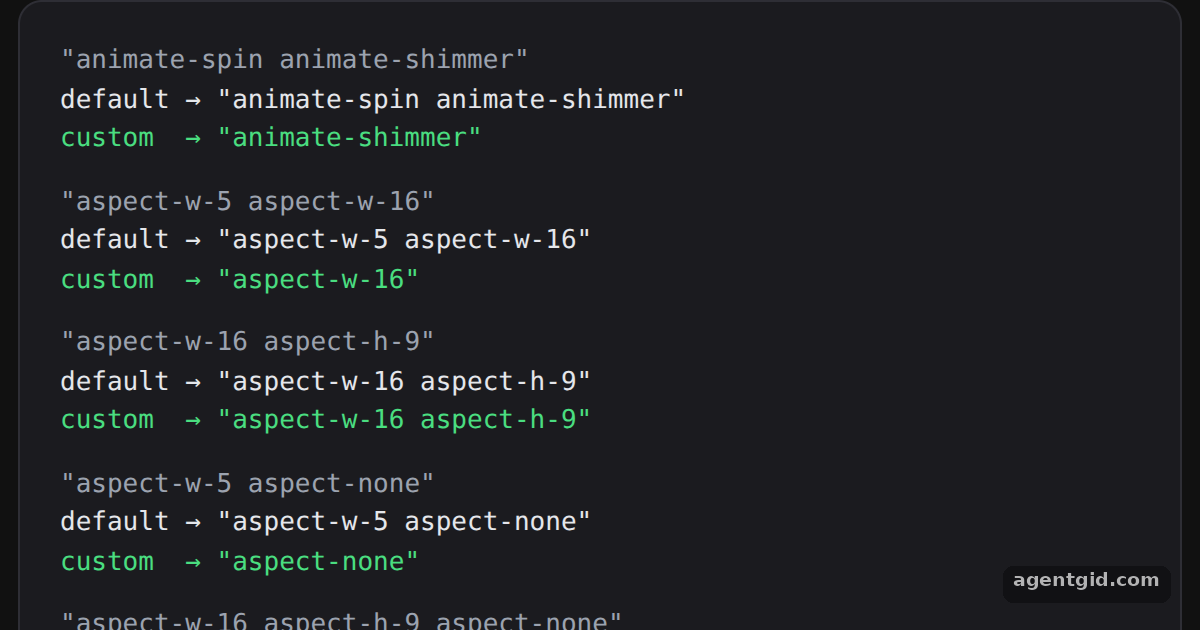
How it works
- Add to an existing group.
animate: ["animate-shimmer"]puts the new class into theanimategroup, so it conflicts withanimate-spin. [1] - Match classes with a function.
aspect-wandaspect-huse a validator that accepts numbers, soaspect-w-16belongs to the group. [1] - Conflicts across groups.
conflictingClassGroupsmakesaspect-noneremove earlieraspect-w-*andaspect-h-*classes. [1]
Run and edit it
It runs in your browser, in a sandboxed frame that cannot see this site; the packages load from esm.sh only after you press Run.
import { twMerge, extendTailwindMerge } from "tailwind-merge";
const isNumber = (value) => Boolean(value) && !isNaN(value);
const customTwMerge = extendTailwindMerge({
extend: {
classGroups: {
animate: ["animate-shimmer"],
"aspect-w": [{ "aspect-w": [isNumber] }],
"aspect-h": [{ "aspect-h": [isNumber] }],
"aspect-reset": ["aspect-none"],
},
conflictingClassGroups: {
// aspect-none removes earlier aspect-w-* and aspect-h-* classes
"aspect-reset": ["aspect-w", "aspect-h"],
},
},
});
const CASES = [
"animate-spin animate-shimmer",
"aspect-w-5 aspect-w-16",
"aspect-w-16 aspect-h-9",
"aspect-w-5 aspect-none",
"aspect-w-16 aspect-h-9 aspect-none",
];
export default function App() {
return (
<div style={page}>
<div style={card}>
{CASES.map((input) => (
<div key={input} style={{ marginBottom: 12 }}>
<div style={{ color: "#9ca3af" }}>"{input}"</div>
<div>default → "{twMerge(input)}"</div>
<div style={{ color: "#4ade80" }}>custom → "{customTwMerge(input)}"</div>
</div>
))}
</div>
</div>
);
}
const page = { minHeight: "100vh", display: "flex", alignItems: "center", justifyContent: "center", background: "#111", fontFamily: "ui-monospace, Menlo, monospace" };
const card = { width: 540, padding: 20, borderRadius: 12, background: "#1b1b1f", border: "1px solid #2e2e35", color: "#e5e7eb", fontSize: 13 };
Compare the default and custom lines for each input to see which classes the new groups merge. Code written by AgentGid [1].
Compare the default and custom lines for each input to see which classes the new groups merge. Code written by AgentGid [1].Checked Oct 12, 2026: it starts without errors in Chromium with tailwind-merge 3.7.0, react 19.3.0, react-dom 19.3.0. Needs WebGL.
More Tailwind Merge examples
Merging conflicting classes with twMerge Conditional classes with twJoin Custom theme values in tailwind-merge Overriding component classes with twMerge
Sources
Explanations written by AgentGid from the official docs; the numbers in brackets point here. The code marked "written by AgentGid" is ours and free to copy.