Overriding component classes with twMerge
Components often ship default classes and accept a className prop. twMerge lets the caller's classes replace the defaults that conflict with them.
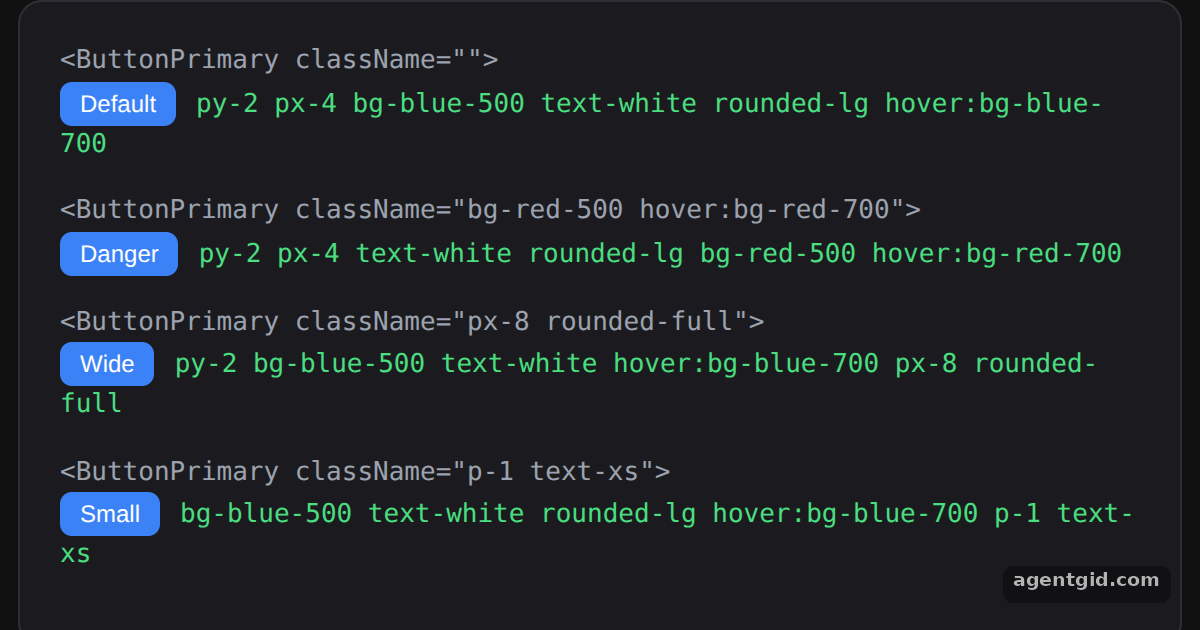
How it works
- Keep defaults in a string.
BTN_PRIMARY_CLASSNAMESholds the button's base classes as a plain JavaScript string. [1] - Merge with props.className.
twMerge(BTN_PRIMARY_CLASSNAMES, props.className)puts the caller's classes last, sobg-red-500replacesbg-blue-500. [1] - No config changes. Because the defaults are ordinary Tailwind classes, the merge works without touching the tailwind-merge config. [1]
Run and edit it
It runs in your browser, in a sandboxed frame that cannot see this site; the packages load from esm.sh only after you press Run.
import { twMerge } from "tailwind-merge";

// Reusable style collection kept in a JS string
const BTN_PRIMARY_CLASSNAMES = "py-2 px-4 bg-blue-500 text-white rounded-lg hover:bg-blue-700";

function ButtonPrimary(props) {
  // Classes passed by the caller override the defaults
  const className = twMerge(BTN_PRIMARY_CLASSNAMES, props.className);
  return (
    <div style={{ marginBottom: 14 }}>
      <div style={{ color: "#9ca3af" }}>
        {"<ButtonPrimary className=\"" + (props.className ?? "") + "\">"}
      </div>
      <button {...props} className={className} style={btn}>{props.children}</button>
      <span style={{ color: "#4ade80", marginLeft: 10 }}>{className}</span>
    </div>
  );
}

export default function App() {
  return (
    <div style={page}>
      <div style={card}>
        <ButtonPrimary>Default</ButtonPrimary>
        <ButtonPrimary className="bg-red-500 hover:bg-red-700">Danger</ButtonPrimary>
        <ButtonPrimary className="px-8 rounded-full">Wide</ButtonPrimary>
        <ButtonPrimary className="p-1 text-xs">Small</ButtonPrimary>
      </div>
    </div>
  );
}

const btn = { padding: "4px 10px", borderRadius: 6, border: "none", background: "#3b82f6", color: "#fff", fontSize: 12 };
const page = { minHeight: "100vh", display: "flex", alignItems: "center", justifyContent: "center", background: "#111", fontFamily: "ui-monospace, Menlo, monospace" };
const card = { width: 540, padding: 20, borderRadius: 12, background: "#1b1b1f", border: "1px solid #2e2e35", color: "#e5e7eb", fontSize: 13 };
The green text next to each button is its final className; edit a className prop to see the merge change. Code written by AgentGid [1].
The green text next to each button is its final className; edit a className prop to see the merge change. Code written by AgentGid [1].Checked Oct 12, 2026: it starts without errors in Chromium with tailwind-merge 3.7.0, react 19.3.0, react-dom 19.3.0. Needs WebGL.
More Tailwind Merge examples
Merging conflicting classes with twMerge Conditional classes with twJoin Custom theme values in tailwind-merge Custom class groups in tailwind-merge
Sources
Explanations written by AgentGid from the official docs; the numbers in brackets point here. The code marked "written by AgentGid" is ours and free to copy.