Shadows in React Three Fiber
Shadows are off by default in three.js because they cost an extra render from the light's point of view. In React Three Fiber you turn them on in three places.
All React Three Fiber examples React Three Fiber: usage and stats
How it works
- Turn on the shadow map. The
shadowsprop on<Canvas>enables the renderer's shadow map. Withtruethe docs say it usesPCFSoftShadowMap; you can also pass 'basic', 'percentage', 'soft' or 'variance'. [1] - A light that casts.
castShadowon the directional light. Props with a dash reach nested objects:shadow-mapSizesetslight.shadow.mapSize(bigger is sharper and slower) and theshadow-camera-*props size the area the shadow covers. [2][3] - Objects cast, the floor receives. Each mesh that should throw a shadow gets
castShadow; the surface it falls on getsreceiveShadow. A mesh can do both. [3]
Run and edit it
It runs in your browser, in a sandboxed frame that cannot see this site; the packages load from esm.sh only after you press Run.
import { Canvas, useFrame } from '@react-three/fiber'
import { useRef } from 'react'

function Spinner() {
  const ref = useRef()
  useFrame((state, delta) => {
    ref.current.rotation.x += delta * 0.6
    ref.current.rotation.y += delta * 0.8
  })
  return (
    <mesh ref={ref} position={[0, 1.4, 0]} castShadow>
      <torusKnotGeometry args={[0.6, 0.22, 128, 16]} />
      <meshStandardMaterial color="#2a78d6" roughness={0.4} />
    </mesh>
  )
}

export default function App() {
  return (
    // 1. shadows on: the renderer draws a shadow map
    <Canvas shadows camera={{ position: [3.5, 3.5, 5], fov: 45 }}>
      <color attach="background" args={['#ecebe6']} />
      <ambientLight intensity={0.6} />
      {/* 2. a light that casts shadows; mapSize and the shadow camera set quality and area */}
      <directionalLight
        position={[3, 6, 2]} intensity={2.5} castShadow
        shadow-mapSize={[2048, 2048]}
        shadow-camera-left={-4} shadow-camera-right={4}
        shadow-camera-top={4} shadow-camera-bottom={-4}
      />
      <Spinner />
      <mesh position={[-1.7, 0.4, 0.8]} castShadow>
        <boxGeometry args={[0.8, 0.8, 0.8]} />
        <meshStandardMaterial color="#eb6834" />
      </mesh>
      <mesh position={[1.6, 0.5, 0.9]} castShadow>
        <sphereGeometry args={[0.5, 32, 32]} />
        <meshStandardMaterial color="#1baf7a" />
      </mesh>
      {/* 3. the floor receives them */}
      <mesh rotation={[-Math.PI / 2, 0, 0]} receiveShadow>
        <planeGeometry args={[14, 14]} />
        <meshStandardMaterial color="#ffffff" />
      </mesh>
    </Canvas>
  )
}
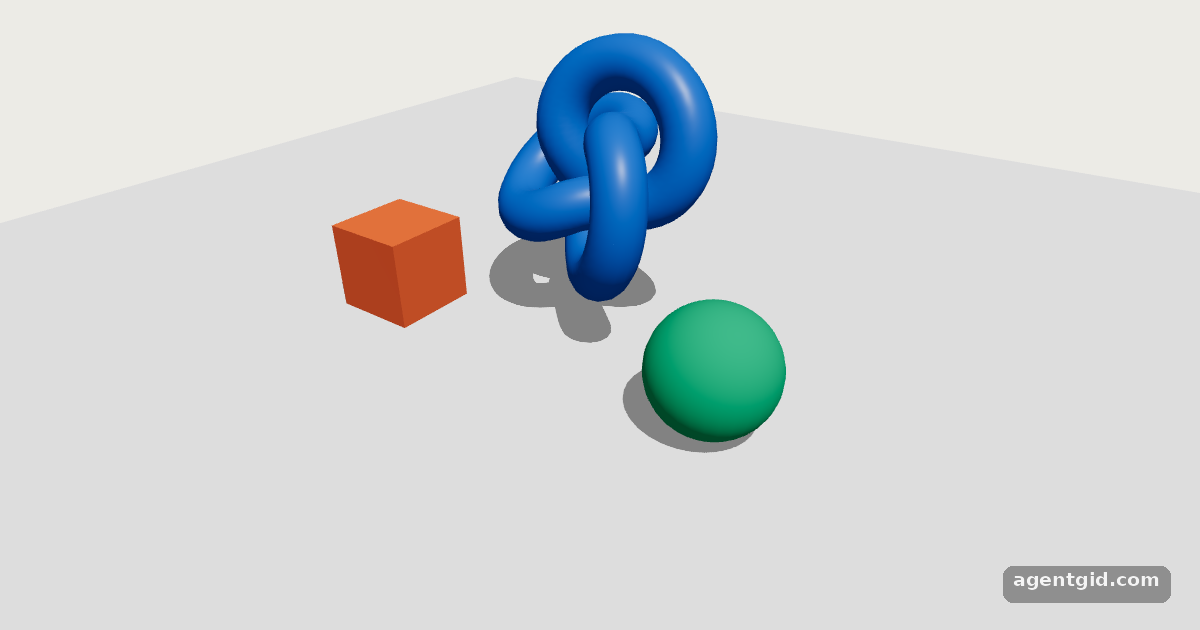
Shadows need three switches: shadows on the Canvas, castShadow on the light and the objects, receiveShadow on the floor. Code written by AgentGid [1].
Shadows need three switches: shadows on the Canvas, castShadow on the light and the objects, receiveShadow on the floor. Code written by AgentGid [1].Checked Oct 12, 2026: it starts without errors in Chromium with React Three Fiber 9.8.1, three.js 0.186.1, Drei 10.7.9, React 19.3.0. Needs WebGL.
More React Three Fiber examples
InstancedMesh in React Three Fiber useFrame in React Three Fiber onClick and pointer events in React Three Fiber OrbitControls in React Three Fiber
Sources
- Docs: Canvas (the shadows prop)
- Docs: Objects, properties and constructor arguments (dash-case props)
- three.js docs: DirectionalLightShadow
Explanations written by AgentGid from the official docs; the numbers in brackets point here. The code marked "written by AgentGid" is ours and free to copy.