onClick and pointer events in React Three Fiber
Meshes in React Three Fiber take pointer events like DOM elements: onClick, onPointerOver, onPointerOut and more. A raycaster finds what is under the pointer.
All React Three Fiber examples React Three Fiber: usage and stats
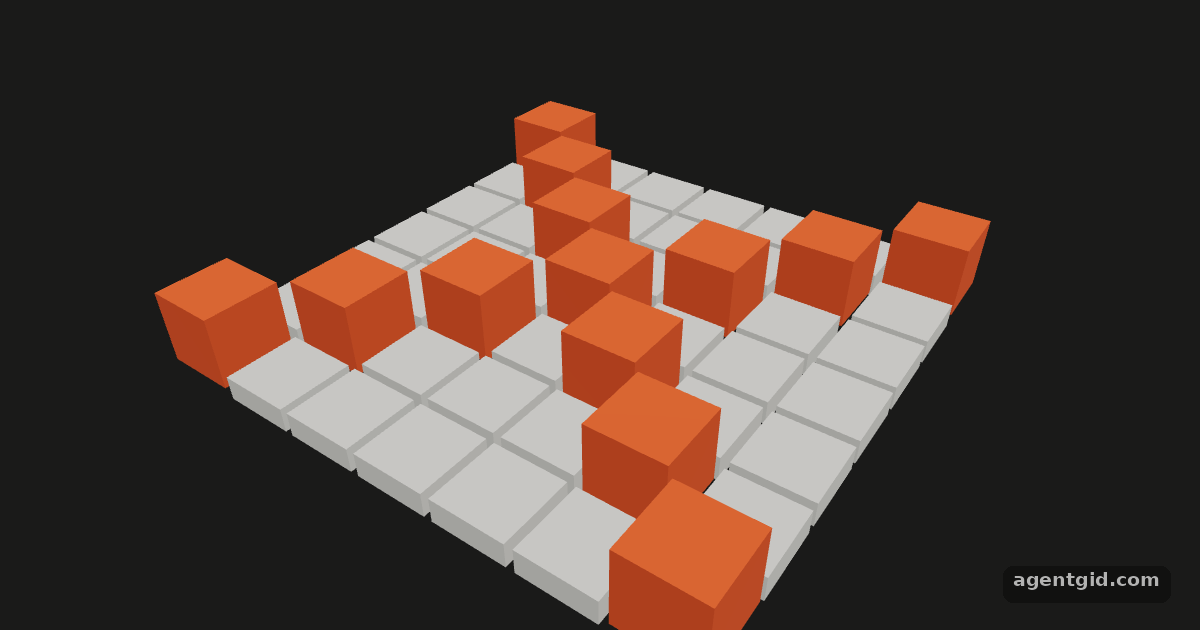
How it works
- Events on a mesh. Each tile has
onClick,onPointerOverandonPointerOut. The event carries the browser event plus three.js data such as the hitobject,pointanddistance. [1] - Only the nearest object. Events reach every object the ray hits, front to back.
e.stopPropagation()stops delivery to the objects behind, so only the tile on top lights up. [1] - Clicks on nothing.
onPointerMissedon the<Canvas>fires for clicks that hit no mesh. Here it prints a line at the bottom of the result. [1]
Run and edit it
It runs in your browser, in a sandboxed frame that cannot see this site; the packages load from esm.sh only after you press Run.
import { Canvas } from '@react-three/fiber'
import { useEffect, useState } from 'react'

function Tile({ x, z, up }) {
  const [hovered, setHovered] = useState(false)
  const [raised, setRaised] = useState(up)
  useEffect(() => {
    document.body.style.cursor = hovered ? 'pointer' : 'auto'
  }, [hovered])
  return (
    <mesh
      position={[x, raised ? 0.4 : 0, z]}
      scale={[1, raised ? 3 : 1, 1]}
      onClick={(e) => { e.stopPropagation(); setRaised(!raised) }}
      onPointerOver={(e) => { e.stopPropagation(); setHovered(true) }}
      onPointerOut={() => setHovered(false)}
    >
      <boxGeometry args={[0.9, 0.3, 0.9]} />
      <meshStandardMaterial color={raised ? '#eb6834' : hovered ? '#6da7ec' : '#d9d8d2'} />
    </mesh>
  )
}

const tiles = []
for (let x = -3; x <= 3; x++) {
  // a few tiles start raised; click any tile to toggle it
  for (let z = -3; z <= 3; z++) tiles.push({ x, z, up: x === z || x === -z })
}

export default function App() {
  return (
    <Canvas
      camera={{ position: [5, 6, 7], fov: 40 }}
      onPointerMissed={() => console.log('Clicked empty space')}
    >
      <color attach="background" args={['#1a1a19']} />
      <ambientLight intensity={0.7} />
      <directionalLight position={[4, 8, 3]} intensity={2} />
      {tiles.map((t) => <Tile key={`${t.x},${t.z}`} {...t} />)}
    </Canvas>
  )
}
A grid of tiles: hover to highlight, click to raise. Clicking empty space prints a line from onPointerMissed. Code written by AgentGid [1].
A grid of tiles: hover to highlight, click to raise. Clicking empty space prints a line from onPointerMissed. Code written by AgentGid [1].Checked Oct 12, 2026: it starts without errors in Chromium with React Three Fiber 9.8.1, three.js 0.186.1, Drei 10.7.9, React 19.3.0. Needs WebGL.
More React Three Fiber examples
InstancedMesh in React Three Fiber Shadows in React Three Fiber useFrame in React Three Fiber OrbitControls in React Three Fiber
Sources
Explanations written by AgentGid from the official docs; the numbers in brackets point here. The code marked "written by AgentGid" is ours and free to copy.