Transforming link URLs in react-markdown
Every URL in rendered markdown goes through a transform function. You can keep the built-in safety check and add your own rewriting, such as prefixing relative links.
How it works
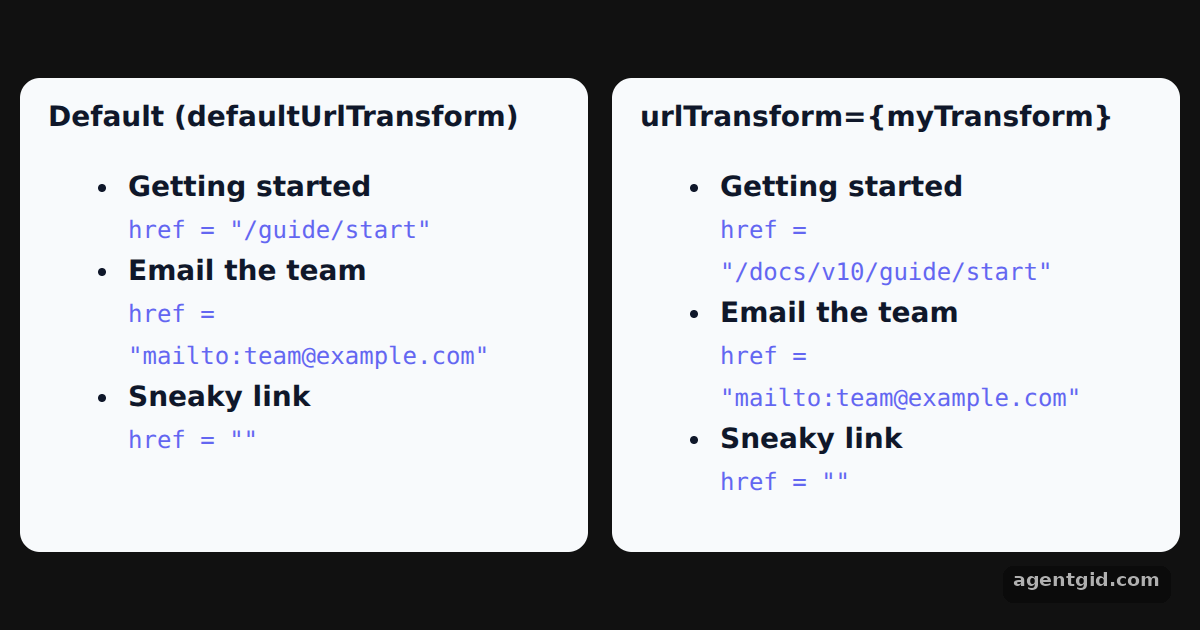
- The default transform. The left panel uses the default,
defaultUrlTransform. The relative path and themailto:link keep their URL, while thejavascript:link ends up with an emptyhref. [1] - Your own urlTransform. The right panel passes
urlTransform. Paths that start with/get a/docs/v10prefix, and every other URL is handed to the exporteddefaultUrlTransform. [1] - Show the final href. A custom
acomponent prints each link's finalhrefinstead of rendering a clickable link, so you can compare both panels. [1]
Run and edit it
It runs in your browser, in a sandboxed frame that cannot see this site; the packages load from esm.sh only after you press Run.
import Markdown, { defaultUrlTransform } from 'react-markdown'

const markdown = `- [Getting started](/guide/start)
- [Email the team](mailto:team@example.com)
- [Sneaky link](javascript:alert(1))`

// Prefix relative paths, keep the default safety check for the rest
function myTransform(url) {
  if (url.startsWith('/')) return '/docs/v10' + url
  return defaultUrlTransform(url)
}

// Show the final href instead of a clickable link
const components = {
  a: ({ href, children }) => (
    <span><b>{children}</b><br /><code style={{ fontSize: 12, color: '#6366f1' }}>href = {JSON.stringify(href)}</code></span>
  ),
}

function Panel({ title, children }) {
  return (
    <div style={{ flex: 1, background: '#f8fafc', color: '#0f172a', borderRadius: 10, padding: '10px 14px', fontSize: 14 }}>
      <div style={{ fontWeight: 600 }}>{title}</div>
      {children}
    </div>
  )
}

export default function App() {
  return (
    <div style={{ minHeight: '100vh', display: 'grid', placeItems: 'center', background: '#111', fontFamily: 'system-ui, sans-serif' }}>
      <div style={{ display: 'flex', gap: 12, width: 580 }}>
        <Panel title="Default (defaultUrlTransform)">
          <Markdown components={components}>{markdown}</Markdown>
        </Panel>
        <Panel title="urlTransform={myTransform}">
          <Markdown components={components} urlTransform={myTransform}>{markdown}</Markdown>
        </Panel>
      </div>
    </div>
  )
}
Compare the hrefs in both panels; try adding a link with another protocol to the markdown. Code written by AgentGid [1].
Compare the hrefs in both panels; try adding a link with another protocol to the markdown. Code written by AgentGid [1].Checked Oct 12, 2026: it starts without errors in Chromium with react-markdown 10.1.0, react 19.3.0, react-dom 19.3.0. Needs WebGL.
More react-markdown examples
Rendering markdown with react-markdown Custom components in react-markdown Filtering elements in react-markdown Handling HTML in markdown with react-markdown
Sources
Explanations written by AgentGid from the official docs; the numbers in brackets point here. The code marked "written by AgentGid" is ours and free to copy.