Rendering markdown with react-markdown
The Markdown component takes a markdown string as its children and renders it as React elements, which makes a live preview a few lines of code.
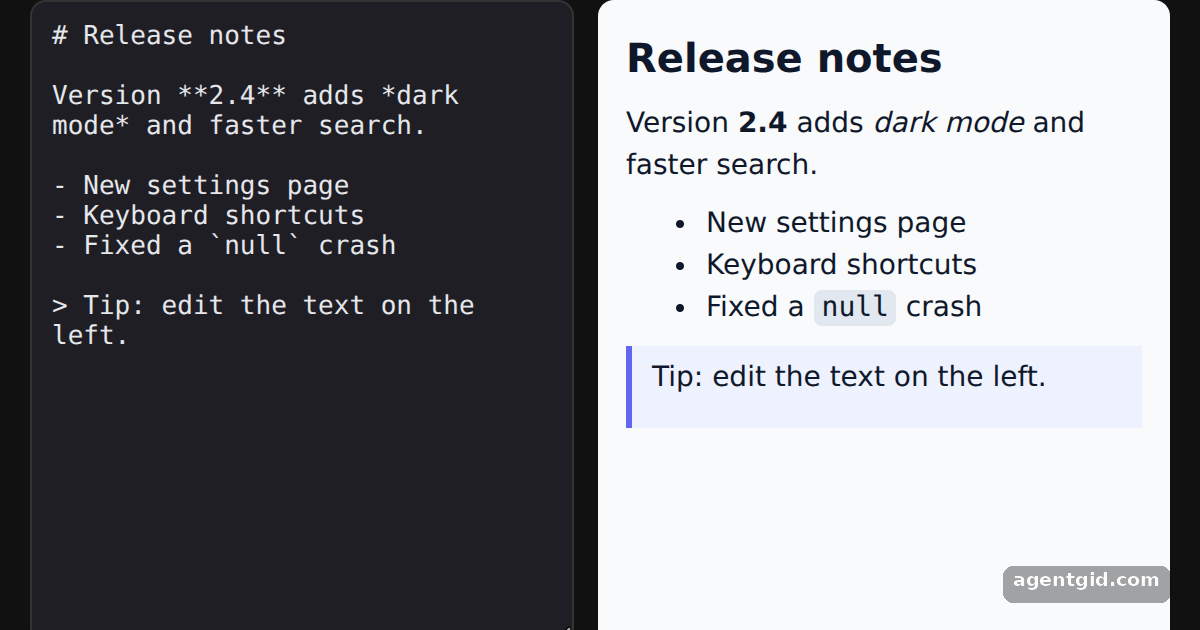
How it works
- Import the component. The default export of
react-markdownis theMarkdowncomponent. The example imports it next touseStatefrom React. [1] - Pass markdown as children. The textarea value is passed as the child of
<Markdown>. Headings, emphasis, lists and block quotes become the matching React elements. [1] - Re-render on every keystroke. Each change updates state and renders a new tree, so the preview follows the text as you type. [1]
Run and edit it
It runs in your browser, in a sandboxed frame that cannot see this site; the packages load from esm.sh only after you press Run.
import { useState } from 'react'
import Markdown from 'react-markdown'

const start = `# Release notes

Version **2.4** adds *dark mode* and faster search.

- New settings page
- Keyboard shortcuts
- Fixed a \`null\` crash

> Tip: edit the text on the left.`

const css = `
  .preview h1 { font-size: 20px; margin: 0 0 8px; }
  .preview p, .preview ul { margin: 0 0 8px; }
  .preview code { background: #e2e8f0; padding: 1px 4px; border-radius: 4px; }
  .preview blockquote { margin: 0; padding: 6px 10px; border-left: 3px solid #6366f1; background: #eef2ff; }
`

export default function App() {
  const [text, setText] = useState(start)
  return (
    <div style={{ minHeight: '100vh', display: 'grid', placeItems: 'center', background: '#111', fontFamily: 'system-ui, sans-serif' }}>
      <style>{css}</style>
      <div style={{ display: 'flex', gap: 12, width: 570 }}>
        <textarea
          value={text}
          onChange={(e) => setText(e.target.value)}
          style={{ width: 250, height: 300, background: '#1e1e24', color: '#e5e7eb', border: '1px solid #333', borderRadius: 8, padding: 10, fontFamily: 'monospace', fontSize: 13 }}
        />
        <div className="preview" style={{ flex: 1, height: 300, overflow: 'auto', background: '#f8fafc', color: '#0f172a', borderRadius: 8, padding: 14, fontSize: 14 }}>
          <Markdown>{text}</Markdown>
        </div>
      </div>
    </div>
  )
}
Type in the left box: the right side re-renders the markdown on every keystroke. Code written by AgentGid [1].
Type in the left box: the right side re-renders the markdown on every keystroke. Code written by AgentGid [1].Checked Oct 12, 2026: it starts without errors in Chromium with react-markdown 10.1.0, react 19.3.0, react-dom 19.3.0. Needs WebGL.
More react-markdown examples
Custom components in react-markdown Filtering elements in react-markdown Handling HTML in markdown with react-markdown Transforming link URLs in react-markdown
Sources
Explanations written by AgentGid from the official docs; the numbers in brackets point here. The code marked "written by AgentGid" is ours and free to copy.