Filtering elements in react-markdown
Sometimes user markdown should only produce a few tags, such as no headings or links in a comment. react-markdown can drop those elements or keep just their text.
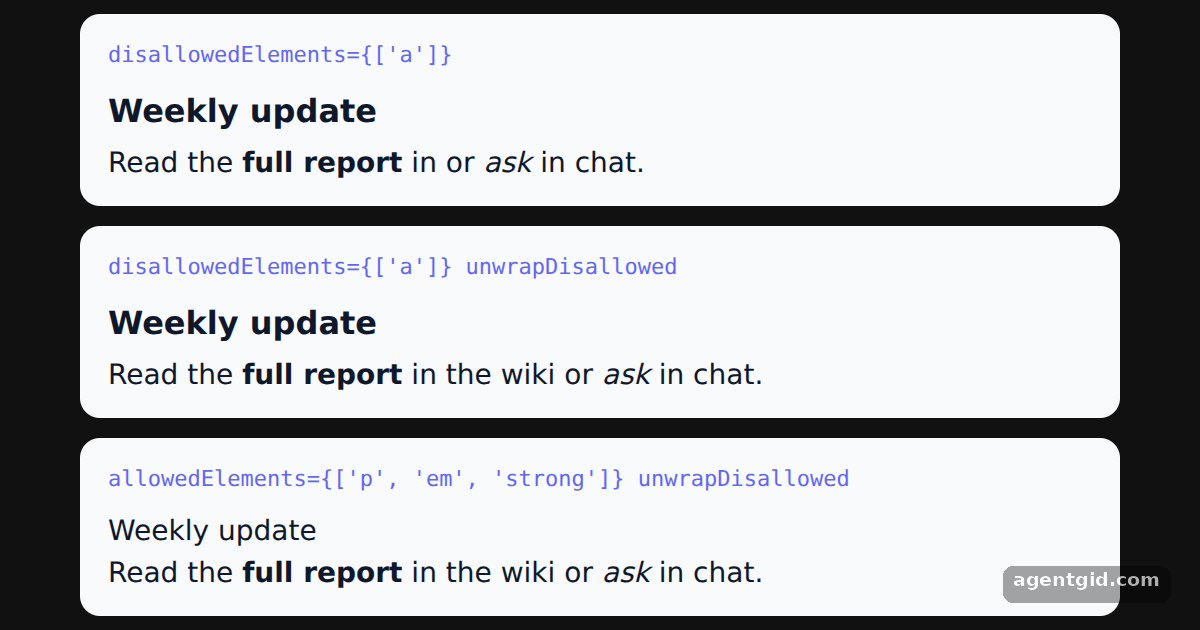
How it works
- Disallow a tag. The first panel passes
disallowedElements={['a']}, so the link and its text are removed from the output. [1] - Keep the text with unwrapDisallowed. The second panel adds
unwrapDisallowed. The link element is replaced by its children, so the words stay as plain text. [1] - Allow only a few tags. The third panel uses
allowedElementswithp,emandstrongplusunwrapDisallowed, so the heading and link become plain text while emphasis stays. [1]
Run and edit it
It runs in your browser, in a sandboxed frame that cannot see this site; the packages load from esm.sh only after you press Run.
import Markdown from 'react-markdown'

const markdown = `# Weekly update

Read the **full report** in [the wiki](#wiki) or *ask* in chat.`

const panels = [
  { label: "disallowedElements={['a']}", props: { disallowedElements: ['a'] } },
  { label: "disallowedElements={['a']} unwrapDisallowed", props: { disallowedElements: ['a'], unwrapDisallowed: true } },
  { label: "allowedElements={['p', 'em', 'strong']} unwrapDisallowed", props: { allowedElements: ['p', 'em', 'strong'], unwrapDisallowed: true } },
]

const css = `
  .md h1 { font-size: 16px; margin: 0 0 4px; }
  .md p { margin: 0; }
  .md a { color: #4f46e5; }
`

export default function App() {
  return (
    <div style={{ minHeight: '100vh', display: 'grid', placeItems: 'center', background: '#111', fontFamily: 'system-ui, sans-serif' }}>
      <style>{css}</style>
      <div style={{ display: 'grid', gap: 10, width: 520 }}>
        {panels.map((p) => (
          <div key={p.label} style={{ background: '#f8fafc', color: '#0f172a', borderRadius: 10, padding: '10px 14px', fontSize: 14 }}>
            <code style={{ fontSize: 11, color: '#6366f1' }}>{p.label}</code>
            <div className="md" style={{ marginTop: 6 }}>
              <Markdown {...p.props}>{markdown}</Markdown>
            </div>
          </div>
        ))}
      </div>
    </div>
  )
}
Edit the tag lists in each panel and compare how the same markdown is rendered. Code written by AgentGid [1].
Edit the tag lists in each panel and compare how the same markdown is rendered. Code written by AgentGid [1].Checked Oct 12, 2026: it starts without errors in Chromium with react-markdown 10.1.0, react 19.3.0, react-dom 19.3.0. Needs WebGL.
More react-markdown examples
Rendering markdown with react-markdown Custom components in react-markdown Handling HTML in markdown with react-markdown Transforming link URLs in react-markdown
Sources
Explanations written by AgentGid from the official docs; the numbers in brackets point here. The code marked "written by AgentGid" is ours and free to copy.