Handling HTML in markdown with react-markdown
Markdown written by users can contain HTML tags. react-markdown does not inject them as HTML, and the skipHtml option removes them from the output completely.
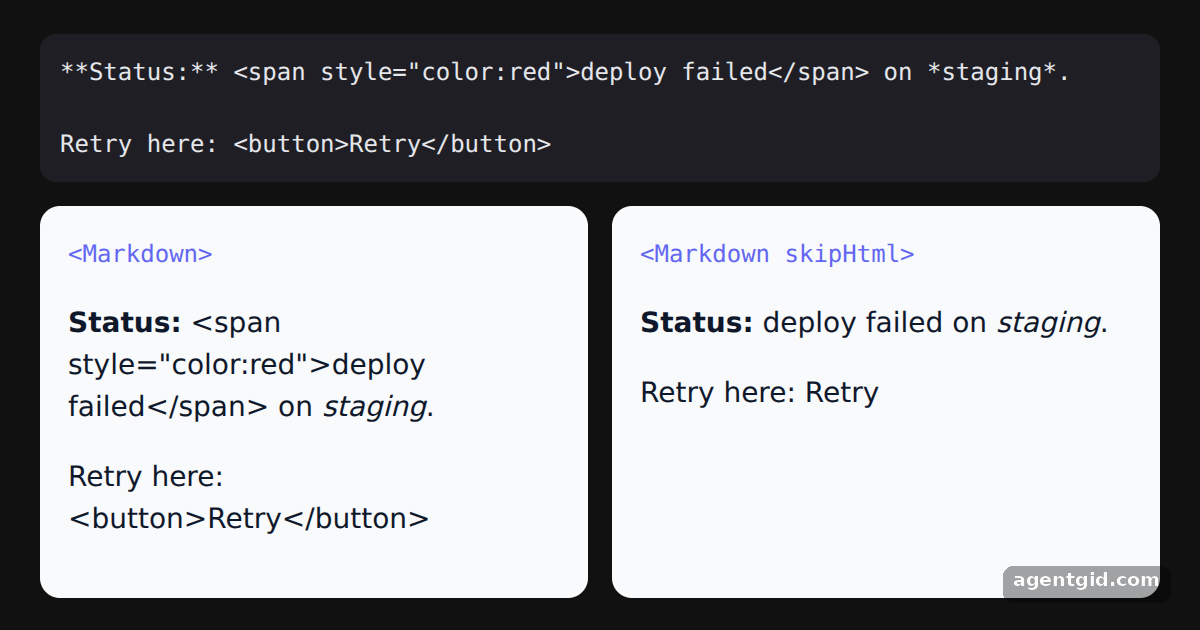
How it works
- Markdown with HTML inside. The sample text mixes normal markdown with a
<span>and a<button>tag. Both panels render the same string. [1] - Default rendering. The first panel uses
Markdownwithout options. In this example the tags show up as literal text rather than as a styled span or a real button. [1] - Ignore HTML with skipHtml. The second panel sets
skipHtml, so the HTML tags are left out and only the markdown text remains. [1]
Run and edit it
It runs in your browser, in a sandboxed frame that cannot see this site; the packages load from esm.sh only after you press Run.
import Markdown from 'react-markdown'

const markdown = `**Status:** <span style="color:red">deploy failed</span> on *staging*.

Retry here: <button>Retry</button>`

function Panel({ title, children }) {
  return (
    <div style={{ flex: 1, background: '#f8fafc', color: '#0f172a', borderRadius: 10, padding: 14, fontSize: 14 }}>
      <code style={{ fontSize: 12, color: '#6366f1' }}>{title}</code>
      <div style={{ marginTop: 8 }}>{children}</div>
    </div>
  )
}

export default function App() {
  return (
    <div style={{ minHeight: '100vh', display: 'grid', placeItems: 'center', background: '#111', fontFamily: 'system-ui, sans-serif' }}>
      <div style={{ width: 560 }}>
        <pre style={{ background: '#1e1e24', color: '#e5e7eb', padding: 10, borderRadius: 8, fontSize: 12, whiteSpace: 'pre-wrap', margin: '0 0 12px' }}>{markdown}</pre>
        <div style={{ display: 'flex', gap: 12 }}>
          <Panel title="<Markdown>">
            <Markdown>{markdown}</Markdown>
          </Panel>
          <Panel title="<Markdown skipHtml>">
            <Markdown skipHtml>{markdown}</Markdown>
          </Panel>
        </div>
      </div>
    </div>
  )
}
Compare the two panels: the left shows the raw tags as text, the right drops them. Code written by AgentGid [1].
Compare the two panels: the left shows the raw tags as text, the right drops them. Code written by AgentGid [1].Checked Oct 12, 2026: it starts without errors in Chromium with react-markdown 10.1.0, react 19.3.0, react-dom 19.3.0. Needs WebGL.
More react-markdown examples
Rendering markdown with react-markdown Custom components in react-markdown Filtering elements in react-markdown Transforming link URLs in react-markdown
Sources
Explanations written by AgentGid from the official docs; the numbers in brackets point here. The code marked "written by AgentGid" is ours and free to copy.