Map, marker and popup in React Leaflet
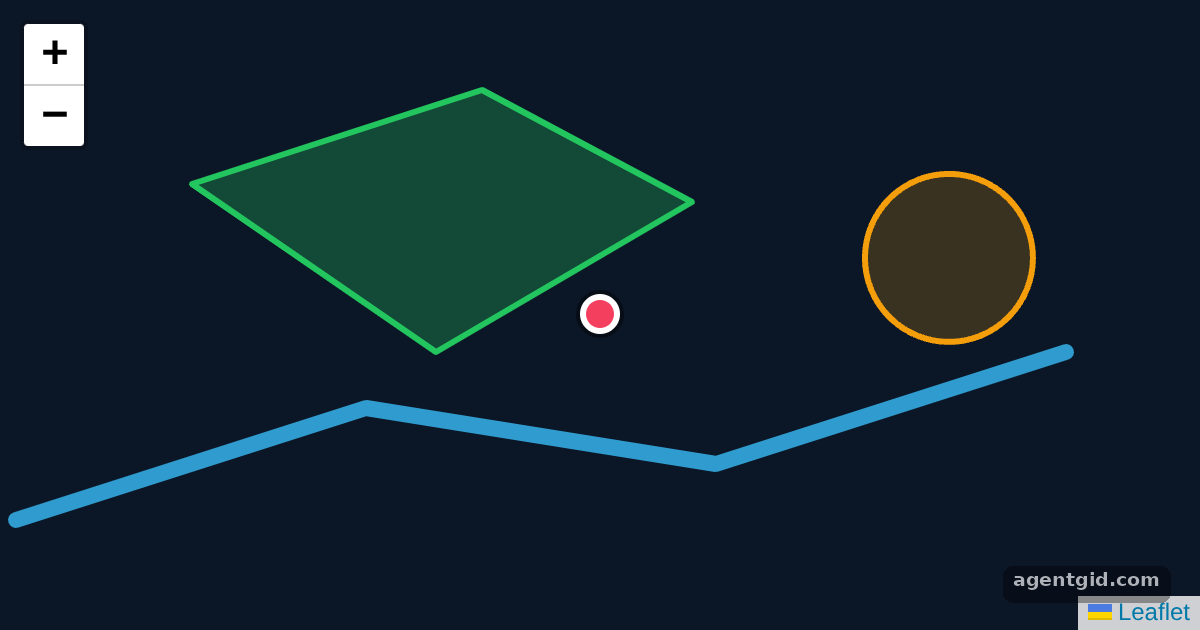
Every React Leaflet map starts with MapContainer, and layers such as markers and shapes are its children. This example draws everything as vector layers.
How it works
- Create the map.
MapContainergets acenter, azoomandscrollWheelZoom={false}, plus a height and a dark background instyle. There is no tile layer, so the map shows only the shapes. [1] - Add layers as children.
Polygon,PolylineandCircleare React components for Leaflet vector layers, styled withpathOptions. [2] - Marker with a popup. The
Markeruses an HTMLL.divIconfrom Leaflet instead of an image, and thePopupinside it opens when the marker is clicked. [1]
Run and edit it
It runs in your browser, in a sandboxed frame that cannot see this site; the packages load from esm.sh only after you press Run.
import { MapContainer, Marker, Popup, Polygon, Polyline, Circle } from "react-leaflet";
import L from "leaflet";

// A marker icon drawn with HTML and CSS (no image files)
const pin = (color) => L.divIcon({ className: "", iconSize: [20, 20], iconAnchor: [10, 10],
  html: `<div style="width:14px;height:14px;border-radius:50%;background:${color};border:3px solid #fff;box-shadow:0 0 0 2px rgba(0,0,0,.4)"></div>` });

const position = [51.505, -0.09];
const park = [[51.512, -0.125], [51.517, -0.1], [51.511, -0.082], [51.503, -0.104]];
const river = [[51.494, -0.14], [51.5, -0.11], [51.497, -0.08], [51.503, -0.05]];

export default function App() {
  return (
    <MapContainer center={position} zoom={13} scrollWheelZoom={false} style={{ height: "100vh", background: "#0b1626" }}>
      <Polygon positions={park} pathOptions={{ color: "#22c55e", fillOpacity: 0.3 }} />
      <Polyline positions={river} pathOptions={{ color: "#38bdf8", weight: 8, opacity: 0.8 }} />
      <Circle center={[51.508, -0.06]} radius={500} pathOptions={{ color: "#f59e0b" }} />
      <Marker position={position} icon={pin("#f43f5e")}>
        <Popup>
          A pretty CSS3 popup. <br /> Easily customizable.
        </Popup>
      </Marker>
    </MapContainer>
  );
}
Click the pink marker to open its popup, and drag the map to pan around the shapes. Code written by AgentGid [1].
Click the pink marker to open its popup, and drag the map to pan around the shapes. Code written by AgentGid [1].Checked Oct 12, 2026: it starts without errors in Chromium with react-leaflet 5.0.0, react 19.3.0, react-dom 19.3.0, leaflet 1.9.4. Needs WebGL.
More React Leaflet examples
Listening to map events with useMapEvents Changing the map view with useMap Adding markers on click in React Leaflet Fitting the map to bounds in React Leaflet
Sources
Explanations written by AgentGid from the official docs; the numbers in brackets point here. The code marked "written by AgentGid" is ours and free to copy.