Fitting the map to bounds in React Leaflet
Instead of guessing a center and zoom, you can give MapContainer the area to show. A new key creates a fresh map with that first view.
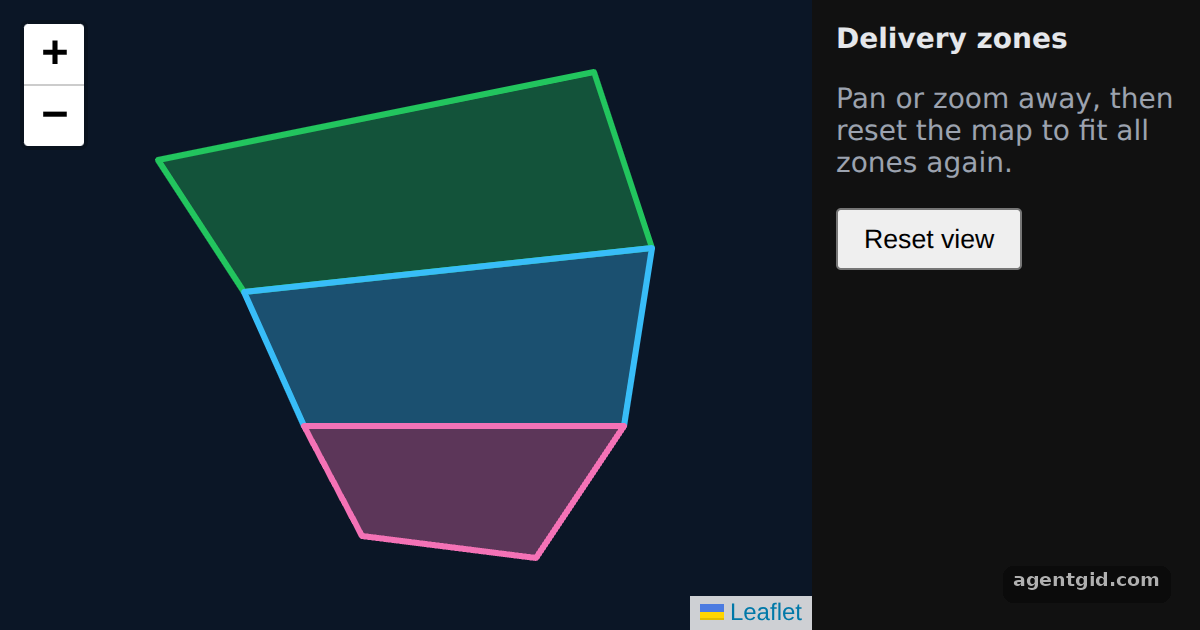
How it works
- Pass bounds instead of center.
boundsgets every corner of the zones, andboundsOptionsadds padding around them. These are extra props MapContainer accepts. [1] - Polygons with popups. Each zone is a
Polygonwith its own colour inpathOptionsand aPopupchild with its name. [2] - Reset with a key. The Reset view button increases
resets, which is thekeyofMapContainer. React then creates the map again, fitted to the bounds. [2]
Run and edit it
It runs in your browser, in a sandboxed frame that cannot see this site; the packages load from esm.sh only after you press Run.
import { useState } from "react";
import { MapContainer, Polygon, Popup } from "react-leaflet";

const zones = [
  { name: "North zone", color: "#22c55e", positions: [[48.9, 2.25], [48.92, 2.4], [48.88, 2.42], [48.87, 2.28]] },
  { name: "Centre zone", color: "#38bdf8", positions: [[48.87, 2.28], [48.88, 2.42], [48.84, 2.41], [48.84, 2.3]] },
  { name: "South zone", color: "#f472b6", positions: [[48.84, 2.3], [48.84, 2.41], [48.81, 2.38], [48.815, 2.32]] },
];
// Every corner of every zone; the map fits its first view to these points
const allPoints = zones.flatMap((z) => z.positions);

export default function App() {
  const [resets, setResets] = useState(0);
  return (
    <div style={{ display: "flex", height: "100vh", background: "#111", color: "#e5e7eb", font: "14px system-ui, sans-serif" }}>
      <MapContainer key={resets} bounds={allPoints} boundsOptions={{ padding: [20, 20] }}
        style={{ flex: 1, height: "100%", background: "#0b1626" }}>
        {zones.map((z) => (
          <Polygon key={z.name} positions={z.positions} pathOptions={{ color: z.color, fillOpacity: 0.35 }}>
            <Popup>{z.name}</Popup>
          </Polygon>
        ))}
      </MapContainer>
      <div style={{ width: 170, padding: 12 }}>
        <b>Delivery zones</b>
        <p style={{ color: "#9ca3af" }}>Pan or zoom away, then reset the map to fit all zones again.</p>
        <button onClick={() => setResets((n) => n + 1)} style={{ padding: "6px 12px" }}>Reset view</button>
      </div>
    </div>
  );
}
Drag or zoom the map, then press Reset view; click a zone to see its name. Code written by AgentGid [1].
Drag or zoom the map, then press Reset view; click a zone to see its name. Code written by AgentGid [1].Checked Oct 12, 2026: it starts without errors in Chromium with react-leaflet 5.0.0, react 19.3.0, react-dom 19.3.0, leaflet 1.9.4. Needs WebGL.
More React Leaflet examples
Map, marker and popup in React Leaflet Listening to map events with useMapEvents Changing the map view with useMap Adding markers on click in React Leaflet
Sources
Explanations written by AgentGid from the official docs; the numbers in brackets point here. The code marked "written by AgentGid" is ours and free to copy.