Switching fonts with setFont in jsPDF
A PDF can name standard fonts without embedding them. jsPDF's setFont switches the active font before each text call.
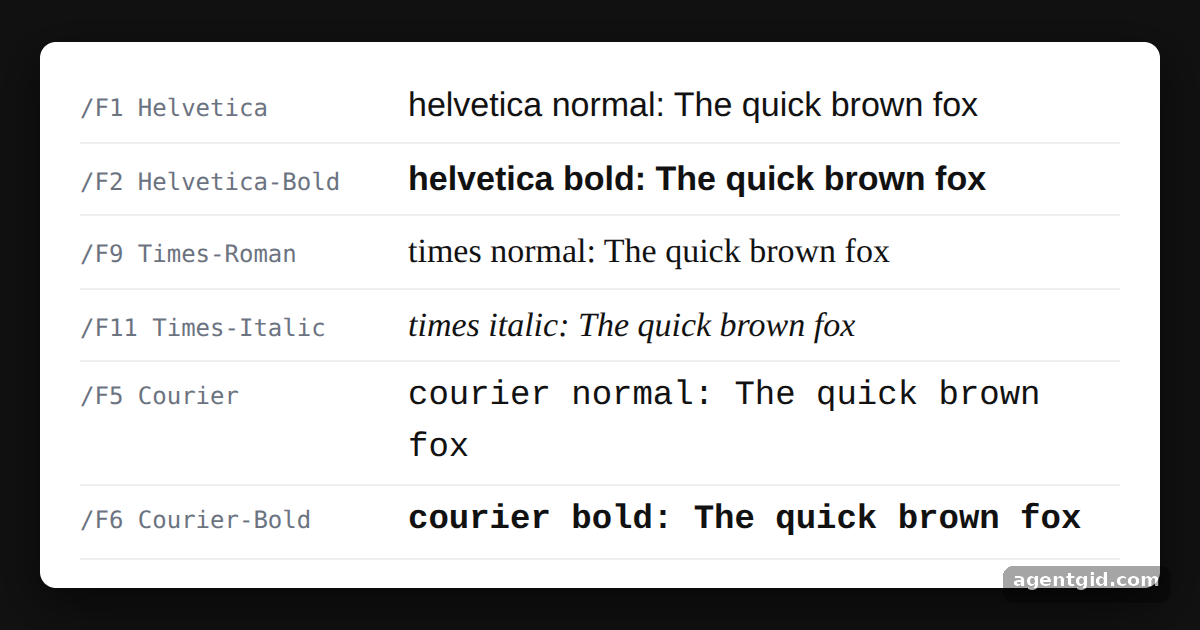
How it works
- Pick a font, then write. Each loop step calls
doc.setFont(font, style)and thendoc.text(), so every line uses a different face. [1] - Standard fonts are ASCII only. Helvetica, Times and Courier are standard PDF fonts, so this example sticks to plain ASCII text. The preview reads
doc.output(), finds each line's font key (/F1,/F2...) and itsBaseFontname, then draws the line in a similar browser font. [1] - Custom fonts for other scripts. For UTF-8 text the README adds a .ttf font with
addFileToVFSandaddFont, then selects it withsetFont. That needs a font file, so this example stays with the built-in fonts. [1]
Run and edit it
It runs in your browser, in a sandboxed frame that cannot see this site; the packages load from esm.sh only after you press Run.
import { jsPDF } from "jspdf";

const samples = [
  ["helvetica", "normal"],
  ["helvetica", "bold"],
  ["times", "normal"],
  ["times", "italic"],
  ["courier", "normal"],
  ["courier", "bold"],
];

const doc = new jsPDF();
samples.forEach(([font, style], i) => {
  doc.setFont(font, style); // switch the active font, then draw with it
  doc.text(`${font} ${style}: The quick brown fox`, 10, 20 + i * 12);
});

// Read the result back: each text command names a font resource (/F1, /F2...)
// and the PDF maps that resource to a standard font name such as Times-Italic.
const pdf = doc.output();
const baseFont = (key) => {
  const ref = pdf.match(new RegExp(`/${key} (\\d+) 0 R`));
  const obj = ref && pdf.match(new RegExp(`\\n${ref[1]} 0 obj[\\s\\S]*?/BaseFont /([\\w-]+)`));
  return obj ? obj[1] : "";
};

const root = document.getElementById("root");
root.style.cssText = "height:100%;box-sizing:border-box;padding:16px;display:grid;place-items:center;background:#111;font-family:system-ui,sans-serif";
const page = document.createElement("div");
page.style.cssText = "background:#fff;color:#111;border-radius:8px;padding:14px 20px;width:520px;box-shadow:0 8px 24px rgba(0,0,0,.6)";

for (const op of pdf.match(/\bBT\b[\s\S]*?\bET\b/g) || []) {
  const key = (op.match(/\/(F\d+) /) || [])[1];
  const text = (op.match(/\(([^)]*)\) Tj/) || [, ""])[1];
  const name = baseFont(key) || text.split(":")[0]; // fallback: the label we wrote
  const row = document.createElement("div");
  row.style.cssText = "display:flex;align-items:baseline;gap:14px;padding:5px 0;border-bottom:1px solid #eee";
  const tag = document.createElement("code");
  tag.style.cssText = "width:150px;flex:none;font-size:12px;color:#6b7280";
  tag.textContent = `/${key} ${name}`;
  const sample = document.createElement("span");
  // approximate the PDF font in CSS so the difference is visible
  sample.style.fontFamily = /times/i.test(name) ? "Times New Roman, serif" : /courier/i.test(name) ? "Courier New, monospace" : "Helvetica, Arial, sans-serif";
  sample.style.fontWeight = /bold/i.test(name) ? "700" : "400";
  sample.style.fontStyle = /italic|oblique/i.test(name) ? "italic" : "normal";
  sample.style.fontSize = "17px";
  sample.textContent = text;
  row.append(tag, sample);
  page.append(row);
}
root.append(page);
Add ["times", "bold"] to the samples list to see one more font appear. Code written by AgentGid [1].
Add ["times", "bold"] to the samples list to see one more font appear. Code written by AgentGid [1].Checked Oct 12, 2026: it starts without errors in Chromium with jspdf 4.2.1. Needs WebGL.
More jsPDF examples
Creating your first PDF with jsPDF Page size, orientation and units in jsPDF Downloading a generated PDF with jsPDF save() Generating a PDF from user input with jsPDF
Sources
Explanations written by AgentGid from the official docs; the numbers in brackets point here. The code marked "written by AgentGid" is ours and free to copy.