Downloading a generated PDF with jsPDF save()
The last step of most jsPDF code is saving the document. doc.save() takes the file name the download should get.
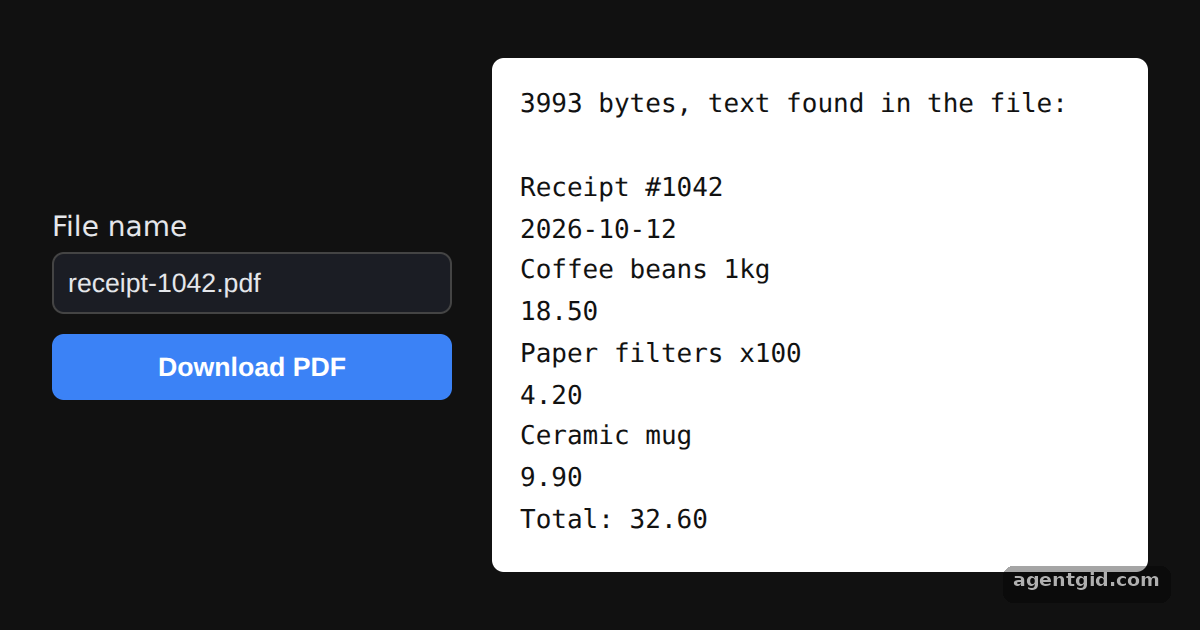
How it works
- Build the document. The receipt is a header, three item lines and a total, each written with
doc.text(text, x, y)in millimetres on an A4 page. [1] - Save under a name. Clicking the button calls
doc.save(name)with the value from the input, the same call the README ends its example with. [1] - Check what is inside. The white panel lists the strings found in
doc.output(), the same file that is downloaded. [1]
Run and edit it
It runs in your browser, in a sandboxed frame that cannot see this site; the packages load from esm.sh only after you press Run.
import { jsPDF } from "jspdf";

const items = [
  ["Coffee beans 1kg", 18.5],
  ["Paper filters x100", 4.2],
  ["Ceramic mug", 9.9],
];

// Build a small receipt: one doc.text call per line
const doc = new jsPDF();
doc.text("Receipt #1042", 10, 15);
doc.text("2026-10-12", 160, 15);
items.forEach(([name, price], i) => {
  doc.text(name, 10, 35 + i * 10);
  doc.text(price.toFixed(2), 180, 35 + i * 10);
});
const total = items.reduce((sum, [, price]) => sum + price, 0);
doc.text(`Total: ${total.toFixed(2)}`, 150, 75);

// UI: file name, download button, and the strings found in the generated file
const root = document.getElementById("root");
root.style.cssText = "height:100%;box-sizing:border-box;padding:18px;display:flex;gap:20px;align-items:center;justify-content:center;background:#111;color:#e5e7eb;font:14px system-ui,sans-serif";
root.innerHTML = `
  <div style="display:flex;flex-direction:column;gap:10px;width:200px">
    <label>File name<input id="name" value="receipt-1042.pdf" style="display:block;width:100%;box-sizing:border-box;margin-top:4px;padding:7px;border-radius:6px;border:1px solid #444;background:#1b1d24;color:#e5e7eb"></label>
    <button id="save" style="padding:9px;border:0;border-radius:6px;background:#3b82f6;color:#fff;font-weight:600;cursor:pointer">Download PDF</button>
    <small id="msg" style="color:#9ca3af"></small>
  </div>
  <pre id="out" style="margin:0;width:300px;padding:14px;border-radius:6px;background:#fff;color:#111;font:13px/1.6 ui-monospace,monospace;white-space:pre-wrap"></pre>`;

const pdf = doc.output(); // the generated PDF as a string
const strings = [...pdf.matchAll(/\(([^)]*)\) Tj/g)].map((m) => m[1]);
document.getElementById("out").textContent = `${pdf.length} bytes, text found in the file:\n\n` + strings.join("\n");

document.getElementById("save").onclick = () => {
  const name = document.getElementById("name").value.trim() || "receipt.pdf";
  doc.save(name);
  document.getElementById("msg").textContent = `doc.save("${name}") called`;
};
Type a different file name and press Download PDF; the white panel shows the text inside the file. Code written by AgentGid [1].
Type a different file name and press Download PDF; the white panel shows the text inside the file. Code written by AgentGid [1].Checked Oct 12, 2026: it starts without errors in Chromium with jspdf 4.2.1. Needs WebGL.
More jsPDF examples
Creating your first PDF with jsPDF Page size, orientation and units in jsPDF Switching fonts with setFont in jsPDF Generating a PDF from user input with jsPDF
Sources
Explanations written by AgentGid from the official docs; the numbers in brackets point here. The code marked "written by AgentGid" is ours and free to copy.