Page size, orientation and units in jsPDF
Labels, tickets and cards need page sizes other than A4. jsPDF takes the paper size, orientation and unit in its constructor.
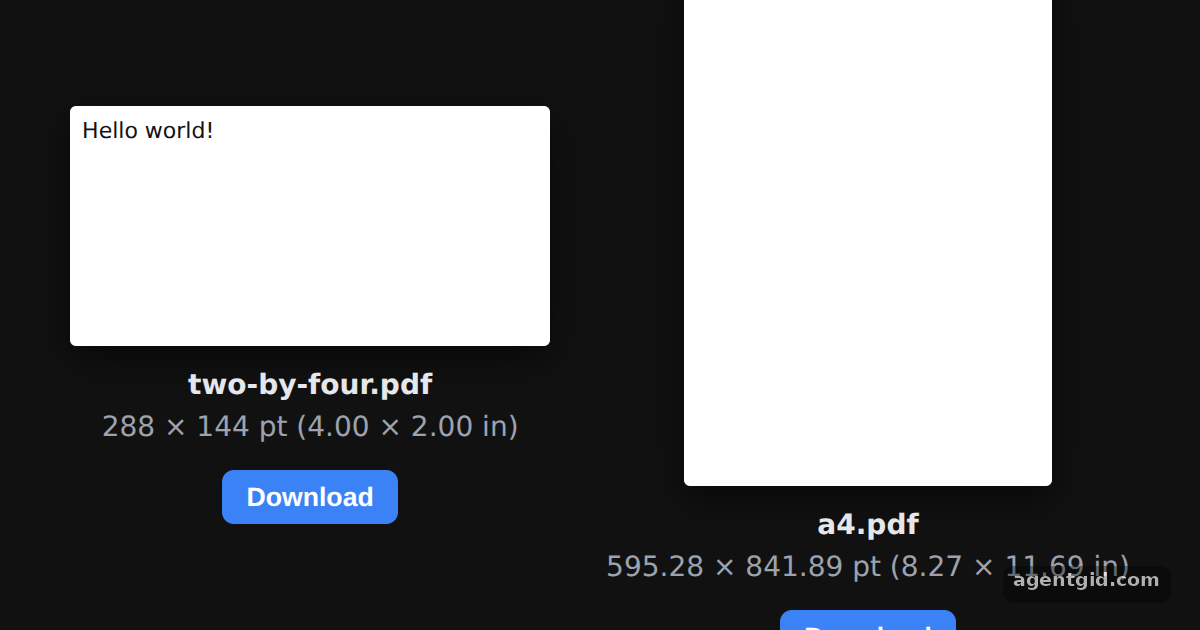
How it works
- Pass options to the constructor. The first document uses
{ orientation: "landscape", unit: "in", format: [4, 2] }. The second uses no options at all. [1] - Coordinates follow the unit. With
unit: "in",doc.text("Hello world!", 1, 1)uses inches. The A4 document keeps millimetres, so its text goes at 10, 10. [1] - Check the result. Each preview reads the page box from the generated file with
doc.output()and draws a white page with the same proportions, labelled in points and inches. [1]
Run and edit it
It runs in your browser, in a sandboxed frame that cannot see this site; the packages load from esm.sh only after you press Run.
import { jsPDF } from "jspdf";

const docs = {
  // Landscape export, 2×4 inches
  "two-by-four.pdf": new jsPDF({ orientation: "landscape", unit: "in", format: [4, 2] }),
  // the default: a4 paper, portrait, millimeters
  "a4.pdf": new jsPDF(),
};
docs["two-by-four.pdf"].text("Hello world!", 1, 1);
docs["a4.pdf"].text("Hello world!", 10, 10);

const root = document.getElementById("root");
root.style.cssText = "height:100%;box-sizing:border-box;padding:20px;display:flex;gap:28px;align-items:center;justify-content:center;background:#111;color:#e5e7eb;font:14px system-ui,sans-serif";

for (const [file, doc] of Object.entries(docs)) {
  const pdf = doc.output(); // the generated PDF as a string
  // MediaBox holds the page size in points (1 in = 72 pt)
  const [w, h] = (pdf.match(/\/MediaBox \[0 0 ([\d.]+) ([\d.]+)\]/) || [0, 0, 0]).slice(1).map(Number);
  const scale = Math.min(240 / w, 260 / h);
  const text = (pdf.match(/\(([^)]*)\) Tj/) || [, ""])[1];

  const col = document.createElement("div");
  col.style.cssText = "display:flex;flex-direction:column;align-items:center;gap:10px";
  const page = document.createElement("div");
  page.style.cssText = `width:${w * scale}px;height:${h * scale}px;background:#fff;color:#111;border-radius:3px;box-shadow:0 6px 20px rgba(0,0,0,.6);padding:6px;box-sizing:border-box;font-size:11px`;
  page.textContent = text;
  const info = document.createElement("div");
  info.style.cssText = "text-align:center;line-height:1.5";
  info.innerHTML = `<b></b><br><span style="color:#9ca3af">${w} × ${h} pt (${(w / 72).toFixed(2)} × ${(h / 72).toFixed(2)} in)</span>`;
  info.querySelector("b").textContent = file;
  const btn = document.createElement("button");
  btn.textContent = "Download";
  btn.style.cssText = "padding:6px 12px;border:0;border-radius:6px;background:#3b82f6;color:#fff;font-weight:600;cursor:pointer";
  btn.onclick = () => doc.save(file);
  col.append(page, info, btn);
  root.append(col);
}
Change format to [6, 4] or orientation to "portrait" and the page preview changes shape. Code written by AgentGid [1].
Change format to [6, 4] or orientation to "portrait" and the page preview changes shape. Code written by AgentGid [1].Checked Oct 12, 2026: it starts without errors in Chromium with jspdf 4.2.1. Needs WebGL.
More jsPDF examples
Creating your first PDF with jsPDF Switching fonts with setFont in jsPDF Downloading a generated PDF with jsPDF save() Generating a PDF from user input with jsPDF
Sources
Explanations written by AgentGid from the official docs; the numbers in brackets point here. The code marked "written by AgentGid" is ours and free to copy.