Generating a PDF from user input with jsPDF
Certificates, labels and receipts are often filled from what a user typed. The input should be cleaned before it goes into the document.
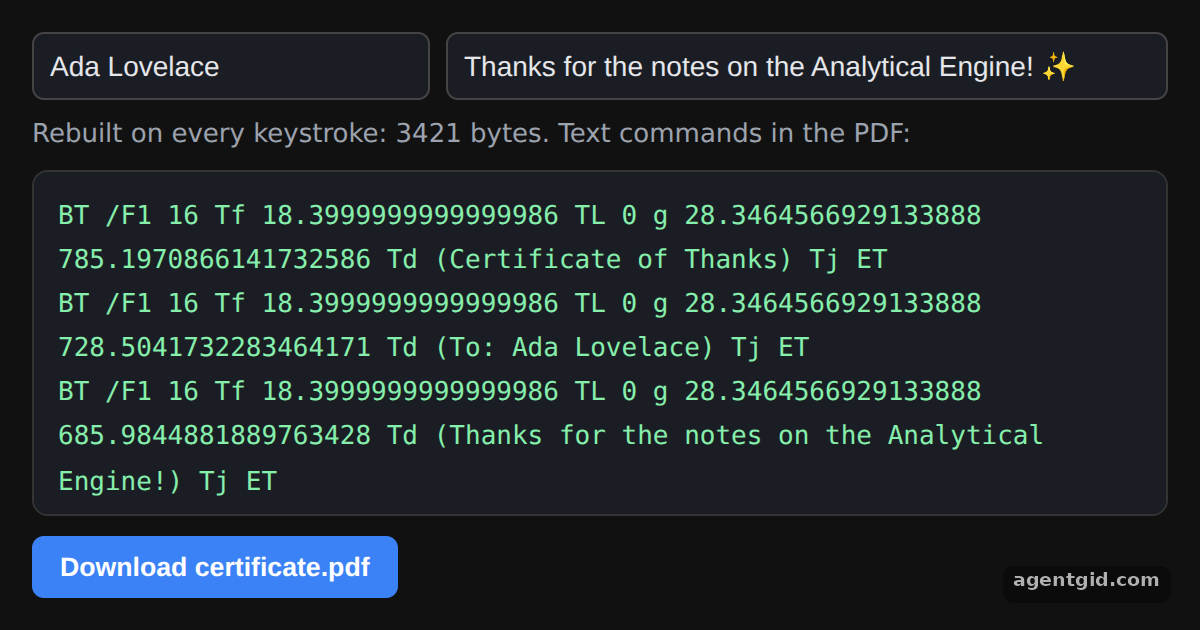
How it works
- Sanitize first.
clean()keeps printable ASCII characters and cuts the text to a maximum length. The default message ends with an emoji that gets removed. [1] - Why ASCII. The document uses the default standard font, which is ASCII only. Text outside that range would need a custom font. [1]
- Rebuild on input.
buildPdf()creates a newjsPDF()each time an input changes. The panel shows the text commands fromdoc.output(), and the button saves the latest version. [1]
Run and edit it
It runs in your browser, in a sandboxed frame that cannot see this site; the packages load from esm.sh only after you press Run.
import { jsPDF } from "jspdf";

// Keep printable ASCII only and cap the length before the text reaches jsPDF
const clean = (value, max) => value.replace(/[^\x20-\x7E]/g, "").trim().slice(0, max);

function buildPdf(name, message) {
  const doc = new jsPDF();
  doc.text("Certificate of Thanks", 10, 20);
  doc.text(`To: ${clean(name, 40) || "Your name"}`, 10, 40);
  doc.text(clean(message, 80) || "Your message", 10, 55);
  return doc;
}

const root = document.getElementById("root");
root.style.cssText = "height:100%;box-sizing:border-box;padding:16px;display:flex;flex-direction:column;gap:10px;background:#111;color:#e5e7eb;font:14px system-ui,sans-serif";
root.innerHTML = `
  <div style="display:flex;gap:8px">
    <input id="name" value="Ada Lovelace" placeholder="Name" style="flex:1">
    <input id="message" value="Thanks for the notes on the Analytical Engine! ✨" placeholder="Message" style="flex:2">
  </div>
  <div id="meta" style="color:#9ca3af;font-size:13px"></div>
  <pre id="out" style="flex:1;margin:0;overflow:auto;white-space:pre-wrap;padding:12px;border-radius:8px;background:#1b1d24;border:1px solid #333;color:#86efac;font:13px/1.7 ui-monospace,monospace"></pre>
  <button id="save" style="align-self:flex-start;padding:8px 14px;border:0;border-radius:6px;background:#3b82f6;color:#fff;font-weight:600;cursor:pointer">Download certificate.pdf</button>`;
for (const input of root.querySelectorAll("input")) {
  input.style.cssText += ";padding:8px;border-radius:6px;border:1px solid #444;background:#1b1d24;color:#e5e7eb;font-size:14px";
}

let doc;
function render() {
  doc = buildPdf(document.getElementById("name").value, document.getElementById("message").value);
  const pdf = doc.output(); // the generated PDF as a string
  const ops = pdf.match(/\bBT\b[\s\S]*?\bET\b/g) || [];
  document.getElementById("meta").textContent = `Rebuilt on every keystroke: ${pdf.length} bytes. Text commands in the PDF:`;
  document.getElementById("out").textContent = ops.map((op) => op.replace(/\s+/g, " ")).join("\n");
}

root.addEventListener("input", render);
document.getElementById("save").onclick = () => doc.save("certificate.pdf");
render();
Type in either field and watch the PDF text commands update; non-ASCII characters are dropped. Code written by AgentGid [1].
Type in either field and watch the PDF text commands update; non-ASCII characters are dropped. Code written by AgentGid [1].Checked Oct 12, 2026: it starts without errors in Chromium with jspdf 4.2.1. Needs WebGL.
More jsPDF examples
Creating your first PDF with jsPDF Page size, orientation and units in jsPDF Switching fonts with setFont in jsPDF Downloading a generated PDF with jsPDF save()
Sources
Explanations written by AgentGid from the official docs; the numbers in brackets point here. The code marked "written by AgentGid" is ours and free to copy.