Cmd+K command dialog in cmdk
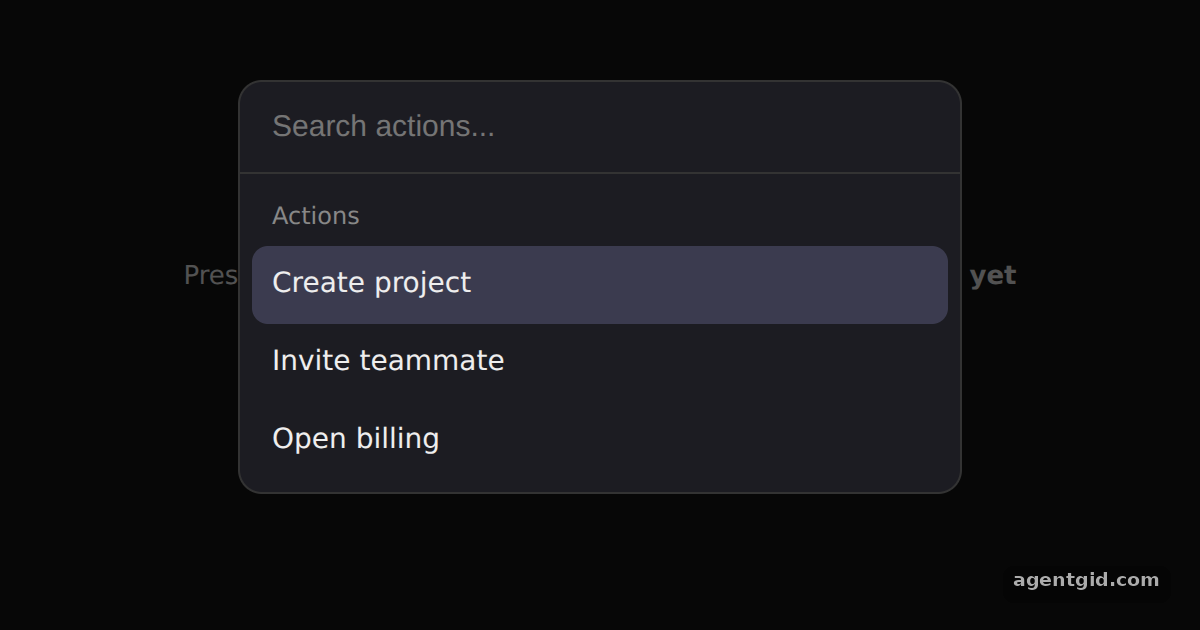
Command.Dialog renders the command menu in a modal dialog, the usual pattern for a global Cmd+K command palette.
How it works
- Render the menu in a dialog.
Command.Dialogtakes the same children asCommand. ItsopenandonOpenChangeprops are wired to React state, which starts astrueso the palette is visible right away. [1] - Add the keyboard shortcut yourself. A
keydownlistener ondocumenttoggles the state whenkis pressed with Cmd or Ctrl. The library does not register this shortcut for you. [1] - Run an action with onSelect. Each
Command.ItemcallsrunthroughonSelect, which records the action and closes the dialog. The value passed in comes from the item text because novalueprop is set. [1]
Run and edit it
It runs in your browser, in a sandboxed frame that cannot see this site; the packages load from esm.sh only after you press Run.
import { useState, useEffect } from 'react'
import { Command } from 'cmdk'

const css = `
  .wrap { min-height: 100vh; display: grid; place-items: center; background: #111; color: #ccc; font-family: system-ui, sans-serif; }
  .wrap button { padding: 10px 16px; border-radius: 8px; border: 1px solid #444; background: #222; color: #eee; font-size: 14px; cursor: pointer; }
  [cmdk-overlay] { position: fixed; inset: 0; background: rgba(0, 0, 0, 0.6); }
  [cmdk-dialog] { position: fixed; top: 40px; left: 50%; transform: translateX(-50%); width: 360px;
    background: #1c1c22; border: 1px solid #333; border-radius: 12px; color: #eee; overflow: hidden; font-family: system-ui, sans-serif; }
  [cmdk-input] { width: 100%; box-sizing: border-box; padding: 14px 16px; border: 0; border-bottom: 1px solid #333;
    background: transparent; color: #fff; font-size: 15px; outline: none; }
  [cmdk-list] { max-height: 220px; overflow: auto; padding: 6px; }
  [cmdk-group-heading] { padding: 6px 10px; font-size: 12px; color: #888; }
  [cmdk-item] { padding: 9px 10px; border-radius: 8px; font-size: 14px; cursor: pointer; }
  [cmdk-item][data-selected="true"] { background: #3b3b4f; }
  [cmdk-empty] { padding: 18px; text-align: center; color: #888; font-size: 14px; }
`

export default function App() {
  const [open, setOpen] = useState(true)
  const [last, setLast] = useState('nothing yet')

  // Toggle the menu when Cmd+K / Ctrl+K is pressed
  useEffect(() => {
    const down = (e) => {
      if (e.key === 'k' && (e.metaKey || e.ctrlKey)) {
        e.preventDefault()
        setOpen((open) => !open)
      }
    }
    document.addEventListener('keydown', down)
    return () => document.removeEventListener('keydown', down)
  }, [])

  const run = (value) => { setLast(value); setOpen(false) }

  return (
    <div className="wrap">
      <style>{css}</style>
      <div style={{ textAlign: 'center' }}>
        <p>Press <b>Ctrl+K</b> / <b>⌘K</b> or click the button. Last action: <b>{last}</b></p>
        <button onClick={() => setOpen(true)}>Open command menu</button>
      </div>
      <Command.Dialog open={open} onOpenChange={setOpen} label="Global Command Menu">
        <Command.Input placeholder="Search actions..." />
        <Command.List>
          <Command.Empty>No results found.</Command.Empty>
          <Command.Group heading="Actions">
            <Command.Item onSelect={run}>Create project</Command.Item>
            <Command.Item onSelect={run}>Invite teammate</Command.Item>
            <Command.Item onSelect={run}>Open billing</Command.Item>
          </Command.Group>
        </Command.List>
      </Command.Dialog>
    </div>
  )
}
Pick an action with Enter or a click; the dialog closes and the page shows what ran. Press Ctrl+K or Cmd+K to open it again. Code written by AgentGid [1].
Pick an action with Enter or a click; the dialog closes and the page shows what ran. Press Ctrl+K or Cmd+K to open it again. Code written by AgentGid [1].Checked Oct 12, 2026: it starts without errors in Chromium with cmdk 1.1.1, react 19.3.0, react-dom 19.3.0. Needs WebGL.
More cmdk examples
Command menu in cmdk Custom filter and keywords in cmdk Nested pages in cmdk useCommandState in cmdk
Sources
Explanations written by AgentGid from the official docs; the numbers in brackets point here. The code marked "written by AgentGid" is ours and free to copy.