Rich colors for Sonner toasts
Coloured toasts make success and error messages easier to tell apart at a glance. Sonner turns this on with one Toaster prop.
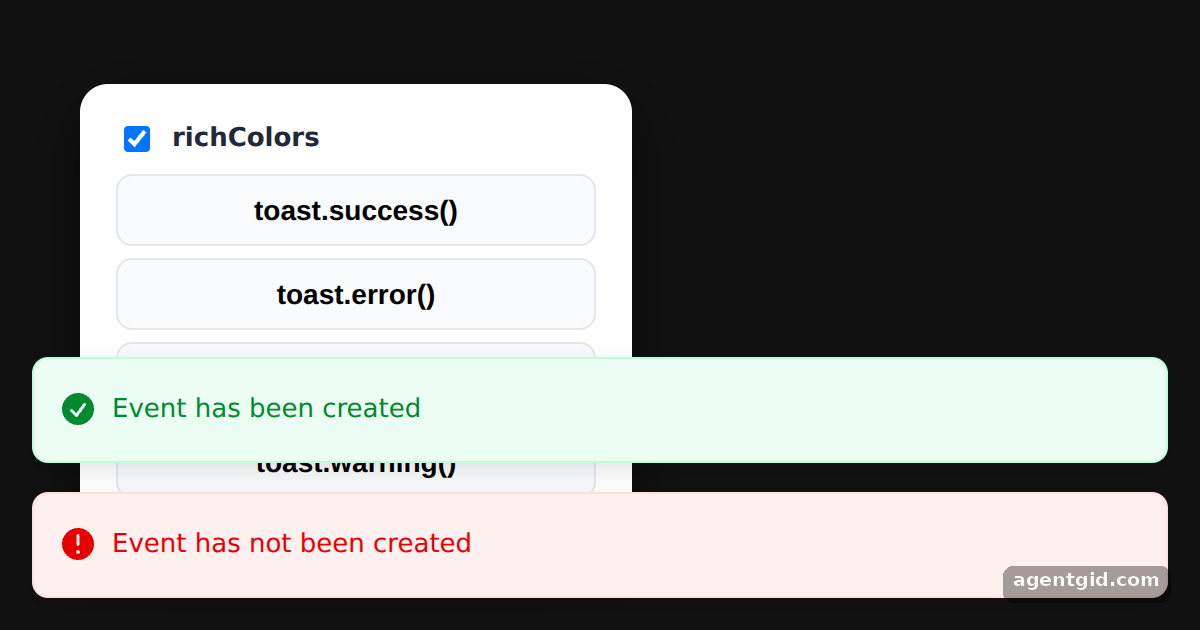
How it works
- Enable richColors.
<Toaster richColors={rich} expand />reads the checkbox. The docs show the same prop with a success toast. [1] - Works per type. The buttons call
toast.success,toast.error,toast.infoandtoast.warning, the four types the docs show with rich colours. [1] - Compare. A success and an error toast fire on load. Untick richColors and fire them again to see the plain style. [1]
Run and edit it
It runs in your browser, in a sandboxed frame that cannot see this site; the packages load from esm.sh only after you press Run.
import { useEffect, useState } from "react";
import { Toaster, toast } from "sonner";

const fire = {
  success: () => toast.success("Event has been created"),
  error: () => toast.error("Event has not been created"),
  info: () => toast.info("Be at the area 10 minutes before the event time"),
  warning: () => toast.warning("Event start time cannot be earlier than 8am"),
};

const S = {
  page: { minHeight: "100vh", display: "flex", alignItems: "center", justifyContent: "flex-start", paddingLeft: 40, background: "#111", fontFamily: "system-ui, sans-serif" },
  card: { width: 240, background: "#fff", color: "#1f2937", borderRadius: 14, padding: 18, boxShadow: "0 10px 30px rgba(0,0,0,.5)" },
  btn: { display: "block", width: "100%", margin: "6px 0", padding: "9px 0", border: "1px solid #e5e7eb", borderRadius: 8, background: "#f9fafb", fontSize: 14, fontWeight: 600, cursor: "pointer" },
};

export default function App() {
  const [rich, setRich] = useState(true);

  useEffect(() => {
    const ids = [fire.success, fire.error].map((f, i) => setTimeout(f, 300 + i * 400));
    return () => ids.forEach(clearTimeout);
  }, []);

  return (
    <div style={S.page}>
      {/* toggle richColors to compare both styles */}
      <Toaster richColors={rich} expand />
      <div style={S.card}>
        <label style={{ display: "flex", gap: 8, fontWeight: 600, marginBottom: 8 }}>
          <input type="checkbox" checked={rich} onChange={(e) => setRich(e.target.checked)} />
          richColors
        </label>
        {Object.entries(fire).map(([type, f]) => (
          <button key={type} style={S.btn} onClick={f}>toast.{type}()</button>
        ))}
      </div>
    </div>
  );
}
Untick richColors and press the buttons again to compare the two styles. Code written by AgentGid [1].
Untick richColors and press the buttons again to compare the two styles. Code written by AgentGid [1].Checked Oct 12, 2026: it starts without errors in Chromium with sonner 2.0.8, react 19.3.0, react-dom 19.3.0. Needs WebGL.
More Sonner examples
Showing a toast with Sonner Toast types in Sonner Changing toast position in Sonner Expanded toasts and visibleToasts in Sonner
Sources
Explanations written by AgentGid from the official docs; the numbers in brackets point here. The code marked "written by AgentGid" is ours and free to copy.