Icons from different packs in React Icons
react-icons bundles many icon libraries under one package. Each library has a short prefix and its own import path, so you can mix sets in one UI.
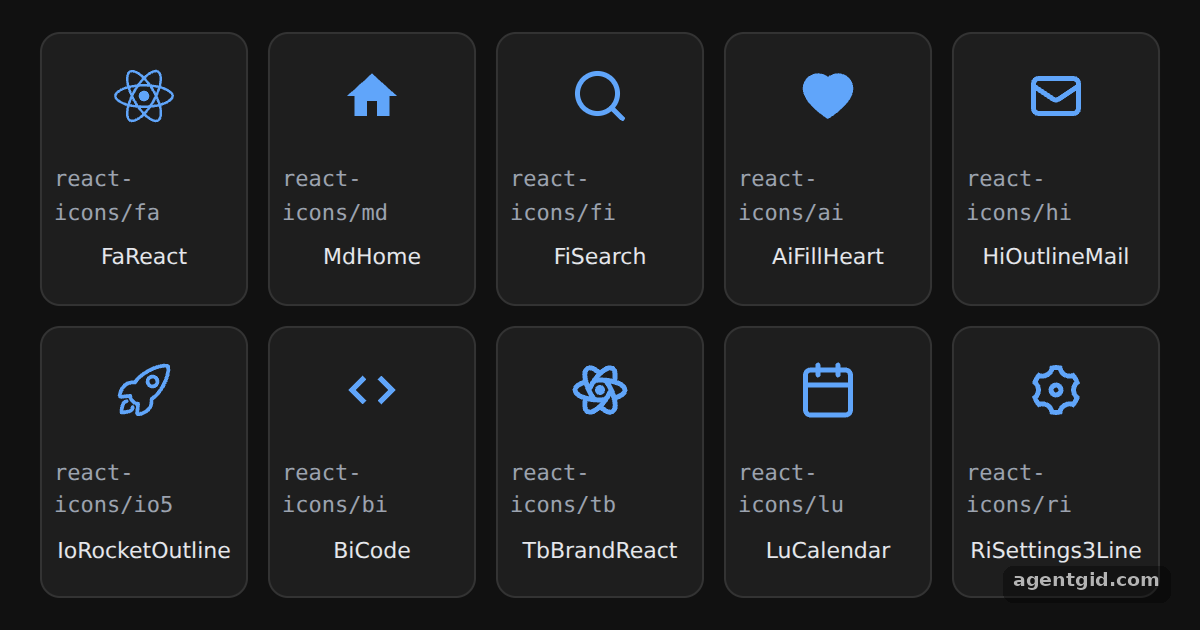
How it works
- One subfolder per library. Every import uses a different path:
react-icons/fa,react-icons/md,react-icons/fiand so on. The tile under each icon shows the path it came from. [1] - Material Design example.
MdHomecomes from the Material Design set, imported exactly the way the README describes. The two-letter prefix of each name matches its folder. [1] - Same component API. Icons from all sets are rendered the same way, so the grid maps over one array of components. Each one takes its size from the tile's
fontSize. [2]
Run and edit it
It runs in your browser, in a sandboxed frame that cannot see this site; the packages load from esm.sh only after you press Run.
import { FaReact } from "react-icons/fa";
import { MdHome } from "react-icons/md";
import { FiSearch } from "react-icons/fi";
import { AiFillHeart } from "react-icons/ai";
import { HiOutlineMail } from "react-icons/hi";
import { IoRocketOutline } from "react-icons/io5";
import { BiCode } from "react-icons/bi";
import { TbBrandReact } from "react-icons/tb";
import { LuCalendar } from "react-icons/lu";
import { RiSettings3Line } from "react-icons/ri";

const icons = [
  [FaReact, "fa", "FaReact"], [MdHome, "md", "MdHome"], [FiSearch, "fi", "FiSearch"],
  [AiFillHeart, "ai", "AiFillHeart"], [HiOutlineMail, "hi", "HiOutlineMail"],
  [IoRocketOutline, "io5", "IoRocketOutline"], [BiCode, "bi", "BiCode"],
  [TbBrandReact, "tb", "TbBrandReact"], [LuCalendar, "lu", "LuCalendar"],
  [RiSettings3Line, "ri", "RiSettings3Line"],
];

const tile = { background: "#1e1e1e", border: "1px solid #333", borderRadius: 10, padding: "14px 6px",
  display: "flex", flexDirection: "column", alignItems: "center", gap: 6 };

export default function App() {
  return (
    <div style={{ minHeight: "100vh", background: "#111", display: "flex", alignItems: "center",
      justifyContent: "center", fontFamily: "system-ui, sans-serif", color: "#e5e7eb" }}>
      <div style={{ display: "grid", gridTemplateColumns: "repeat(5, 104px)", gap: 10 }}>
        {icons.map(([Icon, pack, name]) => (
          <div key={name} style={tile}>
            <span style={{ fontSize: 30, color: "#60a5fa" }}><Icon /></span>
            <code style={{ fontSize: 11, color: "#9ca3af" }}>react-icons/{pack}</code>
            <span style={{ fontSize: 11 }}>{name}</span>
          </div>
        ))}
      </div>
    </div>
  );
}
Each tile shows the import path; swap an icon for another one from the same set. Code written by AgentGid [1].
Each tile shows the import path; swap an icon for another one from the same set. Code written by AgentGid [1].Checked Oct 12, 2026: it starts without errors in Chromium with react-icons 5.7.0, react 19.3.0, react-dom 19.3.0. Needs WebGL.
More React Icons examples
Using an icon in React Icons IconContext in React Icons Aligning icons with text in React Icons Icon size, color and title in React Icons
Sources
Explanations written by AgentGid from the official docs; the numbers in brackets point here. The code marked "written by AgentGid" is ours and free to copy.