Stacked bar chart in React Chart.js 2
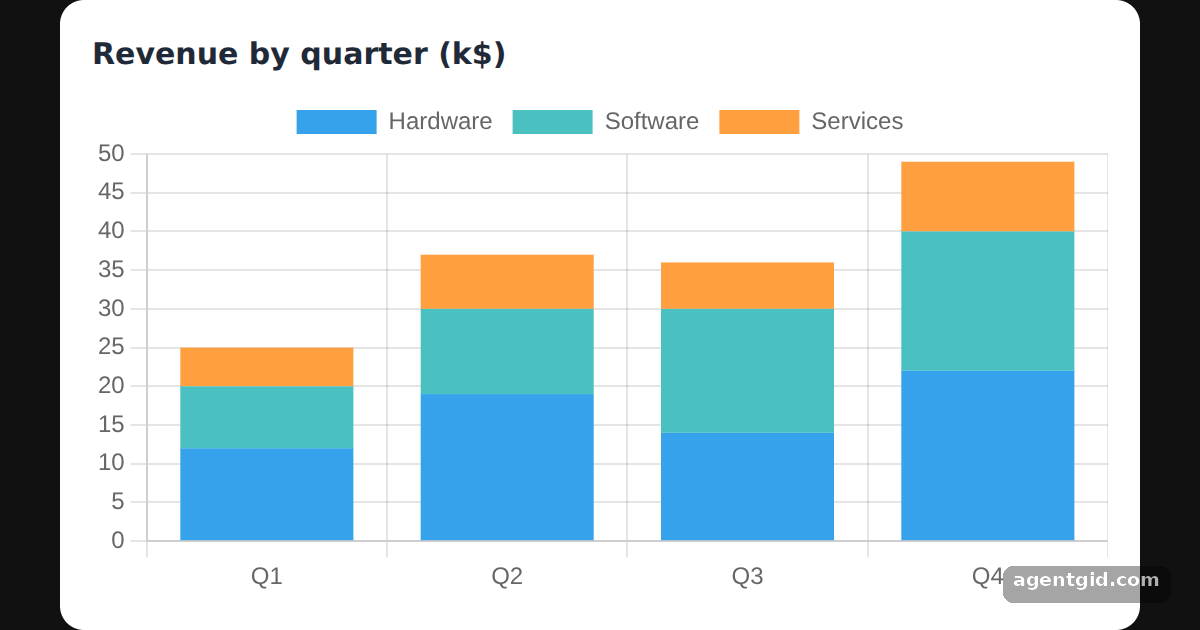
A stacked bar chart shows how a total is split into parts, with each part stacked on the previous one. In react-chartjs-2 you get it from the Bar component plus two scale options.
All React Chart.js 2 examples React Chart.js 2: usage and stats
How it works
- Turn on stacking. The
optionsobject setsstacked: trueon both thexandyscales. Without these two flags the datasets would sit side by side. [1] - One dataset per part. Each dataset is one product line, and each label is one quarter. The bar height for a quarter is the sum of the three products. [1]
- Label the parts. Every dataset has a
label, which the legend at the top shows next to its color. Hovering a segment shows the same label in the tooltip. [1]
Run and edit it
It runs in your browser, in a sandboxed frame that cannot see this site; the packages load from esm.sh only after you press Run.
import { Chart as ChartJS, CategoryScale, LinearScale, BarElement, Tooltip, Legend } from "chart.js";
import { Bar } from "react-chartjs-2";

ChartJS.register(CategoryScale, LinearScale, BarElement, Tooltip, Legend);

const data = {
  labels: ["Q1", "Q2", "Q3", "Q4"],
  datasets: [
    { label: "Hardware", data: [12, 19, 14, 22], backgroundColor: "rgb(54, 162, 235)" },
    { label: "Software", data: [8, 11, 16, 18], backgroundColor: "rgb(75, 192, 192)" },
    { label: "Services", data: [5, 7, 6, 9], backgroundColor: "rgb(255, 159, 64)" },
  ],
};

const options = {
  animation: false,
  scales: {
    x: { stacked: true },
    y: { stacked: true },
  },
};

const page = { minHeight: "100vh", background: "#111", display: "flex", alignItems: "center",
  justifyContent: "center", fontFamily: "system-ui, sans-serif" };
const card = { background: "#fff", color: "#1f2937", borderRadius: 12, padding: 16, boxSizing: "border-box" };

export default function App() {
  return (
    <div style={page}>
      <div style={{ ...card, width: 540 }}>
        <h3 style={{ margin: "0 0 6px", fontSize: 15 }}>Revenue by quarter (k$)</h3>
        <Bar data={data} options={options} />
      </div>
    </div>
  );
}
Click a legend entry to hide that dataset and watch the stacks shrink. Code written by AgentGid [1].
Click a legend entry to hide that dataset and watch the stacks shrink. Code written by AgentGid [1].Checked Oct 12, 2026: it starts without errors in Chromium with react-chartjs-2 5.3.1, react 19.3.0, react-dom 19.3.0, chart.js 4.5.1. Needs WebGL.
More React Chart.js 2 examples
Doughnut chart in React Chart.js 2 Bar chart in React Chart.js 2 Line chart in React Chart.js 2 Horizontal bar chart in React Chart.js 2
Sources
Explanations written by AgentGid from the official docs; the numbers in brackets point here. The code marked "written by AgentGid" is ours and free to copy.