Horizontal bar chart in React Chart.js 2
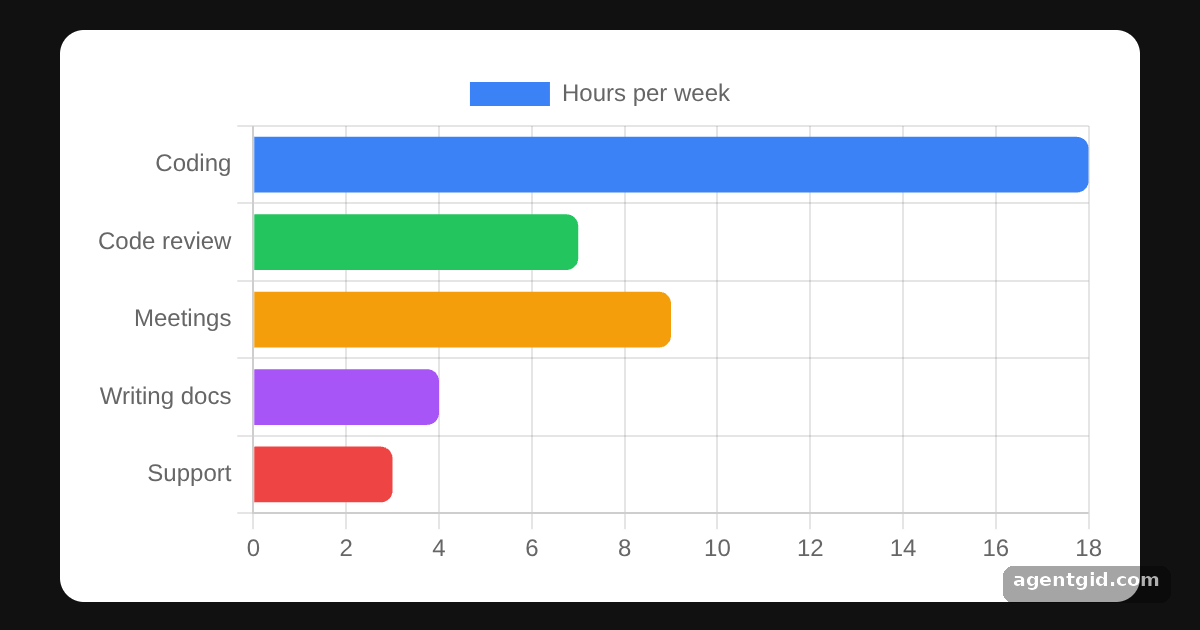
Horizontal bars are handy when category names are long or when you rank items. With react-chartjs-2 it is the same Bar component with one extra option.
All React Chart.js 2 examples React Chart.js 2: usage and stats
How it works
- Flip the axis.
indexAxis: "y"inoptionsputs the categories on the y axis, so the bars grow to the right. Removing it brings back vertical bars. [1] - Value axis from zero. With the axes swapped, the values now run along
x. That is whybeginAtZerois set on thexscale here. [1] - Round the bars.
borderRadius: 6on the dataset rounds the bar corners. A single number applies to every corner. [1]
Run and edit it
It runs in your browser, in a sandboxed frame that cannot see this site; the packages load from esm.sh only after you press Run.
import { Chart as ChartJS, CategoryScale, LinearScale, BarElement, Tooltip, Legend } from "chart.js";
import { Bar } from "react-chartjs-2";

ChartJS.register(CategoryScale, LinearScale, BarElement, Tooltip, Legend);

const data = {
  labels: ["Coding", "Code review", "Meetings", "Writing docs", "Support"],
  datasets: [
    {
      label: "Hours per week",
      data: [18, 7, 9, 4, 3],
      backgroundColor: ["#3b82f6", "#22c55e", "#f59e0b", "#a855f7", "#ef4444"],
      borderRadius: 6,
    },
  ],
};

const options = {
  indexAxis: "y", // bars grow along the x axis
  animation: false,
  scales: { x: { beginAtZero: true } },
};

const page = { minHeight: "100vh", background: "#111", display: "flex", alignItems: "center",
  justifyContent: "center", fontFamily: "system-ui, sans-serif" };
const card = { background: "#fff", color: "#1f2937", borderRadius: 12, padding: 16, boxSizing: "border-box" };

export default function App() {
  return (
    <div style={page}>
      <div style={{ ...card, width: 540 }}>
        <Bar data={data} options={options} />
      </div>
    </div>
  );
}
Delete the indexAxis line to see the same data as vertical bars. Code written by AgentGid [1].
Delete the indexAxis line to see the same data as vertical bars. Code written by AgentGid [1].Checked Oct 12, 2026: it starts without errors in Chromium with react-chartjs-2 5.3.1, react 19.3.0, react-dom 19.3.0, chart.js 4.5.1. Needs WebGL.
More React Chart.js 2 examples
Doughnut chart in React Chart.js 2 Bar chart in React Chart.js 2 Line chart in React Chart.js 2 Stacked bar chart in React Chart.js 2
Sources
Explanations written by AgentGid from the official docs; the numbers in brackets point here. The code marked "written by AgentGid" is ours and free to copy.