How Radix Slot merges props
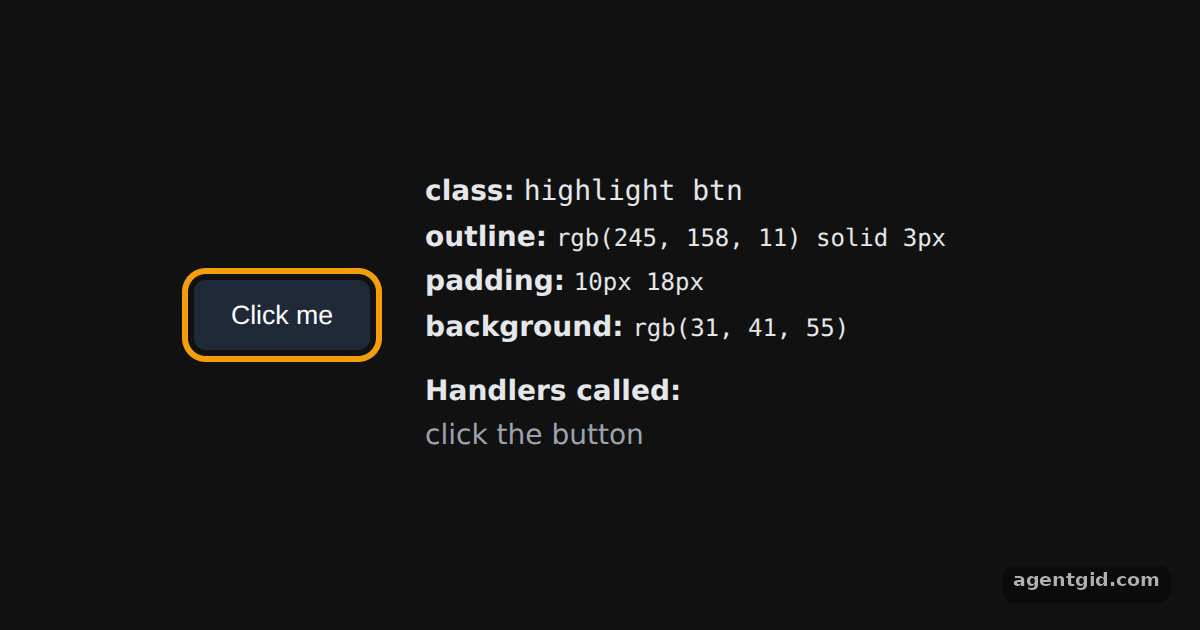
Slot puts its props on its child, and the child can have props of its own. This example shows the class, style and click handlers that end up on the element.
How it works
- Props on both sides.
Highlightrenders aSlot, one of the Radix utilities, with a class, an outline style and anonClick. The child button has its own class, style andonClick. [1] - Read the result from the DOM. A ref on the button reads its final
classNameand a few style values after mount. Both classes are there, the outline comes from the Slot, and padding and background show which value ended up on the button. [1] - Click to see the handlers. Each handler adds a line to the log, so one click shows which handlers ran for the merged
onClick. [1]
Run and edit it
It runs in your browser, in a sandboxed frame that cannot see this site; the packages load from esm.sh only after you press Run.
import { useEffect, useRef, useState } from "react";
import { Slot } from "@radix-ui/react-slot";

// A wrapper that adds a class, styles and a click handler to whatever child it gets
function Highlight({ onLog, ...props }) {
  return (
    <Slot className="highlight" style={{ outline: "3px solid #f59e0b", outlineOffset: 3, padding: 8 }}
      onClick={() => onLog("Slot onClick")} {...props} />
  );
}

export default function App() {
  const btn = useRef(null);
  const [attrs, setAttrs] = useState({});
  const [log, setLog] = useState([]);
  const onLog = (line) => setLog((l) => [...l, line].slice(-6));
  useEffect(() => {
    const st = btn.current.style;
    setAttrs({ className: btn.current.className, outline: st.outline, padding: st.padding, background: st.background });
  }, []);

  return (
    <div style={{ minHeight: "100vh", display: "flex", alignItems: "center", justifyContent: "center", gap: 28, background: "#111", color: "#e5e7eb", font: "14px system-ui, sans-serif" }}>
      <Highlight onLog={onLog}>
        <button ref={btn} className="btn" style={{ padding: "10px 18px", background: "#1f2937", color: "#fff", border: "none", borderRadius: 6 }}
          onClick={() => onLog("child onClick")}>
          Click me
        </button>
      </Highlight>
      <div style={{ width: 290, lineHeight: 1.6 }}>
        <div><b>class:</b> <code>{attrs.className}</code></div>
        {["outline", "padding", "background"].map((k) => <div key={k}><b>{k}:</b> <code style={{ fontSize: 12 }}>{attrs[k]}</code></div>)}
        <div style={{ marginTop: 10 }}><b>Handlers called:</b></div>
        {log.length ? log.map((l, i) => <div key={i} style={{ color: "#fcd34d" }}>{l}</div>) : <div style={{ color: "#9ca3af" }}>click the button</div>}
      </div>
    </div>
  );
}
Click the button: the log on the right shows the child's and the Slot's click handlers. Code written by AgentGid [1].
Click the button: the log on the right shows the child's and the Slot's click handlers. Code written by AgentGid [1].Checked Oct 12, 2026: it starts without errors in Chromium with @radix-ui/react-slot 1.5.0, react 19.3.0, react-dom 19.3.0. Needs WebGL.
More Radix UI examples
The asChild pattern with Radix Slot Passing refs through Radix Slot Icon button with Radix Slottable
Sources
Explanations written by AgentGid from the official docs; the numbers in brackets point here. The code marked "written by AgentGid" is ours and free to copy.