Removing zero-width characters before Marked
Invisible zero-width characters at the start of a file can change how Markdown is parsed, so the docs show how to remove them first.
How it works
- The hidden character. The input starts with
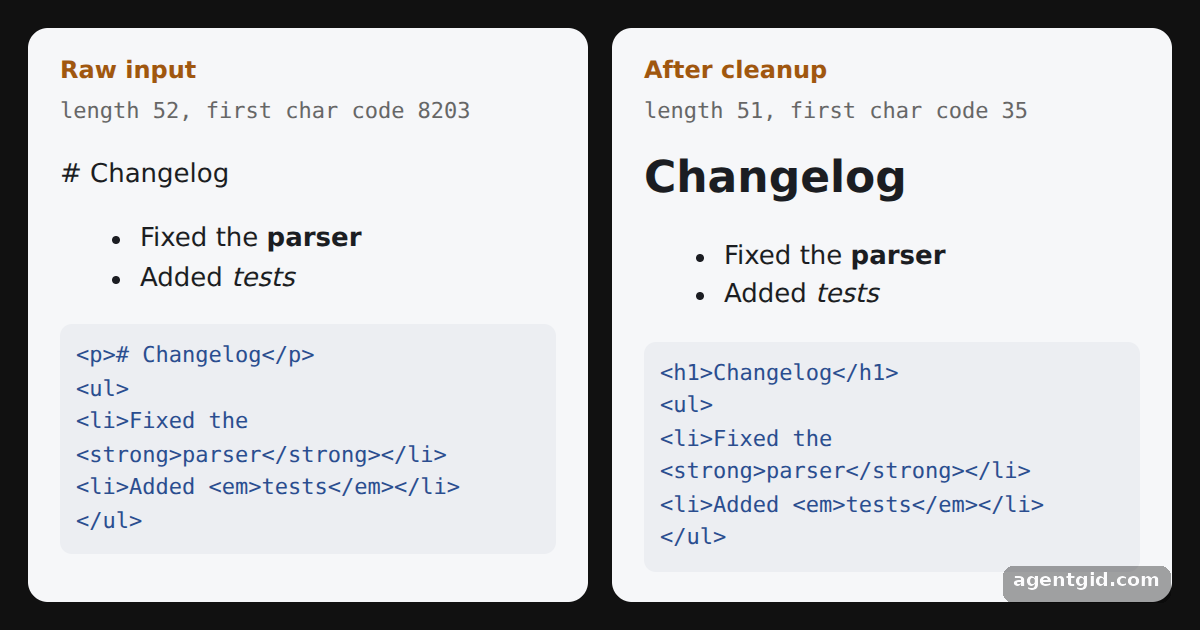
\u200B, a zero width space, right before# Changelog. You cannot see it, but the length and first char code show it. [1] - Where it comes from. Files saved by some editors begin with such a character, so content loaded from files is a common source. [1]
- Strip it, then parse. The regular expression from the docs removes one of these characters from the very start of the string. The right panel parses the cleaned text and renders a real heading. [1]
Run and edit it
It runs in your browser, in a sandboxed frame that cannot see this site; the packages load from esm.sh only after you press Run.
import { marked } from 'marked'
// A zero width space (U+200B) hides in front of the heading
const contents = '\u200B# Changelog\n\n- Fixed the **parser**\n- Added *tests*'
// Remove the most common zero-width characters from the start
const cleaned = contents.replace(/^[\u200B\u200C\u200D\u200E\u200F\uFEFF]/, '')
const style = document.createElement('style')
style.textContent = `
html, body, #root { margin: 0; height: 100%; background: #111; font-family: system-ui, sans-serif; }
.wrap { display: grid; grid-template-columns: 1fr 1fr; gap: 12px; padding: 14px; height: 100%; box-sizing: border-box; }
.card { background: #f6f7f9; color: #1b1d22; border-radius: 10px; padding: 12px 16px; overflow: auto; }
.label { font-size: 12px; color: #a0570f; margin: 0 0 4px; font-weight: 600; }
.meta { font-family: ui-monospace, monospace; font-size: 11px; color: #666; margin: 0 0 8px; }
h1 { font-size: 22px; margin: 6px 0; }
pre { white-space: pre-wrap; font-size: 11px; color: #2a4d8f; background: #eceef2; padding: 8px; border-radius: 6px; }
`
document.head.appendChild(style)
const panel = (label, text) => {
const html = marked.parse(text)
return `<section class="card">
<p class="label">${label}</p>
<p class="meta">length ${text.length}, first char code ${text.charCodeAt(0)}</p>
${html}
<pre>${html.replace(/</g, '<')}</pre>
</section>`
}
document.getElementById('root').innerHTML =
`<div class="wrap">${panel('Raw input', contents)}${panel('After cleanup', cleaned)}</div>`
Compare the two panels: the raw input shows "# Changelog" as text, the cleaned one renders a heading. Code written by AgentGid [1].
Compare the two panels: the raw input shows "# Changelog" as text, the cleaned one renders a heading. Code written by AgentGid [1].Checked Oct 12, 2026: it starts without errors in Chromium with marked 18.1.0. Needs WebGL.
More Marked examples
Converting Markdown to HTML with Marked GitHub Flavored Markdown tables in Marked The breaks option in Marked A live Markdown preview with Marked
Sources
Explanations written by AgentGid from the official docs; the numbers in brackets point here. The code marked "written by AgentGid" is ours and free to copy.