Stroke width in Lucide React icons
Lucide icons are outlines, so the stroke width sets how light or heavy they look. Thin strokes suit large icons, heavier ones small icons.
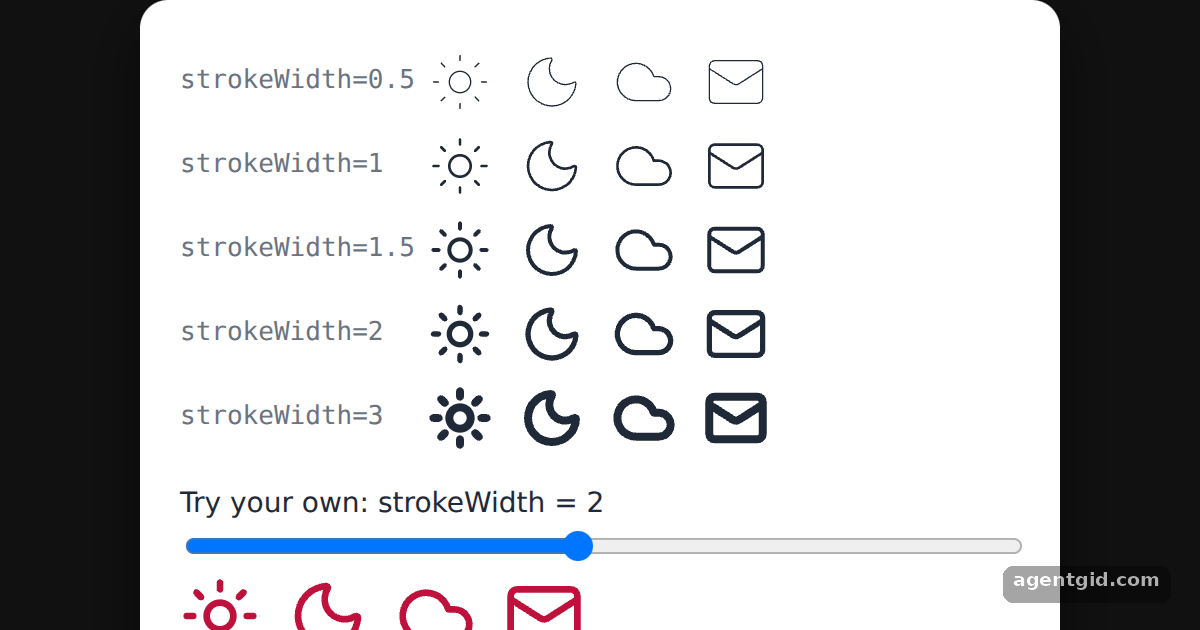
How it works
- strokeWidth is a documented option. Lucide documents stroke width as one of its icon settings and names the
strokeWidthattribute for it. [1] - Set it per icon. Each row renders the same four icons with a different
strokeWidth, from 0.5 to 3. The bottom row reads its value from the slider. [2] - Combine with size and colour. All icons here also get
size={32}orsize={40}. The bottom row has no colour prop and takes the red text colour of its container. [2]
Run and edit it
It runs in your browser, in a sandboxed frame that cannot see this site; the packages load from esm.sh only after you press Run.
import { useState } from "react";
import { Cloud, Mail, Moon, Sun } from "lucide-react";

const widths = [0.5, 1, 1.5, 2, 3];
const icons = [Sun, Moon, Cloud, Mail];

const S = {
  page: { minHeight: "100vh", display: "flex", alignItems: "center", justifyContent: "center", background: "#111", fontFamily: "system-ui, sans-serif" },
  card: { width: 420, background: "#fff", color: "#1f2937", borderRadius: 14, padding: 20, boxShadow: "0 10px 30px rgba(0,0,0,.5)" },
  row: { display: "flex", alignItems: "center", gap: 14, padding: "5px 0" },
  label: { width: 110, fontSize: 13, color: "#6b7280", fontFamily: "ui-monospace, monospace" },
};

export default function App() {
  const [width, setWidth] = useState(2);
  return (
    <div style={S.page}>
      <div style={S.card}>
        {widths.map((w) => (
          <div key={w} style={S.row}>
            <span style={S.label}>strokeWidth={w}</span>
            {icons.map((Icon, i) => (
              <Icon key={i} size={32} strokeWidth={w} />
            ))}
          </div>
        ))}
        <label style={{ display: "block", marginTop: 12, fontSize: 14 }}>
          Try your own: strokeWidth = {width}
          <input type="range" min={0.25} max={4} step={0.25} value={width} onChange={(e) => setWidth(Number(e.target.value))} style={{ width: "100%" }} />
        </label>
        <div style={{ display: "flex", gap: 14, color: "#be123c" }}>
          {icons.map((Icon, i) => (
            <Icon key={i} size={40} strokeWidth={width} />
          ))}
        </div>
      </div>
    </div>
  );
}
Move the slider and watch the bottom icons get thinner or bolder. Code written by AgentGid [1].
Move the slider and watch the bottom icons get thinner or bolder. Code written by AgentGid [1].Checked Oct 12, 2026: it starts without errors in Chromium with lucide-react 1.55.0, react 19.3.0, react-dom 19.3.0. Needs WebGL.
More Lucide React examples
Using Lucide icons as React components Changing icon colour in Lucide React Setting icon size in Lucide React Filled icons in Lucide React
Sources
Explanations written by AgentGid from the official docs; the numbers in brackets point here. The code marked "written by AgentGid" is ours and free to copy.