Default values with _.defaults
_.defaults copies properties from source objects only where the target does not have them yet, which is handy for option objects.
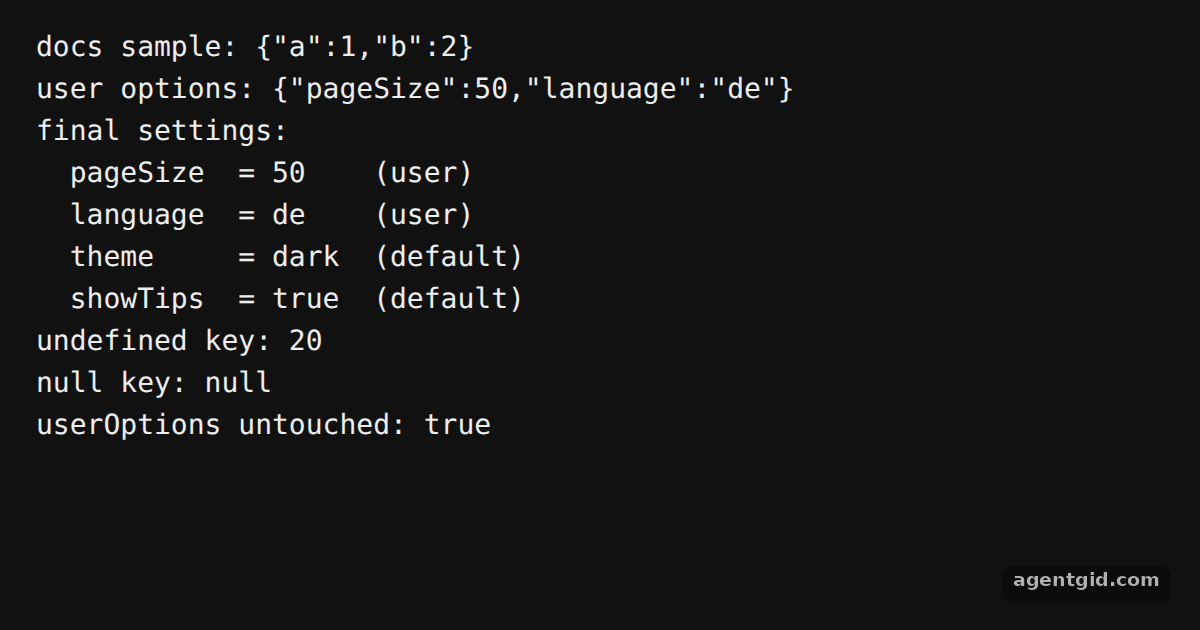
How it works
- Import Lodash. The example imports the full build as
_, the same object the docs load withrequire('lodash'). [1] - Fill in missing keys.
_.defaultskeeps the value already in the first object and only adds keys that are missing, exactly like the{ 'a': 1 }sample in the docs. [1] - Keep the input intact. The example passes a fresh
{}as the first argument and the user's options second, so the result lands in a new object. The last line checks thatuserOptionsstill holds its original values. [1]
Run and edit it
It runs in your browser, in a sandboxed frame that cannot see this site; the packages load from esm.sh only after you press Run.
import _ from 'lodash';

// The exact sample from the Lodash homepage
console.log('docs sample:', JSON.stringify(_.defaults({ a: 1 }, { a: 3, b: 2 })));

const DEFAULTS = { theme: 'dark', pageSize: 20, language: 'en', showTips: true };
const userOptions = { pageSize: 50, language: 'de' };

// Pass a fresh object first so userOptions is not changed
const settings = _.defaults({}, userOptions, DEFAULTS);

console.log('user options:', JSON.stringify(userOptions));
console.log('final settings:');
for (const [key, value] of Object.entries(settings)) {
  const from = key in userOptions ? 'user' : 'default';
  console.log(`  ${key.padEnd(9)} = ${String(value).padEnd(5)} (${from})`);
}

// undefined counts as missing, null does not
console.log('undefined key:', JSON.stringify(_.defaults({ pageSize: undefined }, DEFAULTS).pageSize));
console.log('null key:', JSON.stringify(_.defaults({ pageSize: null }, DEFAULTS).pageSize));

console.log('userOptions untouched:', JSON.stringify(userOptions) === '{"pageSize":50,"language":"de"}');
Add a key to userOptions and see it override the default in the output. Code written by AgentGid [1].
Add a key to userOptions and see it override the default in the output. Code written by AgentGid [1].Checked Oct 12, 2026: it starts without errors in Chromium with lodash 4.18.1. Needs WebGL.
More Lodash examples
Split arrays with _.partition Read nested values with _.at Iterate collections with Lodash Compose functions with Lodash
Sources
Explanations written by AgentGid from the official docs; the numbers in brackets point here. The code marked "written by AgentGid" is ours and free to copy.