
AutoAnimate
by FormKit
Zero-config utility that adds smooth add/remove/move transitions to lists and layouts with one function call (React, Vue, Svelte, plain JS).
Web animation examples and effects Code libraryOpen sourceminimal
1. Price: auto-animate.formkit.com
Fully free.
auto-animate.formkit.comNo quote yet: price is read from the official pages.
2. Commercial use: raw.githubusercontent.com
“to use, copy, modify, merge, publish, distribute, sublicense, and/or sell”
MIT allows use in paid products; no visible credit is needed.
raw.githubusercontent.com3. Credit the author: raw.githubusercontent.com
“The above copyright notice and this permission notice shall be included in all”
No credit on screen. Keep the license notice inside the code you ship.
raw.githubusercontent.com4. Agent access: github.com/formkit/auto-animate
An agent can install it by itself with npm install @formkit/auto-animate. No key or account is needed.
github.com/formkit/auto-animateLicense checked Nov 5, 2026 against 1 official page. Tap a verdict to see its source. How we checked Report an error
AutoAnimate: smooth motion when lists change
AutoAnimate is a small free code library that adds smooth motion to a web page. When items are added to, removed from or moved inside a list or block, they slide and fade instead of jumping. You or your AI assistant switch it on with one line, in React, Vue, Svelte, Angular or a plain page.
Where you can use it
To-do lists, carts and inboxes
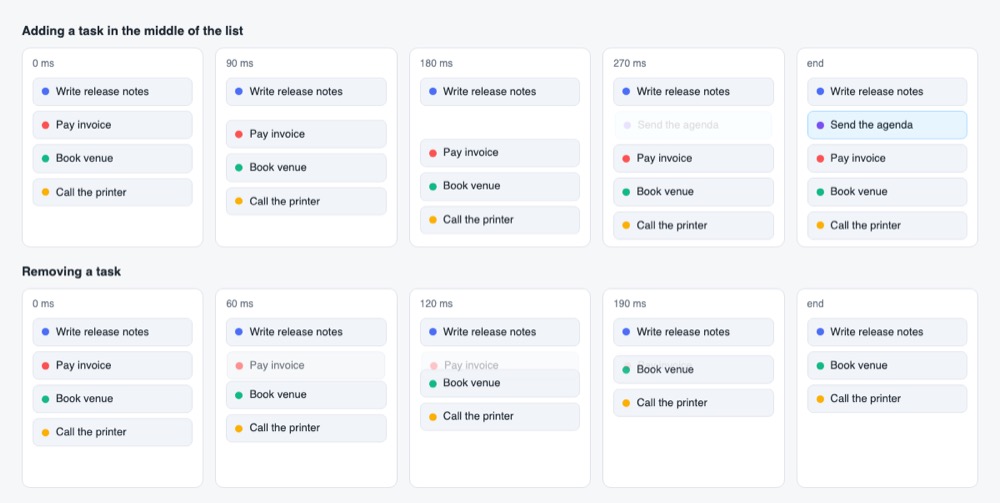
When a row is added or deleted, the other rows slide into place instead of jumping. People can see what changed in the list.
Sorting and filtering results
When someone sorts a table of products or filters search results, items glide to their new places, so the new order is easy to follow.
Dropdowns and question lists that open
A menu, a details box or a list of questions and answers opens and closes with a gentle motion instead of popping.
Error messages in forms
Hints such as "Pick a new password" slide in and out under a field, so the form does not jump when a message appears.
Card grids and photo galleries
Cards that move to another spot or wrap onto the next line slide there across the grid, for example after a new card is added at the front.
Chat messages and notifications Idea
New chat messages or alerts slide in and old ones fade out, which feels calmer than items popping in and out.
AutoAnimate popularity
Downloads from api.npmjs.org, stars from GitHub, checked Nov 17, 2026. How the Gid Score is calculated
How to start
Tell your AI assistant
“Install @formkit/auto-animate at version 0.10.2 and apply it to the element that holds our task list (the React useAutoAnimate hook), giving every item a unique key, so adding, removing and sorting tasks animate.”
Or install it yourself. Add the package to your project.
npm install @formkit/auto-animateShow code
Call autoAnimate once on the element that holds the items (or use the React hook, the Vue v-auto-animate directive, or the Svelte, Solid, Angular or Marko helpers).
import autoAnimate from '@formkit/auto-animate'
autoAnimate(document.getElementById('myList'))
Mistakes to avoid
Only direct children of the element you pass are animated.
With index keys the framework reuses the wrong elements and the motion goes wrong.
Flex children that size themselves late make the motion snap.
The library sets position relative on a parent that has static positioning.
Newer versions need Angular 16 or later for the AutoAnimateDirective.
License
MIT license. Free in personal and paid products, and no visible credit is needed. If you pass on copies of the code, keep its copyright and license notice.
“to use, copy, modify, merge, publish, distribute, sublicense, and/or sell” raw.githubusercontent.com
“The above copyright notice and this permission notice shall be included in all” raw.githubusercontent.com
“to use, copy, modify, merge, publish, distribute, sublicense, and/or sell” raw.githubusercontent.com
“to use, copy, modify, merge, publish, distribute, sublicense, and/or sell” raw.githubusercontent.com
AllowedWith conditionsNot allowedNot stated or not checked yet
Is AutoAnimate free for commercial use? The full answer Not legal advice. Check the license page before you ship.
For your agent
License rules tell your agent what it may do with AutoAnimate. Paste them into your prompt or AGENTS.md.
- AutoAnimate (Web animation examples and effects, UI animation (Lottie, Rive)). Zero-config utility that adds smooth add/remove/move transitions to lists and layouts with one function call (React, Vue, Svelte, plain JS). Price: free; commercial use OK; no credit needed. Style: minimal.
  Connect: npm @formkit/auto-animate.
  Get files: npm install @formkit/auto-animate, then call autoAnimate(parent) or the framework hook (js).
  Rule: Keep the MIT notice if you redistribute the code.
License: https://raw.githubusercontent.com/formkit/auto-animate/master/LICENSE (checked 2026-11-05; details: https://agentgid.com/assets/auto-animate/)Agent installs a package or loads it from a CDN.
npm install @formkit/auto-animateFormats: js
Animations: AutoAnimate by FormKit (MIT)Alternatives
AutoAnimate This page
Pick GSAP when you need full control over timing, sequences and scroll-driven effects, not just list changes.
Pick Animate.css for ready-made effects such as bounce, fade or zoom that you add with one class name.
Pick AOS when blocks should fade or slide in as the visitor scrolls down the page.
Hundreds of official three.js WebGL/WebGPU examples (shaders, particles, post-processing, loaders) with full source in the repo's examples folder.
Gallery of React Three Fiber scenes (shaders, portals, caustics, scroll, physics, glass) linked to runnable sandboxes with source.
Questions
Do I have to write any animation code?
No. You call one function on the element that holds the items; adding, removing and moving its direct children then animate on their own.
Can I change the speed?
Yes. A second argument takes options such as duration (default 250 ms) and easing (default ease-in-out); plugins can replace the motion entirely.
Does it respect people who turn off motion?
Yes. It switches itself off when the device is set to reduce motion.
Can I turn animations off for a moment?
Yes. autoAnimate returns a controller with enable() and disable(), and the React and Vue hooks return a function that switches them on or off.
Is it free for a paid product?
Yes, it is released under the MIT license.