
AOS (Animate On Scroll)
by Michał Sajnóg
Small JS library that fades, slides and zooms elements in as you scroll, set with data-aos attributes in HTML.
Web animation examples and effects Code libraryOpen sourceminimal
1. Price: michalsnik.github.io/aos
Fully free.
michalsnik.github.io/aosNo quote yet: price is read from the official pages.
2. Commercial use: raw.githubusercontent.com
“to use, copy, modify, merge, publish, distribute, sublicense, and/or sell”
MIT allows use in paid sites and products.
raw.githubusercontent.com3. Credit the author: raw.githubusercontent.com
“The above copyright notice and this permission notice shall be included in all”
No credit on screen. Keep the license notice inside the code you ship.
raw.githubusercontent.com4. Agent access: github.com/michalsnik/aos
An agent can install it by itself with npm install aos. No key or account is needed.
github.com/michalsnik/aosLicense checked Nov 5, 2026 against 1 official page. Tap a verdict to see its source. How we checked Report an error
AOS: page blocks that fade in as you scroll
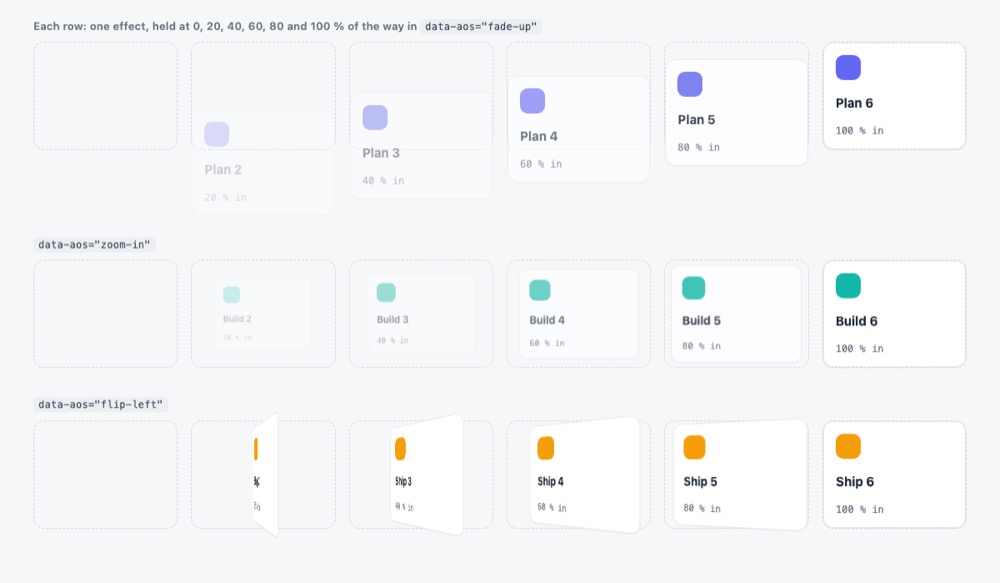
AOS (Animate On Scroll) is a small free script that makes parts of a page fade, slide, zoom or flip into place when the visitor scrolls to them. You or your AI assistant add one attribute to an element, such as data-aos="fade-up", and call one start function. Its last release is from 2018, so it suits simple sites more than new app projects.
Where you can use it
Landing page sections that appear on scroll
Make feature blocks, screenshots and quotes on a landing page fade or slide in as the visitor reaches them.
Cards that come in one after another
Let pricing cards, team photos or feature tiles appear in a short sequence instead of all at once.
Animate once, not on every pass
On long pages, show each block's entrance only the first time, so scrolling back up does not replay every effect.
Calmer pages on phones
Switch the effects off on phones or tablets, or under your own rule such as narrow screens.
Trigger from another block
Start an element's animation when a different block reaches the screen, for example a fixed button that appears with a section.
Portfolio and case-study pages Idea
Reveal project images and short captions one by one as a visitor reads down a portfolio or case-study page.
AOS (Animate On Scroll) popularity
Downloads from api.npmjs.org, stars from GitHub, checked Nov 17, 2026. How the Gid Score is calculated
How to start
Tell your AI assistant
“Add AOS 2.3.4 (self-hosted aos.css and aos.js) to the landing page, use data-aos="fade-up" with small delays on the feature cards, call AOS.init({ once: true }) and disable it when the user prefers reduced motion.”
Or install it yourself.
npm install aos --saveShow codeStep 1 or Step 2
Start AOS once on the page.
AOS.init();Add data-aos with an effect name to each element, and data-aos-* attributes to tune it.
<div data-aos="fade-up" data-aos-anchor-placement="top-center">Mistakes to avoid
npm install aos gives 2.3.4, while the front-page README documents the 3.0 beta (for example the mirror option and aos:in events).
Version 2.3.4 has no reduced-motion check of its own (none in its CSS or script in our demo); disable accepts any condition.
The timing values exist only as prepared CSS rules.
<div aos="fade-up"> (attribute from old tutorials)<div data-aos="fade-up">The plain aos attribute stopped working in version 2.0.0.
The CSS hides elements before their entrance (fade effects start at opacity 0), so without the script they stay invisible; seen in our demo files.
License
MIT license. Free for personal and paid sites, and you may change and share the code. Keep the copyright and license notice with copies of the code you ship.
“to use, copy, modify, merge, publish, distribute, sublicense, and/or sell” raw.githubusercontent.com
“The above copyright notice and this permission notice shall be included in all” raw.githubusercontent.com
“to use, copy, modify, merge, publish, distribute, sublicense, and/or sell” raw.githubusercontent.com
“to use, copy, modify, merge, publish, distribute, sublicense, and/or sell” raw.githubusercontent.com
AllowedWith conditionsNot allowedNot stated or not checked yet
Is AOS (Animate On Scroll) free for commercial use? The full answer Not legal advice. Check the license page before you ship.
For your agent
License rules tell your agent what it may do with AOS (Animate On Scroll). Paste them into your prompt or AGENTS.md.
- AOS (Animate On Scroll) (Web animation examples and effects, UI animation (Lottie, Rive)). Small JS library that fades, slides and zooms elements in as you scroll, set with data-aos attributes in HTML. Price: free; commercial use OK; no credit needed. Style: minimal.
  Connect: npm aos.
  Get files: npm install aos (or CDN), call AOS.init(), add data-aos="fade-up" to elements (js, css, html).
  Rule: Keep the MIT notice if you redistribute the code.
License: https://raw.githubusercontent.com/michalsnik/aos/next/LICENSE (checked 2026-11-05; details: https://agentgid.com/assets/aos/)Agent installs a package or loads it from a CDN.
npm install aosFormats: js, css, html
Scroll animations: AOS (MIT)Alternatives
AOS (Animate On Scroll) This page
Scroll-driven Animations demos
Pick native CSS scroll-driven animations when you want reveal and parallax effects in plain CSS with no script to load.
Pick GSAP with its free ScrollTrigger plugin for scroll effects with timelines, pinning and scrubbing tied to the scroll position.
Pick Animate.css when you need ready keyframe effects added by a class name, for example on page load or on click.
Hundreds of official three.js WebGL/WebGPU examples (shaders, particles, post-processing, loaders) with full source in the repo's examples folder.
Gallery of React Three Fiber scenes (shaders, portals, caustics, scroll, physics, glass) linked to runnable sandboxes with source.
Questions
Do I need to write JavaScript?
Only one line, AOS.init(), plus the data-aos attributes in your HTML.
Which effects are there?
Fade, flip, slide and zoom effects in several directions, with a choice of easing curves.
Can I turn it off on phones?
Yes. Set disable to 'mobile', 'phone' or 'tablet', or to your own condition or function.
What if content is added to the page later?
AOS watches the page for changes and re-reads new elements; call AOS.refresh() if positions change in other ways.
Can I use it in a commercial site?
Yes. It is MIT licensed.