
Animate.css
by Daniel Eden (animate-css)
Ready-made CSS keyframe animations (bounce, fade, slide, zoom, attention seekers) added with one class name.
Web animation examples and effects Code libraryOpen sourceplayfulminimal
1. Price: animate.style
Fully free.
animate.styleNo quote yet: price is read from the official pages.
2. Commercial use: raw.githubusercontent.com
“to do everything with the Software that would otherwise infringe”
Paid use is allowed; the current license requires use consistent with human rights principles and laws (release 4.1.1 itself is marked MIT).
raw.githubusercontent.com3. Credit the author: raw.githubusercontent.com
“Licensee must ensure that everyone who gets a copy of any part of this Software from Licensee, with or without changes, also receives the License and the above copyright notice”
No credit on screen. Keep the license notice inside the code you ship.
raw.githubusercontent.com4. Agent access: github.com/animate-css/animate.css
An agent can install it by itself with npm install animate.css. No key or account is needed.
github.com/animate-css/animate.cssLicense checked Nov 5, 2026 against 1 official page. Tap a verdict to see its source. How we checked Report an error
Animate.css: ready-made effects added with a class name
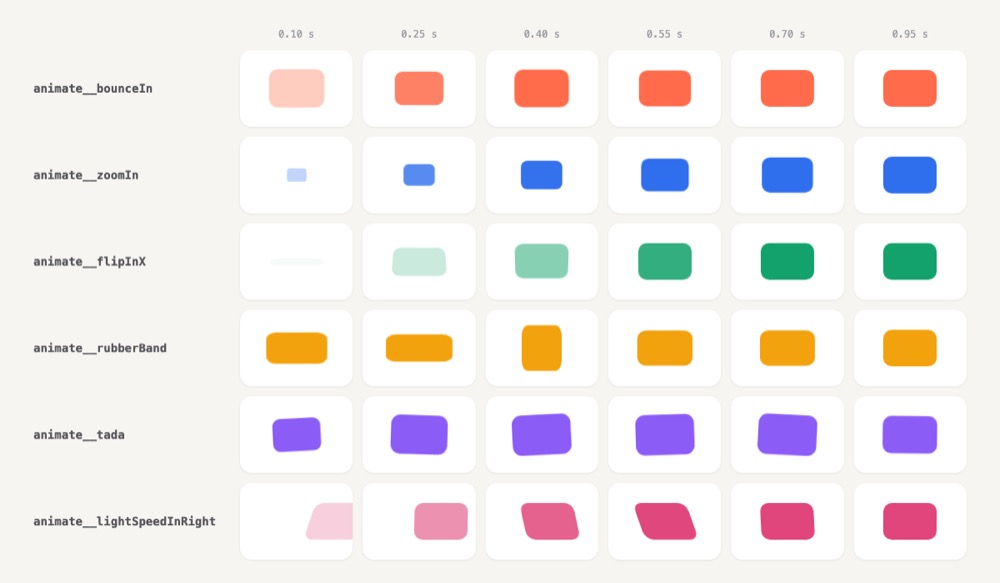
Animate.css is a free style file with ready-made movements, such as bounce, fade in, zoom in or shake. You add one or two class names to a heading, button or picture, and it plays that movement once. No programming is needed for the basic use.
Where you can use it
A heading that enters the page
Let the main heading or a hero picture fade, zoom or bounce in when the page opens, so the first screen does not feel static.
A nudge on an important button
Make a sign-up button or a new message badge pulse, shake or wobble once, to draw the eye to it without a pop-up.
Messages that slide in and out
Slide a notice or a toast in when something happens and out again, then remove it from the page when its movement ends.
Slides and home page sections
Give slides in a slider or blocks on a home page a short entrance, so each new part is clearly announced.
Shake a field on a wrong password Idea
Shake the password box sideways once when the login fails, the way many phones do, next to the error text.
A small celebration when a task is done Idea
Play a short tada or heartbeat on a check mark when someone finishes a step in a to-do list or an onboarding.
Animate.css popularity
Downloads from api.npmjs.org, stars from GitHub, checked Nov 17, 2026. How the Gid Score is calculated
How to start
Tell your AI assistant
“Add animate.css 4.1.1 to the page and give the hero heading animate__animated animate__fadeInDown; keep the built-in reduced-motion rule and do not use animate__infinite.”
Or install it yourself. Add the style file, either from the package or with one link tag in the page head.
npm install animate.css --saveShow codeStep 1 or Step 2
With a bundler, import the file once in your main script.
import 'animate.css';Put the base class and an effect name on the element.
<h1 class="animate__animated animate__bounce">An animated element</h1>Mistakes to avoid
Version 4 put the animate__ prefix on every class; only animate.compat.css keeps the old names.
Inline elements are not reliably animated and break in some browsers.
The docs warn that endless movement distracts and annoys people.
The rule protects people with vestibular and seizure disorders.
Elements moving in from the side can create a horizontal scrollbar.
License
Hippocratic License 2.1 (repo LICENSE; npm 4.1.1 says MIT). The published version 4.1.1 is marked MIT, but the project's license file and site now name the Hippocratic License 2.1. That license allows free use, also in paid products, as long as the use respects human rights. Keep the license and copyright notice with copies.
“to do everything with the Software that would otherwise infringe” raw.githubusercontent.com
“Licensee must ensure that everyone who gets a copy of any part of this Software from Licensee, with or without changes, also receives the License and the above copyright notice” raw.githubusercontent.com
“Licensee shall use the Software in a manner consistent with Human Rights Principles.” raw.githubusercontent.com
“the portion of the Software not modified must be distributed pursuant to this License” raw.githubusercontent.com
AllowedWith conditionsNot allowedNot stated or not checked yet
Is Animate.css free for commercial use? The full answer Not legal advice. Check the license page before you ship.
For your agent
License rules tell your agent what it may do with Animate.css. Paste them into your prompt or AGENTS.md.
- Animate.css (Web animation examples and effects, UI animation (Lottie, Rive)). Ready-made CSS keyframe animations (bounce, fade, slide, zoom, attention seekers) added with one class name. Price: free; commercial use with conditions; no credit needed; ship inside your app with conditions; pass the files on to your users only with conditions. Style: playful, minimal.
  Connect: npm animate.css.
  Get files: npm install animate.css (or CDN), then add class="animate__animated animate__fadeIn" (css).
  Not allowed: Hippocratic License human-rights conditions
  Rule: Keep the license and copyright notice in the CSS file.
  Rule: Use must be consistent with the license's human-rights conditions.
License: https://raw.githubusercontent.com/animate-css/animate.css/main/LICENSE (checked 2026-11-05; details: https://agentgid.com/assets/animate-css/)Agent installs a package or loads it from a CDN.
npm install animate.cssFormats: css
Animations: Animate.css (animate.style)Alternatives
Animate.css This page
Pick AOS when blocks should fade, slide or zoom in as the visitor scrolls down to them, set with attributes in the page.
Pick AutoAnimate when items in lists or layouts should move smoothly as they are added, removed or reordered.
Pick GSAP when you need timelines, scroll-linked effects or text and shape animation written in code.
Hundreds of official three.js WebGL/WebGPU examples (shaders, particles, post-processing, loaders) with full source in the repo's examples folder.
Gallery of React Three Fiber scenes (shaders, portals, caustics, scroll, physics, glass) linked to runnable sandboxes with source.
Questions
Do I need to write code to use it?
No. You add the style file and put two class names on an element; a script is only needed to start an effect later.
Can I make the effects faster or slower?
Yes. Add a speed class such as animate__faster, or set --animate-duration for one element or the whole page.
What happens for people who turn off motion on their device?
The effects switch off for them automatically, with no extra work.
Can I use it in a paid product?
Yes, with conditions. Release 4.1.1 is marked MIT; the current license file is the Hippocratic License 2.1, which allows any use that respects human rights and asks you to keep its notice.
Why does my link or span not move?
Inline elements cannot be animated reliably; set them to inline-block first.