Verify a JWT with jose
Before trusting a token, a server checks its signature and claims; jwtVerify handles both checks in one call.
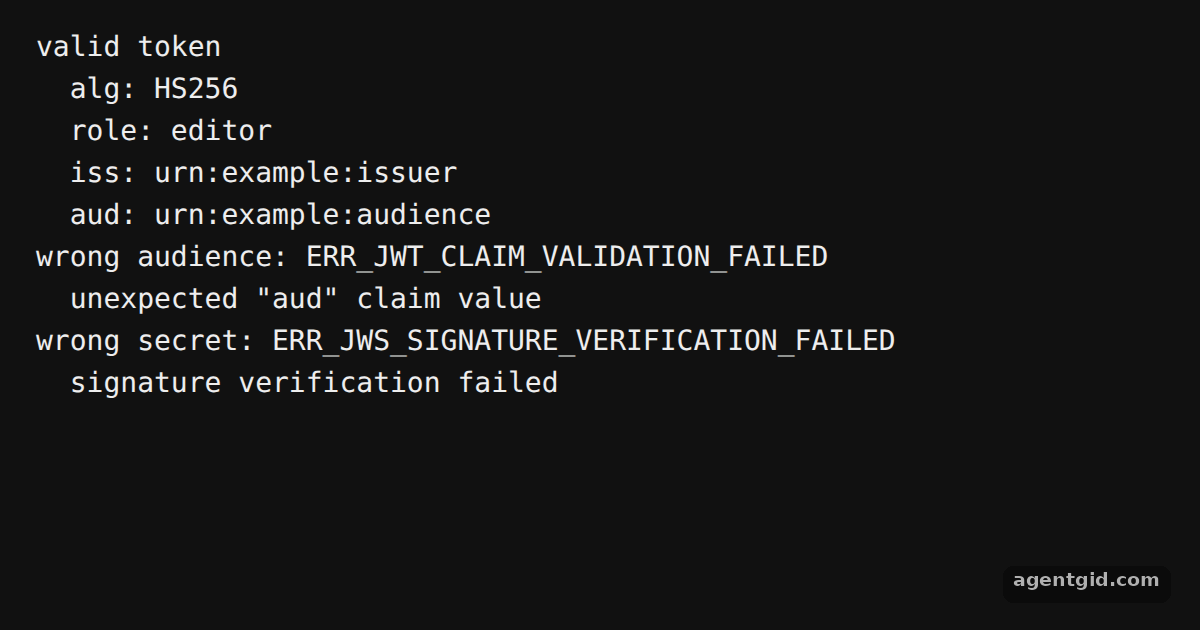
How it works
- Create a token to check. The code signs a short-lived token with
SignJWTand an HS256 secret so the example has something to verify. [1] - Verify signature and claims.
jwtVerify(jwt, secret, { issuer, audience })checks the signature and the listed claims. On success it returnspayloadandprotectedHeader, which the code prints. [1] - Handle failures. The code then verifies with the wrong audience and with a different secret. Each call throws, and the code prints the error's
codeand message. [1]
Run and edit it
It runs in your browser, in a sandboxed frame that cannot see this site; the packages load from esm.sh only after you press Run.
import { SignJWT, jwtVerify } from 'jose'

const secret = new TextEncoder().encode('demo-secret-at-least-32-bytes-long!!')
const otherSecret = new TextEncoder().encode('another-secret-that-is-32-bytes-long')

const jwt = await new SignJWT({ role: 'editor' })
  .setProtectedHeader({ alg: 'HS256' })
  .setIssuedAt()
  .setIssuer('urn:example:issuer')
  .setAudience('urn:example:audience')
  .setExpirationTime('10m')
  .sign(secret)

const expected = { issuer: 'urn:example:issuer', audience: 'urn:example:audience' }

const { payload, protectedHeader } = await jwtVerify(jwt, secret, expected)
console.log('valid token')
console.log('  alg:', protectedHeader.alg)
console.log('  role:', payload.role)
console.log('  iss:', payload.iss)
console.log('  aud:', payload.aud)

async function check(label, key, options) {
  try {
    await jwtVerify(jwt, key, options)
    console.log(label + ': passed')
  } catch (err) {
    console.log(label + ': ' + err.code)
    console.log('  ' + err.message)
  }
}

await check('wrong audience', secret, { ...expected, audience: 'urn:example:other' })
await check('wrong secret', otherSecret, expected)
Change the expected audience back to the right value in the second check and see it pass. Code written by AgentGid [1].
Change the expected audience back to the right value in the second check and see it pass. Code written by AgentGid [1].Checked Oct 12, 2026: it starts without errors in Chromium with jose 6.2.12. Needs WebGL.
More jose examples
Sign a JWT with jose Generate keys and export a JWK with jose Decode a JWT with jose Encrypt and decrypt a JWT with jose
Sources
Explanations written by AgentGid from the official docs; the numbers in brackets point here. The code marked "written by AgentGid" is ours and free to copy.