Encrypt and decrypt a JWT with jose
A signed JWT can be read by anyone who holds it; an encrypted JWT hides its claims so only holders of the key can read them.
How it works
- Create a 256-bit key. The code fills 32 random bytes with
crypto.getRandomValuesto use as a direct symmetric key forA256GCM. [1] - Encrypt with EncryptJWT.
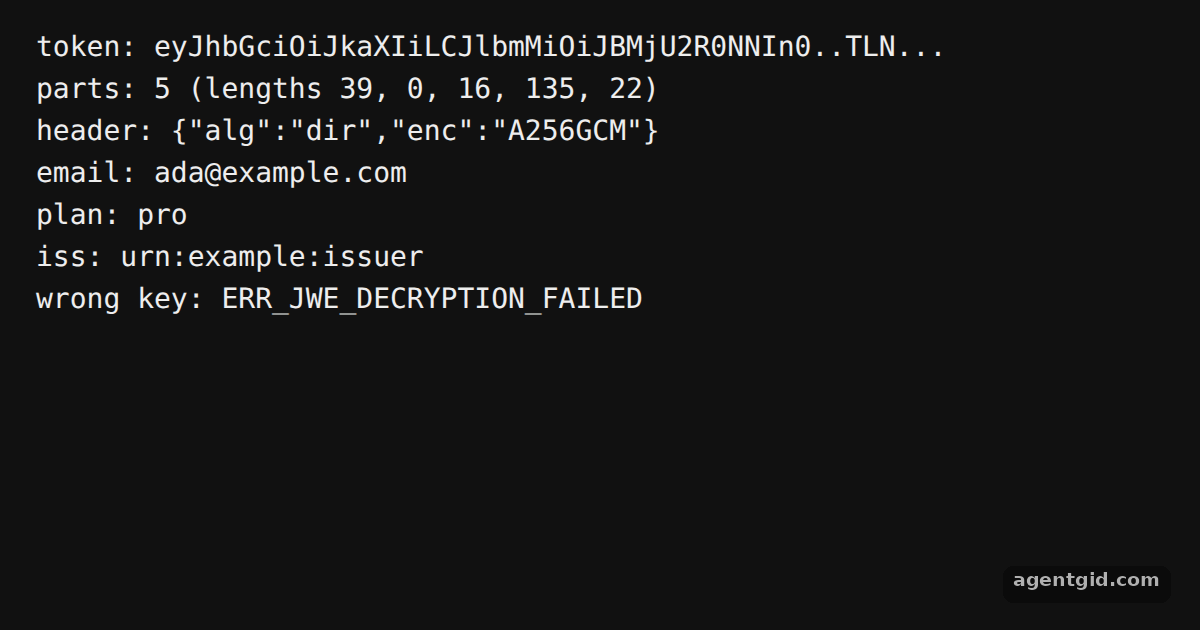
new EncryptJWT(claims)withsetProtectedHeader({ alg: 'dir', enc: 'A256GCM' })andencrypt(key)returns a compact token. The code prints its five parts to show it differs from a signed JWT. [1] - Decrypt and validate.
jwtDecrypt(jwe, key, { issuer })decrypts the token and checks the issuer claim, then returns the payload. A second call with a wrong key fails and the code prints the error code. [1]
Run and edit it
It runs in your browser, in a sandboxed frame that cannot see this site; the packages load from esm.sh only after you press Run.
import { EncryptJWT, jwtDecrypt } from 'jose'

const key = crypto.getRandomValues(new Uint8Array(32))
const wrongKey = crypto.getRandomValues(new Uint8Array(32))

const jwe = await new EncryptJWT({ email: 'ada@example.com', plan: 'pro' })
  .setProtectedHeader({ alg: 'dir', enc: 'A256GCM' })
  .setIssuedAt()
  .setIssuer('urn:example:issuer')
  .setExpirationTime('2h')
  .encrypt(key)

const parts = jwe.split('.')
console.log('token:', jwe.slice(0, 44) + '...')
console.log('parts:', parts.length, '(lengths ' + parts.map((p) => p.length).join(', ') + ')')

const { payload, protectedHeader } = await jwtDecrypt(jwe, key, {
  issuer: 'urn:example:issuer',
})
console.log('header:', JSON.stringify(protectedHeader))
console.log('email:', payload.email)
console.log('plan:', payload.plan)
console.log('iss:', payload.iss)

try {
  await jwtDecrypt(jwe, wrongKey)
} catch (err) {
  console.log('wrong key:', err.code)
}
Add more claims to the payload and see the encrypted token grow while its contents stay hidden. Code written by AgentGid [1].
Add more claims to the payload and see the encrypted token grow while its contents stay hidden. Code written by AgentGid [1].Checked Oct 12, 2026: it starts without errors in Chromium with jose 6.2.12. Needs WebGL.
More jose examples
Sign a JWT with jose Verify a JWT with jose Generate keys and export a JWK with jose Decode a JWT with jose
Sources
Explanations written by AgentGid from the official docs; the numbers in brackets point here. The code marked "written by AgentGid" is ours and free to copy.