Zod validation with zodResolver
@hookform/resolvers connects React Hook Form to schema libraries. With zodResolver, a Zod schema decides which values are valid and supplies the error messages.
All React Hook Form Resolvers examples React Hook Form Resolvers: usage and stats
How it works
- Describe the form with Zod. The schema is a
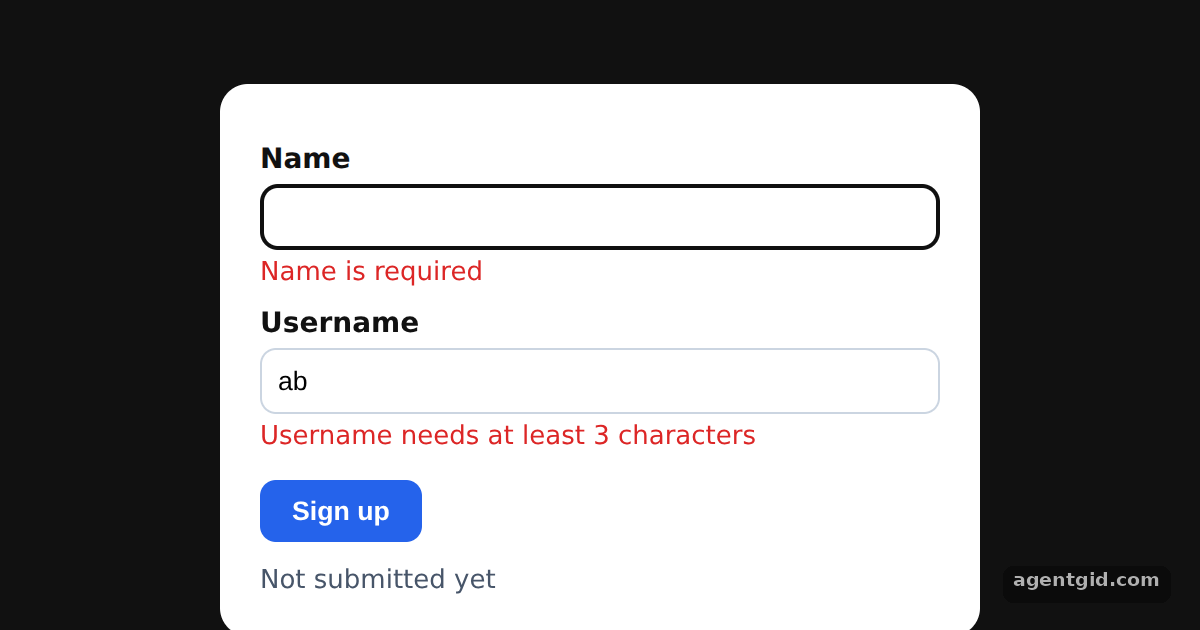
z.objectwith two string fields. Each.min()call carries its ownmessage, which becomes the error text in the form. [1] - Pass zodResolver to useForm.
useForm({ resolver: zodResolver(schema) })hands validation to the schema.register,handleSubmitandformState.errorswork as usual. [1] - Show the messages. Each field prints
errors.name?.messageorerrors.username?.messageunder the input. The form is submitted once on load, so the messages are visible right away. [1]
Run and edit it
It runs in your browser, in a sandboxed frame that cannot see this site; the packages load from esm.sh only after you press Run.
import { useEffect, useState } from 'react';
import { useForm } from 'react-hook-form';
import { zodResolver } from '@hookform/resolvers/zod';
import { z } from 'zod';

const schema = z.object({
  name: z.string().min(1, { message: 'Name is required' }),
  username: z.string().min(3, { message: 'Username needs at least 3 characters' }),
});

const label = { display: 'block', margin: '10px 0 4px', fontWeight: 600 };
const input = { width: '100%', boxSizing: 'border-box', padding: 8, borderRadius: 8, border: '1px solid #cbd5e1' };
const err = { color: '#dc2626', margin: '4px 0 0', fontSize: 13 };

export default function App() {
  const [result, setResult] = useState(null);
  const { register, handleSubmit, formState: { errors } } = useForm({
    resolver: zodResolver(schema),
    defaultValues: { name: '', username: 'ab' },
  });
  const submit = handleSubmit((data) => setResult(data), () => setResult(null));

  // Submit once on load so the error messages are visible right away
  useEffect(() => { submit(); }, []);

  return (
    <div style={{ height: 360, background: '#111', display: 'grid', placeItems: 'center' }}>
      <form onSubmit={submit} style={{ width: 340, padding: 20, borderRadius: 14, background: '#fff', color: '#111', font: '14px system-ui' }}>
        <label style={label}>Name</label>
        <input {...register('name')} style={input} />
        {errors.name?.message && <p style={err}>{errors.name?.message}</p>}

        <label style={label}>Username</label>
        <input {...register('username')} style={input} />
        {errors.username?.message && <p style={err}>{errors.username?.message}</p>}

        <button type="submit" style={{ marginTop: 14, padding: '8px 16px', border: 0, borderRadius: 8, background: '#2563eb', color: '#fff', fontWeight: 600 }}>
          Sign up
        </button>
        <p style={{ margin: '12px 0 0', color: '#475569', fontSize: 13 }}>
          {result ? `Submitted: ${JSON.stringify(result)}` : 'Not submitted yet'}
        </p>
      </form>
    </div>
  );
}
Errors show on load; type a name and a username of 3+ characters, then press Sign up to see the submitted values. Code written by AgentGid [1].
Errors show on load; type a name and a username of 3+ characters, then press Sign up to see the submitted values. Code written by AgentGid [1].Checked Oct 12, 2026: it starts without errors in Chromium with @hookform/resolvers 5.9.1, react 19.3.0, react-dom 19.3.0, react-hook-form 7.90.0, zod 4.6.6. Needs WebGL.
More React Hook Form Resolvers examples
Number fields with zodResolver Schema defaults with zodResolver Showing every error with criteriaMode Resolver options: raw values vs parsed values
Sources
Explanations written by AgentGid from the official docs; the numbers in brackets point here. The code marked "written by AgentGid" is ours and free to copy.