Schema defaults with zodResolver
A Zod schema can supply values the form never asks for. With zodResolver, fields marked .default() are filled in after validation and reach your submit handler.
All React Hook Form Resolvers examples React Hook Form Resolvers: usage and stats
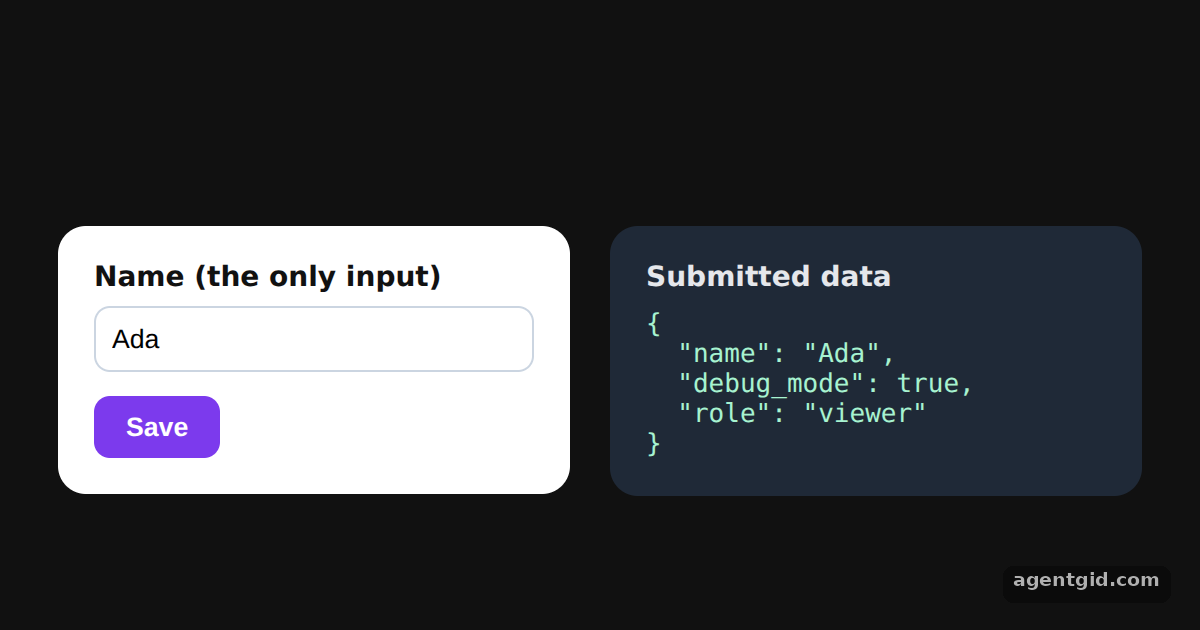
How it works
- Add defaults to the schema.
debug_modeusesz.boolean().default(true)androleusesz.string().default('viewer'). Neither has an input in the form. [1] - Input type vs output type. The form only edits
name, so the defaulted fields are optional on the way in and present on the way out. [2] - See the filled-in values. The panel shows the object your submit handler receives:
namefrom the input plusdebug_modeandrolefrom the schema. [2]
Run and edit it
It runs in your browser, in a sandboxed frame that cannot see this site; the packages load from esm.sh only after you press Run.
import { useEffect, useState } from 'react';
import { useForm } from 'react-hook-form';
import { zodResolver } from '@hookform/resolvers/zod';
import { z } from 'zod';

const schema = z.object({
  name: z.string().min(1, { message: 'Required' }),
  debug_mode: z.boolean().default(true),
  role: z.string().default('viewer'),
});

export default function App() {
  const [result, setResult] = useState(null);
  const { register, handleSubmit, formState: { errors } } = useForm({
    resolver: zodResolver(schema),
    defaultValues: { name: 'Ada' },
  });
  const submit = handleSubmit((data) => setResult(data), () => setResult(null));

  useEffect(() => { submit(); }, []); // submit once on load

  return (
    <div style={{ height: 360, background: '#111', display: 'flex', alignItems: 'center', justifyContent: 'center', gap: 20, font: '14px system-ui' }}>
      <form onSubmit={submit} style={{ width: 220, padding: 18, borderRadius: 14, background: '#fff', color: '#111' }}>
        <label style={{ display: 'block', fontWeight: 600, marginBottom: 6 }}>Name (the only input)</label>
        <input {...register('name')} style={{ width: '100%', boxSizing: 'border-box', padding: 8, borderRadius: 8, border: '1px solid #cbd5e1' }} />
        {errors.name?.message && <p style={{ color: '#dc2626', margin: '6px 0 0' }}>{errors.name?.message}</p>}
        <button type="submit" style={{ marginTop: 12, padding: '8px 16px', border: 0, borderRadius: 8, background: '#7c3aed', color: '#fff', fontWeight: 600 }}>
          Save
        </button>
      </form>
      <div style={{ width: 230, padding: 18, borderRadius: 14, background: '#1f2937', color: '#e5e7eb' }}>
        <div style={{ fontWeight: 600, marginBottom: 8 }}>Submitted data</div>
        <pre style={{ margin: 0, font: '13px ui-monospace, monospace', color: '#a7f3d0' }}>
          {result ? JSON.stringify(result, null, 2) : 'invalid: fix the name'}
        </pre>
      </div>
    </div>
  );
}
The form submits once on load; change the name and press Save to see the defaults added again. Code written by AgentGid [1].
The form submits once on load; change the name and press Save to see the defaults added again. Code written by AgentGid [1].Checked Oct 12, 2026: it starts without errors in Chromium with @hookform/resolvers 5.9.1, react 19.3.0, react-dom 19.3.0, react-hook-form 7.90.0, zod 4.6.6. Needs WebGL.
More React Hook Form Resolvers examples
Zod validation with zodResolver Number fields with zodResolver Showing every error with criteriaMode Resolver options: raw values vs parsed values
Sources
Explanations written by AgentGid from the official docs; the numbers in brackets point here. The code marked "written by AgentGid" is ours and free to copy.