Showing every error with criteriaMode
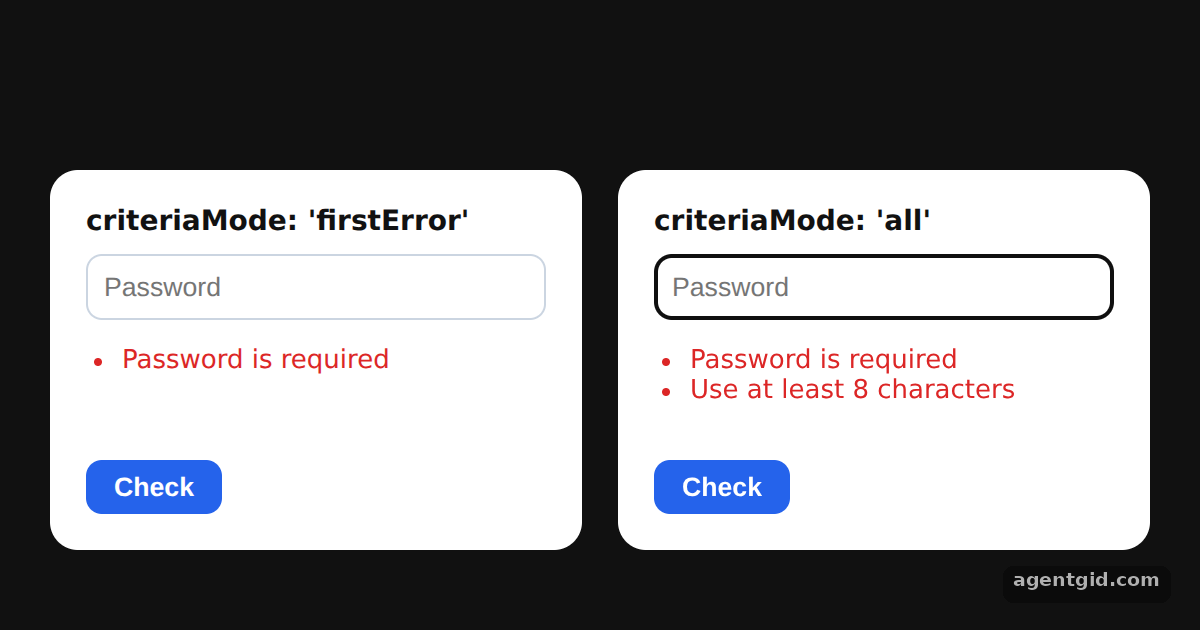
Sometimes a field breaks several rules at once, like a password that is empty and too short. With criteriaMode set to 'all', the resolver reports each rule instead of only the first.
All React Hook Form Resolvers examples React Hook Form Resolvers: usage and stats
How it works
- Zod supports both modes. The resolvers comparison table lists the criteriaMode values each resolver supports; for Zod it lists both
firstErrorandall. [1] - Two rules on one field.
passwordchains.min(1)and.min(8), each with its own message. An empty value fails both. [1] - Compare the two forms. Both panels use the same schema and an empty password. The left form sets
criteriaMode: 'firstError'and shows one message; the right setscriteriaMode: 'all'and lists every message fromerrors.password.types. [2]
Run and edit it
It runs in your browser, in a sandboxed frame that cannot see this site; the packages load from esm.sh only after you press Run.
import { useEffect } from 'react';
import { useForm } from 'react-hook-form';
import { zodResolver } from '@hookform/resolvers/zod';
import { z } from 'zod';

const schema = z.object({
  password: z.string()
    .min(1, { message: 'Password is required' })
    .min(8, { message: 'Use at least 8 characters' }),
});

function PasswordForm({ criteriaMode }) {
  const { register, handleSubmit, formState: { errors } } = useForm({
    resolver: zodResolver(schema),
    criteriaMode,
    defaultValues: { password: '' },
  });
  const submit = handleSubmit(() => {});
  useEffect(() => { submit(); }, []); // validate once on load

  const error = errors.password;
  const messages = error?.types ? Object.values(error.types).flat() : error ? [error.message] : [];

  return (
    <form onSubmit={submit} style={{ width: 230, padding: 18, borderRadius: 14, background: '#fff', color: '#111' }}>
      <div style={{ fontWeight: 700, marginBottom: 8 }}>criteriaMode: '{criteriaMode}'</div>
      <input type="password" placeholder="Password" {...register('password')}
        style={{ width: '100%', boxSizing: 'border-box', padding: 8, borderRadius: 8, border: '1px solid #cbd5e1' }} />
      <ul style={{ color: '#dc2626', paddingLeft: 18, minHeight: 44, fontSize: 13 }}>
        {messages.length ? messages.map((m) => <li key={m}>{m}</li>) : <li style={{ color: '#16a34a' }}>All good</li>}
      </ul>
      <button type="submit" style={{ padding: '6px 14px', border: 0, borderRadius: 8, background: '#2563eb', color: '#fff', fontWeight: 600 }}>
        Check
      </button>
    </form>
  );
}

export default function App() {
  return (
    <div style={{ height: 360, background: '#111', display: 'flex', alignItems: 'center', justifyContent: 'center', gap: 18, font: '14px system-ui' }}>
      <PasswordForm criteriaMode="firstError" />
      <PasswordForm criteriaMode="all" />
    </div>
  );
}
Both forms validate on load; type a short password in each and press Check to compare the messages. Code written by AgentGid [1].
Both forms validate on load; type a short password in each and press Check to compare the messages. Code written by AgentGid [1].Checked Oct 12, 2026: it starts without errors in Chromium with @hookform/resolvers 5.9.1, react 19.3.0, react-dom 19.3.0, react-hook-form 7.90.0, zod 4.6.6. Needs WebGL.
More React Hook Form Resolvers examples
Zod validation with zodResolver Number fields with zodResolver Schema defaults with zodResolver Resolver options: raw values vs parsed values
Sources
Explanations written by AgentGid from the official docs; the numbers in brackets point here. The code marked "written by AgentGid" is ours and free to copy.