Custom adapters in Axios
The adapter option lets you decide how a request is handled. Returning a response object from your own function is a simple way to test code that uses Axios without a server.
How it works
- Write an adapter function.
mockAdapterreceives the final request config and returns a promise for a response object. Nothing leaves the page: the data comes from the function itself. [1] - Return the response shape. The object has the same fields every Axios response has:
data,status,statusText,headersandconfig. The example prints each of them. [2] - Use it with any method. The second call goes through
axios.requestwithmethod: 'post'. Its adapter readsconfig.dataand echoes it back with status 201. [3]
Run and edit it
It runs in your browser, in a sandboxed frame that cannot see this site; the packages load from esm.sh only after you press Run.
import axios from 'axios';

// A custom adapter gets the request config and returns a response object
const mockAdapter = async (config) => ({
  data: { id: 1, name: 'Ada Lovelace', role: 'admin' },
  status: 200,
  statusText: 'OK',
  headers: { 'content-type': 'application/json' },
  config,
  request: {},
});

const response = await axios.get('/users/1', { adapter: mockAdapter });

console.log('GET /users/1');
console.log('  status:', response.status, response.statusText);
console.log('  content-type:', response.headers['content-type']);
console.log('  data:', JSON.stringify(response.data));
console.log('  config.method:', response.config.method);
console.log('  config.url:', response.config.url);

// The same idea with axios.request and a POST body
const created = await axios.request({
  url: '/users',
  method: 'post',
  data: { name: 'Grace Hopper' },
  adapter: async (config) => ({
    data: { id: 2, received: JSON.parse(config.data) },
    status: 201,
    statusText: 'Created',
    headers: {},
    config,
  }),
});

console.log('POST /users');
console.log('  status:', created.status, created.statusText);
console.log('  data:', JSON.stringify(created.data));
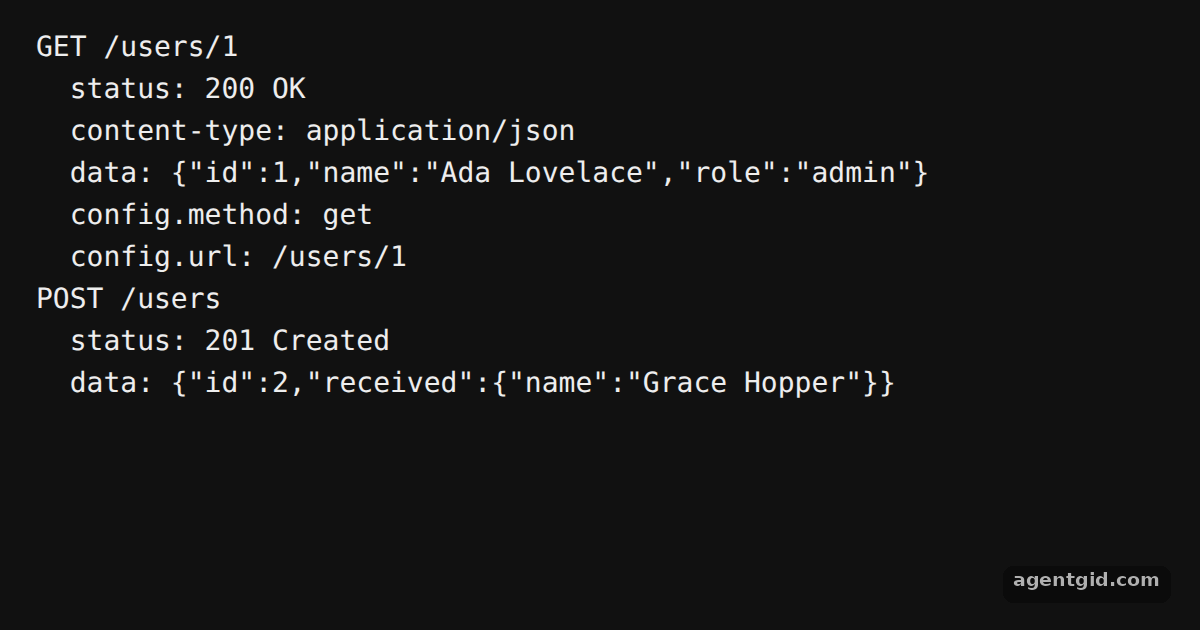
The console shows the fake GET and POST responses; change the data or status in the adapters and run again. Code written by AgentGid [1].
The console shows the fake GET and POST responses; change the data or status in the adapters and run again. Code written by AgentGid [1].Checked Oct 12, 2026: it starts without errors in Chromium with axios 1.20.0. Needs WebGL.
More Axios examples
Creating an instance in Axios Interceptors in Axios Error handling in Axios transformResponse in Axios
Sources
Explanations written by AgentGid from the official docs; the numbers in brackets point here. The code marked "written by AgentGid" is ours and free to copy.