
Vanta.js
by Teng Bao
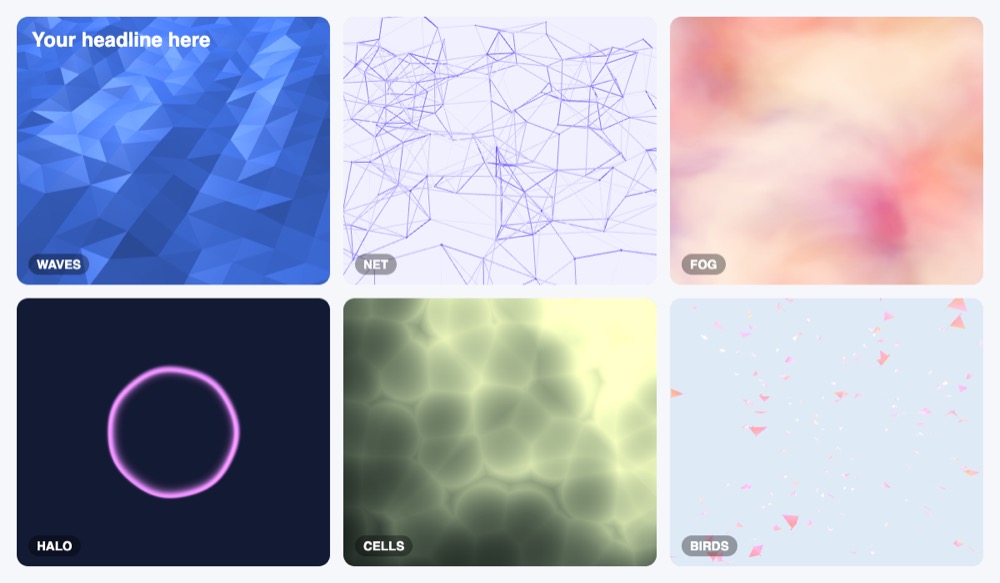
Animated 3D website backgrounds (waves, birds, fog, net, globe, clouds) in a few lines; customize on the site and copy the snippet.
Video references and motion backgrounds Code libraryOpen sourceabstract3dgradient
2. Commercial use: raw.githubusercontent.com
“to use, copy, modify, merge, publish, distribute, sublicense, and/or sell”
MIT allows use in paid products; keep the notice in copies of the code.
raw.githubusercontent.com3. Credit the author: raw.githubusercontent.com
“The above copyright notice and this permission notice shall be included in all”
No credit on screen. Keep the license notice inside the code you ship.
raw.githubusercontent.com4. Agent access: github.com/tengbao/vanta
An agent can install it by itself with npm install vanta. No key or account is needed.
github.com/tengbao/vantaLicense checked Nov 5, 2026 against 1 official page. Tap a verdict to see its source. How we checked Report an error
Vanta.js: moving 3D backgrounds for a web page
Vanta.js puts a moving 3D picture, like waves, fog, a net of lines or flying birds, behind any block of a web page. You or your AI assistant add a few lines of code and pick colors to match your brand. It is free under the MIT license, also for paid products.
Where you can use it
Hero section behind a headline
Put moving waves or fog behind the big title at the top of a landing page. The text stays in front and readable, and the effect fills the block.
Background for a React page
In a React app the effect starts when the block appears and is removed when the person leaves the page, so it does not keep running in the background.
Match colors to your brand
Change the effect's colors after it starts, for example when the person switches to dark mode, without reloading the page.
Lighter than a background video
Use it instead of a large looping video or image behind a section; the moving picture is drawn by the browser at full sharpness.
Website builder custom code
On a site builder that lets you paste code into the page footer, copy the snippet from the Vanta site and point it at your section.
Event or product launch page Idea
Give a one-off launch or event page a moving net or halo in your event colors behind the date and the sign-up button.
As reported by Teng Bao: About 120 kb extra page weight, minified and gzipped, mostly three.js; Runs at 60fps on most laptops and desktops.
Vanta.js popularity
Downloads from api.npmjs.org, stars from GitHub, checked Nov 16, 2026. How the Gid Score is calculated
How to start
Tell your AI assistant
“Add a Vanta.js WAVES background to the hero section with vanta 0.5.24 and three 0.134.0 pinned (no @latest), pass THREE in the options, destroy the effect on unmount, and set a plain background color as a fallback for phones.”
Show codeStep 1 or Step 2 or Step 3
Pick an effect and colors on the Vanta site, or start from the README; load three.js first, then the effect file.
<script src="https://cdnjs.cloudflare.com/ajax/libs/three.js/r134/three.min.js"></script>
<script src="https://cdn.jsdelivr.net/npm/vanta/dist/vanta.waves.min.js"></script>
<script>
  VANTA.WAVES('#my-background')
</script>
Point it at your block with options; the canvas takes the block's width and height.
VANTA.WAVES({
  el: '#my-background', // element selector string or DOM object reference
  color: 0x000000,
  waveHeight: 20,
  shininess: 50,
  waveSpeed: 1.5,
  zoom: 0.75
})
In a bundled app, install the package and import one effect file.
npm i vantaMistakes to avoid
<script src="https://cdn.jsdelivr.net/npm/vanta@latest/dist/vanta.waves.min.js"> with three r121 as in the site snippet@latest moves without notice; the README itself loads three r134.
import BIRDS from 'vanta/dist/vanta.birds.min' with no THREE anywhere on the pageThe effect files expect a THREE object; the README says to make sure window.THREE is defined.
Each effect keeps its own drawing loop running until it is destroyed.
The site warns that WebGL effects are slow on older computers.
The README gives resize() for redrawing at a new size.
License
MIT license. Free for personal and paid sites and apps, with no visible credit needed. Keep the MIT copyright and permission notice in copies of the code.
“to use, copy, modify, merge, publish, distribute, sublicense, and/or sell” raw.githubusercontent.com
“The above copyright notice and this permission notice shall be included in all” raw.githubusercontent.com
“to use, copy, modify, merge, publish, distribute, sublicense, and/or sell” raw.githubusercontent.com
“to use, copy, modify, merge, publish, distribute, sublicense, and/or sell” raw.githubusercontent.com
AllowedWith conditionsNot allowedNot stated or not checked yet
Is Vanta.js free for commercial use? The full answer Not legal advice. Check the license page before you ship.
For your agent
License rules tell your agent what it may do with Vanta.js. Paste them into your prompt or AGENTS.md.
- Vanta.js (Video references and motion backgrounds, Web animation examples and effects, Backgrounds, patterns and shapes). Animated 3D website backgrounds (waves, birds, fog, net, globe, clouds) in a few lines; customize on the site and copy the snippet. Price: free; commercial use OK; no credit needed. Style: abstract, 3d, gradient.
  Connect: npm vanta.
  Get files: Customize an effect on vantajs.com and copy the code, or npm install vanta three (pin versions) (js, html).
  Not allowed: Needs three.js (or p5 for some effects)
  Rule: Keep the MIT notice if you redistribute the code.
  Rule: Pin three.js/p5 versions that the effect expects.
License: https://raw.githubusercontent.com/tengbao/vanta/master/LICENSE.md (checked 2026-11-05; details: https://agentgid.com/assets/vanta-js/)Agent installs a package or loads it from a CDN.
npm install vantaFormats: js, html
Background: Vanta.js (vantajs.com), MIT LicenseAlternatives
Vanta.js This page
Pick ShaderGradient for a soft 3D color gradient made in a visual editor and placed as a React component.
Pick tsParticles for particles, confetti and fireworks with ready wrappers for React, Vue, Angular and Svelte.
Pick Granim.js for a small flat animated gradient on a canvas without a 3D library.
Hundreds of official three.js WebGL/WebGPU examples (shaders, particles, post-processing, loaders) with full source in the repo's examples folder.
Gallery of React Three Fiber scenes (shaders, portals, caustics, scroll, physics, glass) linked to runnable sandboxes with source.
Questions
Can I use Vanta.js on a client's paid website?
Yes. The MIT license allows use, changes and sale; keep the license notice in copies of the code.
Can I put text and buttons on top of the effect?
Yes. Other content inside the same block shows in front of the moving picture.
Does it react to the mouse?
Some effects follow the mouse or touch by default; turn this off with mouseControls and touchControls set to false.
Will it work on phones?
Not every effect does; the site advises a background image or color as a fallback.
Does it work with React or Vue?
Yes. The README shows React and Vue examples that import one effect file and destroy it on unmount.