
Granim.js
by Benjamin Blonde (sarcadass)
Tiny library for fluid animated gradient backgrounds on canvas, with gradient states, image blending and transitions.
Video references and motion backgrounds Code libraryOpen sourcegradientminimal
1. Price: sarcadass.github.io/granim.js
Fully free.
sarcadass.github.io/granim.jsNo quote yet: price is read from the official pages.
2. Commercial use: raw.githubusercontent.com
“to use, copy, modify, merge, publish, distribute, sublicense, and/or sell”
MIT allows use in paid products without a fee.
raw.githubusercontent.com3. Credit the author: raw.githubusercontent.com
“The above copyright notice and this permission notice shall be included in all”
No credit on screen. Keep the license notice inside the code you ship.
raw.githubusercontent.com4. Agent access: github.com/sarcadass/granim.js
An agent can install it by itself with npm install granim. No key or account is needed.
github.com/sarcadass/granim.jsLicense checked Nov 5, 2026 against 1 official page. Tap a verdict to see its source. How we checked Report an error
Granim.js: slowly shifting color gradients behind your content
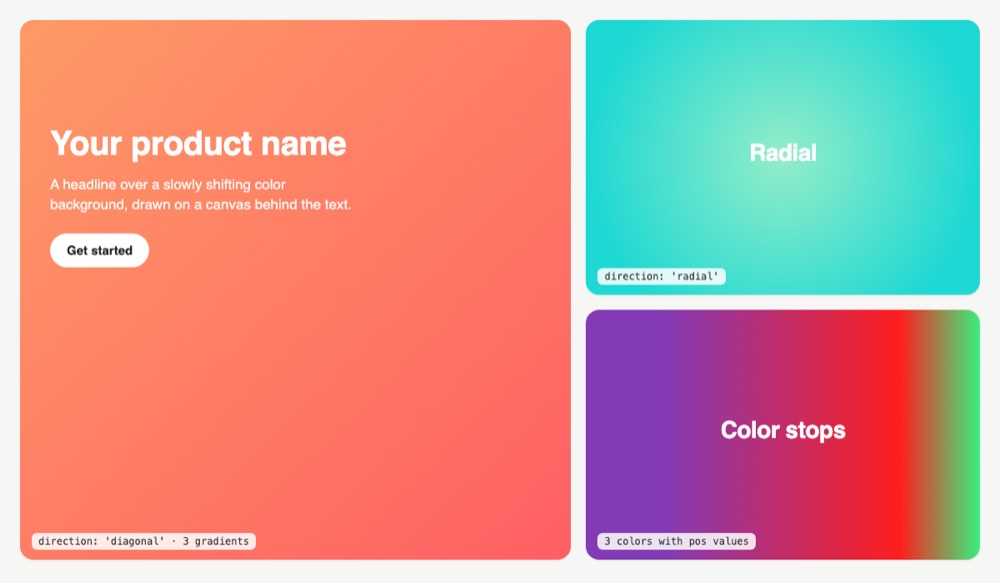
Granim.js is a small free code library that fills a box on a web page with a color gradient that slowly changes from one set of colors to the next. You pick the colors and the direction, and it draws them behind your headline or card. It can also blend the colors with a picture and switch to other colors when a visitor clicks something.
Where you can use it
A moving background for a hero
Put a slowly shifting gradient behind the big headline at the top of a landing page, so the first screen feels alive without a video.
Colors that answer a click
Switch the background to another set of colors when a visitor picks a plan, a mood or a dark theme, with a smooth fade between them.
Colored light over a photo
Lay the moving colors over your own photo with a blend mode such as multiply or screen, for a tinted header picture.
A logo or title filled with moving color
Show the moving gradient only inside a shape, such as your logo or a large word, by placing a cut-out picture over the canvas.
Text that stays readable on any color
Let the library mark the page as dark or light while the colors change, so your styles can switch the text between white and black.
A calm backdrop for a waiting screen Idea
Fill a loading, sign-in or "coming soon" screen with slow color changes, so the empty page looks finished while people wait.
Granim.js popularity
Downloads from api.npmjs.org, stars from GitHub, checked Nov 17, 2026. How the Gid Score is calculated
How to start
Tell your AI assistant
“Add granim 2.0.0 to the hero section of my landing page as an animated background on a full-size canvas behind the headline, with three color pairs from my brand, isPausedWhenNotInView set to true, and a still gradient for visitors who prefer reduced motion.”
Or install it yourself.
npm install granim --saveShow code
Add a canvas where the gradient should appear, load the script and create a Granim instance with at least one state of gradients.
<!-- Create a <canvas> element -->
<canvas id="granim-canvas"></canvas>

<!-- Call the script -->
<script src="granim.min.js"></script>

<!-- Create a Granim instance -->
<script>
var granimInstance = new Granim({
   element: '#granim-canvas',
   name: 'granim',
   opacity: [1, 1],
   states : {
       "default-state": {
           gradients: [
               ['#834D9B', '#D04ED6'],
               ['#1CD8D2', '#93EDC7']
           ]
       }
   }
});
</script>
Mistakes to avoid
Gradients with different numbers of colors are not supported.
The docs' examples size the canvas with CSS; our demo canvases only filled their boxes with these rules.
By default the animation keeps running off screen; it only pauses on a tab change.
The blend only works with an image and gradients set.
License
MIT license. Free to use in personal and paid sites, and you may change and share the code. No visible credit is needed; keep the license notice when you pass the code on.
“to use, copy, modify, merge, publish, distribute, sublicense, and/or sell” raw.githubusercontent.com
“The above copyright notice and this permission notice shall be included in all” raw.githubusercontent.com
“to use, copy, modify, merge, publish, distribute, sublicense, and/or sell” raw.githubusercontent.com
“to use, copy, modify, merge, publish, distribute, sublicense, and/or sell” raw.githubusercontent.com
AllowedWith conditionsNot allowedNot stated or not checked yet
Is Granim.js free for commercial use? The full answer Not legal advice. Check the license page before you ship.
For your agent
License rules tell your agent what it may do with Granim.js. Paste them into your prompt or AGENTS.md.
- Granim.js (Video references and motion backgrounds, Backgrounds, patterns and shapes). Tiny library for fluid animated gradient backgrounds on canvas, with gradient states, image blending and transitions. Price: free; commercial use OK; no credit needed. Style: gradient, minimal.
  Connect: npm granim.
  Get files: npm install granim (or CDN), add a <canvas>, new Granim({element, states}) (js, html).
  Rule: Keep the MIT notice if you redistribute the code.
License: https://raw.githubusercontent.com/sarcadass/granim.js/master/LICENSE (checked 2026-11-05; details: https://agentgid.com/assets/granim-js/)Agent installs a package or loads it from a CDN.
npm install granimFormats: js, html
Animated gradient: Granim.js (MIT License)Alternatives
Granim.js This page
Pick Vanta.js when you want a moving 3D scene such as waves, fog or birds instead of a flat color gradient.
Pick ShaderGradient for a soft 3D gradient shaped like waves or a sphere, set up in a visual editor and used from React or Vue.
Pick tsParticles when the background should be moving dots, stars, confetti or fireworks rather than colors.
Hundreds of official three.js WebGL/WebGPU examples (shaders, particles, post-processing, loaders) with full source in the repo's examples folder.
Gallery of React Three Fiber scenes (shaders, portals, caustics, scroll, physics, glass) linked to runnable sandboxes with source.
Questions
Which color formats can I use?
Hex, rgb, rgba, hsl and hsla. You can also set where each color sits in the gradient with a position from 0 to 1.
Which directions are there?
Diagonal (the default), left to right, top to bottom, radial, and a custom direction set in pixels or percentages.
Can I stop or change the animation from my own code?
Yes. The instance has play, pause, clear, changeState, changeDirection, changeBlendingMode and destroy methods.
How fast do the colors change?
By default each change between two gradients takes 5 seconds, and a switch to another state takes 1 second; both are settings in milliseconds.
Can I use it in a paid product?
Yes. The MIT license allows use, change and sale of copies; keep the license notice with the code.