
Theatre.js
Animation library with a visual timeline editor for motion graphics on the web: animate DOM, three.js/R3F scenes and any JS values.
Web animation examples and effects Code library3dabstract
1. Price: theatrejs.com
Fully free (open source).
theatrejs.comNo quote yet: price is read from the official pages.
2. Commercial use: raw.githubusercontent.com
“Your use of Theatre.js is governed under the Apache License Version 2.0”
The shipped player @theatre/core is Apache-2.0; keep the AGPL Studio out of the product.
raw.githubusercontent.com3. Credit the author: raw.githubusercontent.com
“Your use of Theatre.js is governed under the Apache License Version 2.0”
No credit on screen. Keep the license notice inside the code you ship.
raw.githubusercontent.com4. Agent access: github.com/theatre-js/theatre
An agent can install it by itself with npm install @theatre/core. No key or account is needed.
github.com/theatre-js/theatreLicense checked Nov 5, 2026 against 1 official page. Tap a verdict to see its source. How we checked Report an error
Theatre.js: a visual timeline for web animation
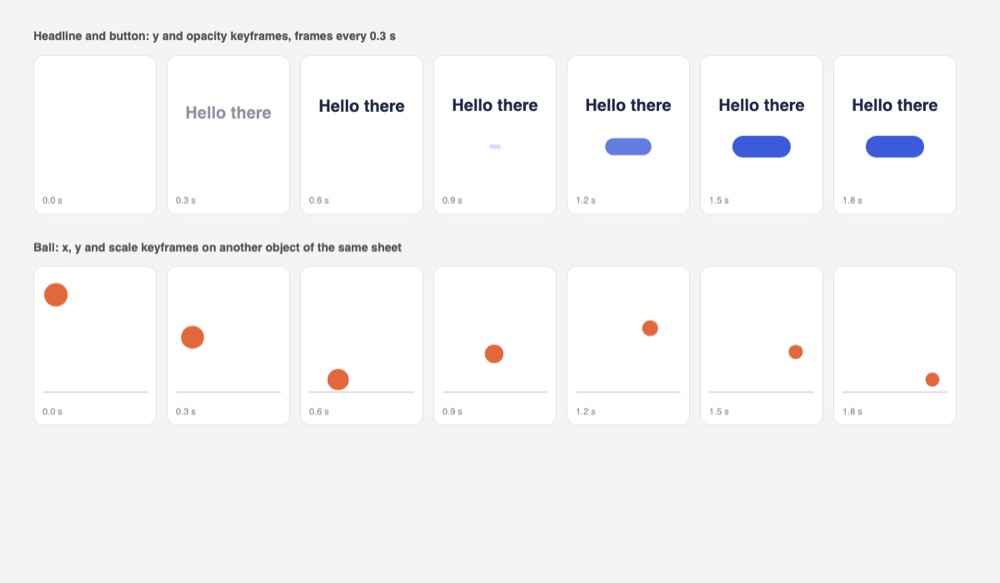
Theatre.js is a free animation library for websites with a visual timeline editor, like a small video editing tool that runs on top of your own page. You set keyframes for a headline, a button or a 3D camera by dragging values, then save the result as a file. Your live site plays that file with the small player part, and the editor stays on your computer.
Where you can use it
Intro animation on a landing page
Fade and slide a headline and button into view with exact timing you tune by eye, then ship only the small player with the saved animation.
Camera moves in 3D scenes
Plan a camera fly-through, lights or material colors in a three.js or React Three Fiber scene on a timeline instead of guessing numbers in code.
Small motion details
Fine-tune hover, press and success animations of buttons and icons, where a few milliseconds and a softer curve change the feel.
Animation in time with music
Attach a music or voice track so the animation and the sound always play in sync, for product stories or event pages.
Generative and interactive art
Drive any value in your code, such as a color, a noise amount or a particle count, from the timeline for art pieces and interactive visuals.
Still frames and a calm version Idea
Jump the animation to any moment to make preview stills, or show a finished still frame to people who turn off motion in their settings.
Theatre.js popularity
Downloads from api.npmjs.org, stars from GitHub, checked Nov 17, 2026. How the Gid Score is calculated
How to start
Tell your AI assistant
“Add Theatre.js 0.7.2 (all @theatre packages at the same version): load @theatre/studio only under import.meta.env.DEV, load the animation from state.json with getProject, start it after project.ready, and make sure the production bundle has no @theatre/studio.”
Or install it yourself. The editor is only for development.
npm install --save @theatre/core @theatre/studioShow codeStep 1 or Step 2
Design the animation in the Studio, export it from the project menu as state.json, and load it in the player.
import { getProject } from '@theatre/core'
import projectState from './state.json'
// This will load the state from the `state.json` file
const project = getProject('My Project', { state: projectState })
Before going live, keep the Studio out of the production build.
if (import.meta.env.DEV) {
  studio.initialize()
}
Mistakes to avoid
The editor is AGPL and meant for design time; in 0.7.2 core-and-studio.js is about 2.6 MB against about 99 KB for core-only.min.js (our demo check).
Until exported, the animation lives only in the localStorage of the browser it was made in.
The project loads its state first; the docs start playback only after project.ready.
npm install @theatre/core@latest @theatre/studio@0.6 (mixed versions)Each package depends on an exact @theatre/dataverse version.
This was a breaking change in 0.7.0.
License
Apache-2.0 (@theatre/core); AGPL-3.0 (@theatre/studio) license. The player part is under the Apache 2.0 license: free for paid products if you pass its license on with your app. The editor part is under the stricter AGPL license, so keep it out of the site you ship, as the makers advise.
“Your use of Theatre.js is governed under the Apache License Version 2.0” raw.githubusercontent.com
“Your use of Theatre.js is governed under the Apache License Version 2.0” raw.githubusercontent.com
“only includes `@theatre/core`, so only the Apache License applies.” raw.githubusercontent.com
“The studio (`@theatre/studio`) is released under the AGPL 3.0 License.” raw.githubusercontent.com
AllowedWith conditionsNot allowedNot stated or not checked yet
Is Theatre.js free for commercial use? The full answer Not legal advice. Check the license page before you ship.
For your agent
License rules tell your agent what it may do with Theatre.js. Paste them into your prompt or AGENTS.md.
- Theatre.js (Web animation examples and effects, Animation and motion capture, Video references and motion backgrounds). Animation library with a visual timeline editor for motion graphics on the web: animate DOM, three.js/R3F scenes and any JS values. Price: free; commercial use OK; no credit needed; pass the files on to your users only with conditions. Style: 3d, abstract.
  Connect: npm @theatre/core.
  Get files: npm install @theatre/core (and @theatre/studio as a dev dependency for the editor); animation state is saved as JSON and loaded by core (js, json).
  Not allowed: Studio is AGPL
  Rule: Ship only @theatre/core in production; @theatre/studio (AGPL) is for design time.
  Rule: If you ship or host the studio editor, AGPL obligations apply.
License: https://raw.githubusercontent.com/theatre-js/theatre/main/README.md (checked 2026-11-05; details: https://agentgid.com/assets/theatre-js/)Agent installs a package or loads it from a CDN.
npm install @theatre/coreFormats: js, json
Animation: Theatre.js (@theatre/core, Apache-2.0)Alternatives
Theatre.js This page
Pick GSAP when you prefer to write timelines and scroll effects in code, with all its plugins free and no separate editor.
Pick AutoAnimate when you only need smooth add, remove and move transitions for lists with one function call.
Pick Animate.css for ready-made bounce, fade and slide effects added with one class name.
Step-by-step online guide to fragment shaders (noise, patterns, shaping functions) with live editable examples; for learning, not reuse.
Collection of CSS hover effects for links, buttons and icons (2D transitions, borders, shadows, icon motion) in CSS, Sass and Less.
Questions
Can I use Theatre.js in a paid product?
Yes for what you ship: the final bundle contains only @theatre/core, which is Apache-2.0, so only the Apache License applies. Keep the Studio out of production.
What exactly is AGPL about it?
Only @theatre/studio, the editor you use to make animations. It is meant for design and development time, not for your live site.
How do I remove the editor before going live?
With the browser bundles, swap core-and-studio.js for core-only.min.js; with a bundler, do not import Studio in production builds and remove all studio.initialize() calls.
Where are my animations stored?
While the Studio is open, in the browser localStorage; export them as a JSON file and pass it to getProject so your site can play them.
Does it work with three.js?
Yes. It can animate the camera, lights, material colors and more in three.js, and there is an extension for React Three Fiber.