
Font Awesome
by Fonticons, Inc.
Icon toolkit with a free set (CC BY 4.0), Pro plans, a GraphQL API and official agent skills.
Icons Code library
1. Price: fontawesome.com
Free icon set and public GraphQL metadata. Paid plans from $10 a month. Usage price: Pro $120/year after 30 Apr 2025; Pro+ $150/year (official blog).
fontawesome.comNo quote yet: price is read from the official pages.
2. Commercial use: fontawesome.com/license/free
“You can use it for commercial projects, open source projects, or really almost whatever you want.”
Font Awesome Free may be used in commercial projects; keep the credit comments in the files.
fontawesome.com/license/free3. Credit the author: github.com/FortAwesome/Font-Awesome/blob/7.x/LICENSE.txt
“Attribution is required by MIT, SIL OFL, and CC BY licenses.”
Icons: Font Awesome Free by Fonticons, Inc. (CC BY 4.0)
github.com/FortAwesome/Font-Awesome/blob/7.x/LICENSE.txt4. Agent access: docs.fontawesome.com/apis
An agent can use it by itself without a key. npm @fortawesome/fontawesome-free; GraphQL API at https://api.fontawesome.com (public metadata needs no token); fa CLI and agent skills via npx skills add FortAwesome/fontawesome-agent-tools.
docs.fontawesome.com/apisLicense checked Oct 27, 2026 against 2 official pages. Tap a verdict to see its source. How we checked Report an error
Font Awesome: icons for sites, with a free set
Font Awesome is a large collection of icons, such as a house, a cart or an envelope, that you add to a web page with one short tag. The free part has solid and outline icons plus logos of many brands, and you may use it in paid products. More styles and extra icons come with a paid Pro plan.
Where you can use it
Icons on any web page
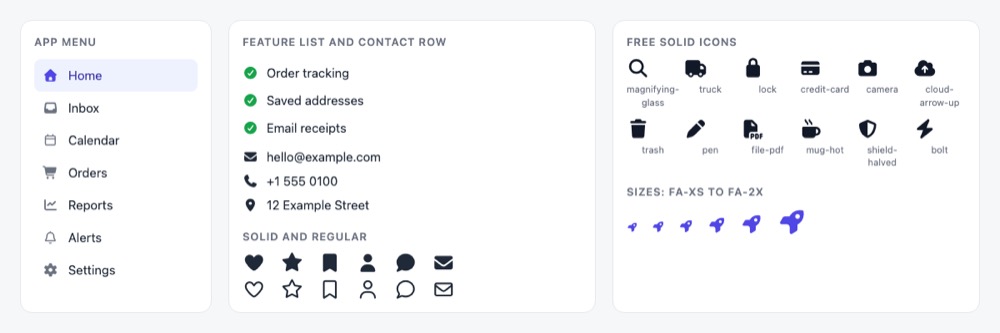
Put a menu, a contact block or a feature list on a plain site with one short tag per icon. The icon takes the size and color of the text around it.
Icons in a React app
Import only the icons a screen needs, such as an envelope on a Contact button, so the app stays small. The free icons need no account or key.
Links to your social pages
Use the free brand icons to point to your company page on a social network or app store. Use each logo only to stand for that brand.
Icons on WordPress and Squarespace sites
Add icons to a site made with a website builder, using the official guides for WordPress and Squarespace.
Look up icon names in code
Ask the public icon catalog which icons and versions exist, without a key, for example to check a name before your assistant uses it.
File and status icons in a dashboard Idea
Mark rows with a PDF file, an upload cloud, a lock or a truck, so people scan a list of orders or files faster.
As reported by Fonticons, Inc.: Version 6 gets only critical bug fixes now that version 7 is out.
Font Awesome popularity
Downloads from api.npmjs.org, stars from GitHub, checked Nov 26, 2026. How the Gid Score is calculated
How to start
Tell your AI assistant
“Self-host Font Awesome Free 7.3.1 (fontawesome.css, solid.css, regular.css and the webfonts folder), add fa-solid icons to the sidebar and contact block, keep the license comments in the files, and give icon-only buttons an aria-label.”
Or install it yourself. For a plain site, copy the css and webfonts folders from the free download or package into your site, and link fontawesome.css plus one file per style you use.
npm i --save @fortawesome/fontawesome-freeShow codeReact or Step 2
In React, install the component, the core and the free icon packages you need.
npm i --save @fortawesome/react-fontawesome@latest
npm i --save @fortawesome/fontawesome-svg-core
npm i --save @fortawesome/free-solid-svg-icons
npm i --save @fortawesome/free-regular-svg-icons
Add an icon by its style and name as classes, for example fa-solid fa-user.
<i class="fa-solid fa-user"></i>
<i class="fa-regular fa-user"></i>
Mistakes to avoid
<i class="fa-light fa-user"></i> or fa-thin, fa-duotone, fa-sharp with the free filesThe other styles are Pro only, so with the free files the icon shows nothing; the free 7.3.1 package has 2001 solid, 273 regular and 609 brand icon files (our count).
The full files and packages are large and slow pages down.
The CSS points to the font files by a relative path; without them every icon is an empty box.
The comment is the required credit; the license asks not to remove it.
<button><i class="fa-solid fa-trash"></i></button> with no text<button aria-label="Delete"><i class="fa-solid fa-trash"></i></button>Icons are hidden from screen readers, so an icon-only button needs a label on the button.
License
Free: icons CC BY 4.0, fonts SIL OFL 1.1, code MIT; Pro: commercial license. The free icons may be used in personal and paid products. Credit is required, but the comments already inside the files count, so do not remove them. Brand logos may only stand for their own brand.
“You can use it for commercial projects, open source projects, or really almost whatever you want.” fontawesome.com/license/free
“Attribution is required by MIT, SIL OFL, and CC BY licenses.” github.com/FortAwesome/Font-Awesome/blob/7.x/LICENSE.txt
“You can use it for commercial projects, open source projects, or really almost whatever you want.” github.com/FortAwesome/Font-Awesome/blob/7.x/LICENSE.txt
The icon files (CC BY 4.0) may be passed on with credit; the font files may not be sold on their own (SIL OFL).
“Neither the Font Software nor any of its individual components, in Original or Modified Versions, may be sold by itself.” github.com/FortAwesome/Font-Awesome/blob/7.x/LICENSE.txt
AllowedWith conditionsNot allowedNot stated or not checked yet
Is Font Awesome free for commercial use? The full answer Not legal advice. Check the license page before you ship.
For your agent
License rules tell your agent what it may do with Font Awesome. Paste them into your prompt or AGENTS.md.
- Font Awesome (Icons). Icon toolkit with a free set (CC BY 4.0), Pro plans, a GraphQL API and official agent skills. Price: free tier; commercial use OK; credit required.
  Connect: API docs https://docs.fontawesome.com/apis; npm @fortawesome/fontawesome-free. Limits: Public metadata needs no token; Kits and account data need a token. SVG downloads via the fa CLI only on download-enabled plans (Pro, Pro+).
  Get files: npm @fortawesome/fontawesome-free; GraphQL API at https://api.fontawesome.com (public metadata needs no token); fa CLI and agent skills via npx skills add FortAwesome/fontawesome-agent-tools (svg, js).
  Not allowed: Do not remove the embedded attribution comments, especially from code
  Not allowed: Brand icons are trademarks of their owners; use them only to represent that brand
  Rule: Keep the attribution comments in Font Awesome Free files.
  Rule: Treat brand icons as trademarks of their respective owners.
License: https://github.com/FortAwesome/Font-Awesome/blob/7.x/LICENSE.txt (checked 2026-10-27; details: https://agentgid.com/assets/font-awesome/)Agent installs a package or loads it from a CDN.
npm install @fortawesome/fontawesome-freeFormats: svg, js
Icons: Font Awesome Free by Fonticons, Inc. (CC BY 4.0)Use it in your stack
ReactInstall commands from https://docs.fontawesome.com/web/use-with/react. Free packages: free-solid-svg-icons, free-regular-svg-icons, free-brands-svg-icons; no key needed. Docs show no Next.js-specific example.
npm i --save @fortawesome/fontawesome-svg-core
npm i --save @fortawesome/free-solid-svg-icons
npm i --save @fortawesome/react-fontawesome@latest

import { createRoot } from 'react-dom/client'
import { FontAwesomeIcon } from '@fortawesome/react-fontawesome'
import { faEnvelope } from '@fortawesome/free-solid-svg-icons'

const element = <FontAwesomeIcon icon={faEnvelope} />

createRoot(document.body).render(element)
From the official docs: docs.fontawesome.com/web/use-with/react/add-icons
Alternatives
Font Awesome This page
Pick Lucide for a free line icon set under the ISC license with no credit needed and no paid tier.
Pick Tabler Icons for a large MIT set where every icon has outline and filled versions for free.
Pick Simple Icons when you mainly need brand logos; it has far more brands as CC0 files.
MIT-licensed SVG icons from Tailwind Labs (324 per style in heroicons 2.2.0) with React and Vue packages.
Google's Apache-2.0 icon set, served as a variable icon font, with the official Google Design MCP.
Questions
Can I use the free icons in a paid app or a client site?
Yes. Font Awesome Free may be used for commercial projects; the icons are CC BY 4.0, the fonts SIL OFL 1.1 and the code MIT.
Do I have to show a credit?
Credit is required by the licenses, but the comments already in the downloaded files are enough. Do not strip them out.
Do I need an account?
Not for the free packages or downloaded files. A Kit, the hosted one-line setup, is made in your account on fontawesome.com.
Will screen readers read the icons?
No, they are hidden by default. Add an aria-label when an icon carries meaning, such as an icon-only button.