
Lucide
by Lucide community
ISC-licensed set of 2,029 icons (Feather fork; count from lucide.dev, v1.70.0) with packages for React, Vue, Svelte, Angular and more.
Icons Code libraryminimaloutline
2. Commercial use: lucide.dev/license
“Permission to use, copy, modify, and/or distribute this software for any purpose with or without fee is hereby granted”
Free for commercial and personal use under the ISC License.
lucide.dev/license3. Credit the author: lucide.dev/license
No credit on screen. Keep the license notice inside the code you ship.
lucide.dev/license4. Agent access: lucide.dev/llms.txt
An agent can install it by itself with npm install lucide-react. No key or account is needed.
lucide.dev/llms.txtLicense checked Nov 9, 2026 against 1 official page. Tap a verdict to see its source. How we checked Report an error
Lucide: free line icons for sites and apps
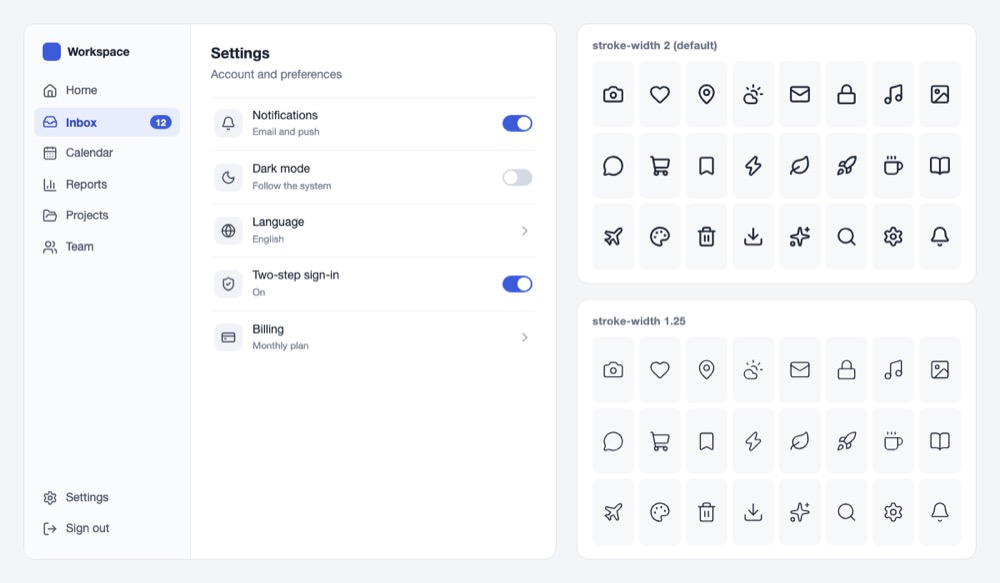
Lucide is a free set of simple line icons, like a house, a bell or a gear, all drawn in one matching style. You or your AI assistant add them to a website or app as ready pieces. You can change their color, size and line thickness to fit your design, and use them in paid products.
Where you can use it
Menus and buttons in a React app
Each icon is its own piece you drop into a screen, such as a bell next to Notifications. Only the icons you use end up in your app, so it stays light.
Icons on a simple website
A plain site without a framework, like a landing page or an older project, gets icons with one short tag per icon and a small script.
Icons picked by editors
Your editors choose an icon by name in the admin panel, for example "rocket" for a feature block, and the page shows it. This loads the whole set while building, so it suits pages that change often.
Icons as plain image files
Use an icon file as an image, as a background in your styles, or as an icon font. Handy for emails, simple templates and pages made on a server.
Feature list on a landing page Idea
Put a matching icon in front of each benefit, like a shield for security and a zap for speed. A thinner line gives a lighter, calmer look.
Settings and account screens Idea
Give every row of a settings page its own icon: notifications, dark mode, language, billing. The rows read faster and the whole screen looks consistent.
As reported by Lucide community: 2029 icons in the search on the Lucide site; 1600+ icons, as the GitHub README puts it.
Lucide popularity
Downloads from api.npmjs.org, stars from GitHub, checked Nov 26, 2026. How the Gid Score is calculated
How to start
Tell your AI assistant
“Add Lucide icons with lucide-react at a fixed version: a house, inbox and calendar icon in the sidebar, a bell and a moon in the settings rows, size 18, and give icon-only buttons an aria-label.”
Or install it yourself. Add the React package to your project (there are also packages for Vue, Svelte, Angular, plain JavaScript and static files).
npm install lucide-reactShow codeStep 1 or Step 2
Import an icon by name and put it on the page; size, color and line width are props (defaults 24, the text color, 2).
import { Camera } from 'lucide-react';
// Usage
const App = () => {
  return <Camera />;
};
export default App;
Without a framework, mark a spot with a data-lucide attribute and call createIcons.
<i data-lucide="menu"></i>Mistakes to avoid
Passing every icon bundles the whole set into the page.
npm install lucide-vue-next for a Vue projectnpm install @lucide/vue; imports change from 'lucide-vue-next' to '@lucide/vue', the rest stays the sameThe Vue package moved to a new name in version 1.
import { Github, Facebook, Slack } from 'lucide-react'Brand icons were removed in version 1, so these imports no longer exist.
<button><House /></button> with no label, or the label put on the icon<button aria-label="Go to home"><House /></button>Icons are hidden from screen readers by default, so an icon-only button needs its label on the button.
<script src="https://unpkg.com/lucide@latest"></script> in productionA new latest release can break the page without any change on your side.
License
ISC (Feather-derived icons MIT) license. Free for personal and paid products, with no visible credit needed. Keep Lucide's short copyright and permission notice with copies of the icon files or code.
“Permission to use, copy, modify, and/or distribute this software for any purpose with or without fee is hereby granted” lucide.dev/license
“Permission to use, copy, modify, and/or distribute this software for any purpose with or without fee is hereby granted” lucide.dev/license
Passing the icon files on is allowed with the ISC notice kept; icons derived from Feather also keep their MIT notice.
“The above copyright notice and this permission notice shall be included in all copies or substantial portions of the Software.” lucide.dev/license.md
AllowedWith conditionsNot allowedNot stated or not checked yet
Is Lucide free for commercial use? The full answer Not legal advice. Check the license page before you ship.
For your agent
License rules tell your agent what it may do with Lucide. Paste them into your prompt or AGENTS.md.
- Lucide (Icons). ISC-licensed set of 2,029 icons (Feather fork; count from lucide.dev, v1.70.0) with packages for React, Vue, Svelte, Angular and more. Price: free; commercial use OK; no credit needed. Style: minimal, outline.
  Connect: community MCP server github.com/SeeYangZhi/lucide-icons-mcp; npm lucide-react.
  Get files: npm packages (lucide-react, @lucide/vue, @lucide/svelte, lucide-solid, @lucide/angular, lucide-static, core lucide) or static SVG/sprite/icon font; docs for LLMs at lucide.dev/llms.txt (svg).
  Not allowed: Keep the copyright and permission notice in all copies
  Rule: Keep the copyright and permission notice in all copies.
License: https://lucide.dev/license (checked 2026-11-09; details: https://agentgid.com/assets/lucide/)Agent installs a package or loads it from a CDN.
npm install lucide-reactFormats: svg
Icons: Lucide (lucide.dev), ISC LicenseUse it in your stack
ReactProps: size (24), color (currentColor), strokeWidth (2), e.g. <Camera size={48} color="red" strokeWidth={1} />.
npm install lucide-react

import { Camera } from 'lucide-react';

const App = () => {
  return <Camera />;
};
export default App;
From the official docs: lucide.dev/guide/react/getting-started
Alternatives
Lucide This page
Pick Phosphor when you want each icon in six weights, not only one line style.
Pick Tabler Icons for a larger MIT set that also has filled versions of its icons.
Pick Iconify when you need icons from many different sets through one free public service.
MIT-licensed SVG icons from Tailwind Labs (324 per style in heroicons 2.2.0) with React and Vue packages.
Icon toolkit with a free set (CC BY 4.0), Pro plans, a GraphQL API and official agent skills.
Questions
Can I use Lucide icons in a paid app or a client site?
Yes. The ISC License allows use for any purpose, with or without a fee; keep the copyright and permission notice with copies of the files.
Do I have to show a credit on my site?
No visible credit is required. The license only asks to keep its notice in copies of the files.
Can I change the color, size and line thickness?
Yes. In React the props are size (default 24), color (default the text color) and strokeWidth (default 2).
Does Lucide have logos of brands like social networks?
No. The project does not accept brand logos and points to a separate logo collection instead.
Is there documentation my AI assistant can read?
Yes. The site offers a short Markdown version of its docs at lucide.dev/llms.txt and a full bundle at /llms-full.txt.